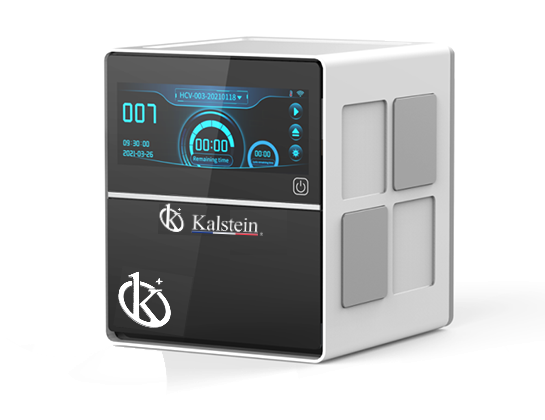
Common Errors and Troubleshooting Symptoms for the YR01869-2 Automatic Nucleic Acid Extractor
The YR01869-2 Automatic Nucleic Acid Extractor is a cutting-edge tool designed to streamline the nucleic acid extraction process. While the device is equipped with advanced features, users may occasionally experience errors. Understanding these common errors and troubleshooting techniques can significantly enhance your experience and productivity with this equipment.
Understanding the YR01869-2: An Overview
The YR01869-2 is engineered to deliver optimal performance in nucleic acid extraction. It is particularly valuable in research laboratories and diagnostic centers. With its rotary mixing technology, it enables simultaneous extraction of multiple samples, enhancing throughput and efficiency. However, like any sophisticated laboratory device, users may encounter issues that can hinder operations.
Technical Specifications of the YR01869-2
| Model | YR01869-2 |
|---|---|
| Performance | 16 |
| Processing Volume | 20-1700μL |
| Sample Processing Volume | 200-500μL |
| Compatible Consumables | Custom 96 deep-well plates, individual 6-strip tubes |
| Temperature Control Range | 30°C to 120°C |
| Weight | 7.4Kg (net) |
Troubleshooting by Symptoms
When operating the YR01869-2, users may encounter various symptoms that indicate potential issues. Below is a breakdown of common symptoms, their probable causes, and solutions.
Equipment Does Not Power On
If the YR01869-2 does not power on, it may be due to several reasons:
- Power source is disconnected.
- Damaged power cable.
- Internal fuse blown.
Solution: Check the power source and connections. Inspect and replace the power cable if necessary. If the fuse is blown, replace it according to the manufacturer’s guidelines.
Error Code E-03
Error code E-03 typically indicates a malfunction in the mixing mechanism.
- Physical obstruction in the mixing area.
- Motor failure.
Solution: Inspect the mixing area for any debris or blockages and remove them. If the issue persists, consider contacting technical support for potential motor repairs.
Inconsistent Results
Inconsistent readings can stem from a variety of factors:
- Calibration issues.
- Incompatible consumables.
- Improper sample preparation.
Solution: Ensure that the YR01869-2 is calibrated correctly before use. Always use compatible consumables as specified in the user manual, and review sample preparation protocols for accuracy.
Symptom-Cause-Solution Table
| Symptom | Possible Cause | Solution |
|---|---|---|
| Equipment Does Not Power On | Power source is disconnected, damaged power cable, internal fuse blown. | Check connections, replace power cable, replace fuse. |
| Error Code E-03 | Physical obstruction in the mixing area, motor failure. | Clear obstructions, contact technical support. |
| Inconsistent Results | Calibration issues, incompatible consumables, improper sample preparation. | Recalibrate, use specified consumables, review protocols. |
Best Practices for Maintenance
Regular maintenance of the YR01869-2 is critical to preventing errors and ensuring longevity. Follow these best practices:
- Perform periodic calibration checks.
- Clean the device after each use, focusing on the mixing area.
- Update the software regularly to ensure optimal performance.
- Utilize UV disinfection as recommended to minimize contamination risks.
Frequently Asked Questions
What types of samples can be processed with the YR01869-2?
The YR01869-2 can process a wide variety of samples, particularly those requiring precise nucleic acid extraction such as DNA and RNA analyses.
Is the YR01869-2 easy to operate?
Yes, the YR01869-2 features a user-friendly interface with a 6.86-inch touchscreen and remote control capabilities via smartphones or tablets, facilitating quick and efficient experiment execution.
How do I maintain the YR01869-2 in good condition?
Regular maintenance is crucial. Clean the device after each use, perform periodic checks, and keep the software updated to maintain optimal performance.
What is the expected lifespan of the YR01869-2?
The expected lifespan varies based on usage and maintenance but adhering to maintenance guidelines can extend its longevity significantly. Regular servicing is advisable.
Can I request a quote for the YR01869-2?
Yes, you can request a personalized quote through the appropriate channels to get the best pricing information and potential discounts.
Conclusion
Understanding common errors and troubleshooting techniques for the YR01869-2 is essential for maximizing its use and ensuring reliable results. By being proactive and incorporating best practices, users can mitigate many potential issues.
If you are looking for a fusion of innovation and quality, you have come to the right place. At Kalstein, we offer you the luxury of exploring our exclusive catalog of laboratory equipment. We manufacture every device to the highest standards of excellence. Our intuitive and seamless online purchasing channels are designed for your convenience, securing the most competitive prices. Hesitate no longer — we bring science to life, it is time to become part of our community.