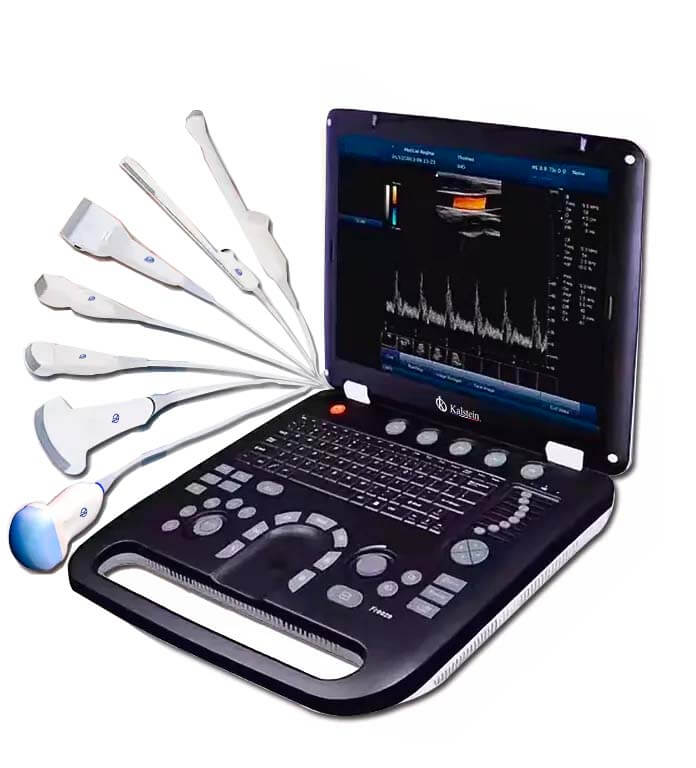
Common Errors and Troubleshooting for the YR05152: A Comprehensive Guide
The YR05152 Color Doppler Ultrasound is a vital piece of equipment used in various medical fields for heart tests and pregnancy assessments. Despite its advanced technology and capabilities, users may encounter issues that can affect its performance. This article will delve into common errors and provide detailed troubleshooting methods to ensure the YR05152 operates efficiently and effectively.
Understanding the YR05152 Color Doppler Ultrasound
The YR05152 model features a 15-inch LED screen and offers multiple imaging modes, including Color M mode and 4D imaging. It supports complex model imaging and facilitates automatic measurements, making it a powerful tool in diagnostics. Understanding the specifications and functionalities of this model is essential for effective troubleshooting.
Technical Specifications for YR05152
| Specification | Details |
|---|---|
| Model | YR05152 |
| Size (W x D x H) | 37.5 x 36 x 75 cm |
| Weight | 5.5 kg |
| Screen Size | 15 inches |
| Ports | 2 probe ports, 2 USB ports |
| Hard Drive | 64GB (optional up to 200GB) |
| Connectivity | DICOM 3.0 compliant |
Troubleshooting Common Errors by Symptoms
This section outlines frequent error symptoms that operators may encounter while using the YR05152, along with probable causes and solutions.
Equipment Does Not Power On
If the YR05152 does not power on, it may be due to:
- Power Cable Issues: Ensure the power cable is fully plugged in and not damaged.
- Power Outlet: Check if the outlet is functioning by testing it with another device.
- Internal Failure: If the above solutions fail, the internal power supply may be faulty.
Solution: Replace the power cable or try a different outlet. If issues persist, contact technical support.
Error Code E-03
Error code E-03 typically indicates a problem with the transducer. Possible causes include:
- Connection Problem: The transducer may not be connected properly.
- Transducer Malfunction: The transducer may be defective.
Solution: Verify the connection of the transducer. If it is securely connected and the error remains, replace the transducer.
Inconsistent Readings
Inconsistent readings can result from several factors, including:
- Calibration Issues: The device may require recalibration.
- Interference: External factors such as electromagnetic interference could affect readings.
Solution: Perform a calibration check according to the user manual. Ensure that the ultrasound environment is free from interference.
Common Troubleshooting Matrix
| Symptom | Probable Cause | Solution |
|---|---|---|
| Equipment Does Not Power On | Power cable issues, outlet failure, internal failure | Check cable, try different outlet, contact support |
| Error Code E-03 | Connection problem, transducer malfunction | Check connection, replace transducer |
| Inconsistent Readings | Calibration issues, interference | Recalibrate, reduce interference |
Best Practices for Operating the YR05152
Understanding best practices can minimize errors and enhance the accuracy of the YR05152. Here are some important tips:
- Regular Maintenance: Schedule regular maintenance checks to ensure all components are functional.
- Proper Training: Ensure that all operators are adequately trained on the equipment.
- Environment Setup: Keep the operating area free from electromagnetic interference and maintain a stable temperature.
Frequently Asked Questions
What steps should I take if the YR05152 displays an error code?
Identify the error code displayed, consult the troubleshooting section of the user manual for specific causes and solutions, and perform the necessary actions to resolve the issue.
How can I ensure accurate readings with the YR05152?
Ensure proper calibration of the device, maintain a stable operating environment, and train operators to use the equipment correctly.
What to do if the ultrasound image quality is poor?
Verify the connections of the transducer, check for any obstructions on the transducer, and perform a recalibration of the device.
How often should the YR05152 be serviced?
The YR05152 should undergo routine maintenance checks at least once a year, or more frequently if usage is heavy.
Are there any specific environmental requirements for the YR05152?
Yes, the YR05152 should be operated in areas free from electromagnetic interference, with stable temperature and humidity levels, as specified in the user manual.
How can I contact technical support for YR05152 issues?
Contact technical support through the provided contact information in the user manual or the manufacturer's website for assistance with any issues.
Where can I find replacement parts for the YR05152?
Replacement parts can typically be ordered through the manufacturer's official channels or authorized distributors.
If you are looking for a fusion of innovation and quality, you have come to the right place. At Kalstein, we offer you the luxury of exploring our exclusive catalog of laboratory equipment. We manufacture every device to the highest standards of excellence. Our intuitive and seamless online purchasing channels are designed for your convenience, securing the most competitive prices. Hesitate no longer — we bring science to life, it is time to become part of our community.