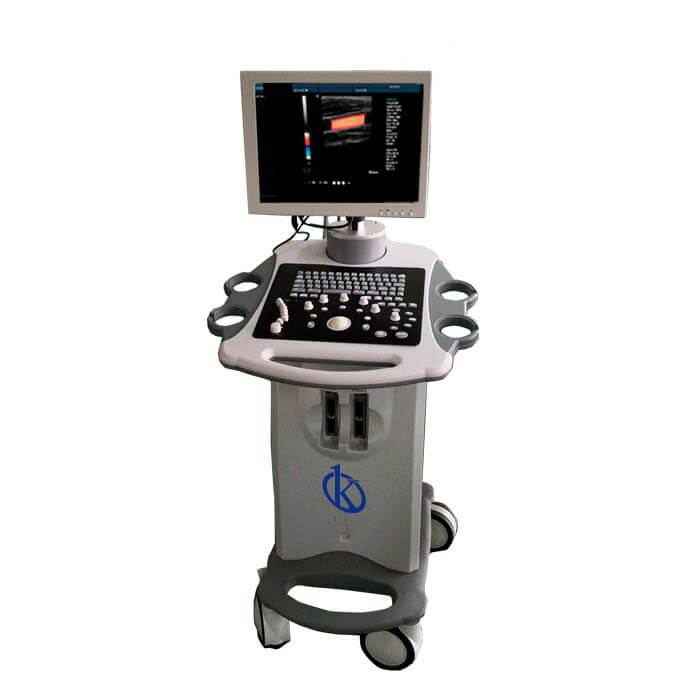
Common Errors and Troubleshooting for the YR05157-1 Ultrasound Scanner
The YR05157-1 ultrasound scanner is a cutting-edge diagnostic tool utilized in various medical settings. However, like any sophisticated device, it may encounter issues that require troubleshooting. This article delves into common errors associated with the YR05157-1 and provides practical solutions tailored to each symptom encountered during operation.
Understanding the YR05157-1 Ultrasound Scanner
The YR05157-1 is not just an ultrasound scanner; it is an essential component in diagnostic imaging. This model is known for its reliability, precision, and user-friendly interface, making it a staple in medical diagnostics.
Technical Specifications of the YR05157-1
| Model | Brand | Category | Subcategory | Price (USD) | Weight (kg) | Dimensions (cm) | Package (cm) |
|---|---|---|---|---|---|---|---|
| YR05157-1 | Kalstein | Ultrasound Scanner | Ultrasonic diagnostic equipment | 1990.00 | 4 | N/A | 31 x 39 x 19 |
Troubleshooting by Symptoms
Equipment Does Not Power On
This is one of the most common issues users might encounter with the YR05157-1. If the device fails to power on, consider the following probable causes:
- Power cable is not securely connected.
- Faulty power outlet.
- Internal components failure.
To diagnose this issue, check the power connections, try a different outlet, and if the problem persists, contact technical support.
Error Code E-03
The appearance of error code E-03 on the display can be concerning. This error typically indicates a malfunction in the scanning process. Possible causes include:
- Probe disconnection.
- Software malfunction.
- Improper settings adjustment.
To resolve this, ensure that the probe is properly connected, restart the device to reset the software, and verify the settings are correct.
Inconsistent Readings
Inconsistent readings can lead to misdiagnoses. Several factors could contribute to this issue, such as:
- Improper patient positioning.
- Probe difficulties.
- Environmental interference.
To address inconsistent readings, ensure the patient is positioned correctly, check the probe for damage, and minimize external interference.
Troubleshooting Matrix
| Symptom | Possible Cause | Solution |
|---|---|---|
| Equipment does not power on | Power cable disconnection | Reconnect power cable and check outlet |
| Error code E-03 | Probe disconnection | Reconnect probe |
| Inconsistent readings | Improper patient positioning | Readjust patient positioning |
Best Practices for Operating the YR05157-1
Understanding the common operational errors can significantly enhance the performance and longevity of the YR05157-1. Here are some best practices:
- Regularly check and maintain probes.
- Ensure the device is in a stable environment free of electromagnetic interference.
- Keep software updated to benefit from the latest features and fixes.
Frequently Asked Questions
What should I do if my YR05157-1 displays an error code?
If your YR05157-1 displays an error code, refer to the troubleshooting guide in the manual, identify the code's meaning, and follow the recommended steps to resolve the issue.
How can I ensure accurate readings with the YR05157-1?
To ensure accurate readings, make sure the patient is properly positioned, the probe is functioning correctly, and environmental factors are controlled as much as possible.
What maintenance is required for the YR05157-1 ultrasound scanner?
Regular maintenance includes checking probe integrity, cleaning the device, updating the software, and ensuring all connections are secure.
What should I do if the YR05157-1 overheats?
If the device overheats, power it down immediately and allow it to cool down. Check for ventilation issues and ensure the device is used in a recommended temperature range.
Is there a warranty for the YR05157-1 model?
Yes, the YR05157-1 ultrasound scanner typically comes with a manufacturer’s warranty. Check the specific terms and conditions in the product documentation.
Can I use third-party accessories with the YR05157-1?
While some third-party accessories may work, it is advisable to use manufacturer-recommended accessories to ensure compatibility and maintain warranty coverage.
How can I request technical support for the YR05157-1?
You can request technical support by reaching out to the manufacturer’s customer service or support team through their official communication channels.
If you are looking for a fusion of innovation and quality, you have come to the right place. At Kalstein, we offer you the luxury of exploring our exclusive catalog of laboratory equipment. We manufacture every device to the highest standards of excellence. Our intuitive and seamless online purchasing channels are designed for your convenience, securing the most competitive prices. Hesitate no longer — we bring science to life, it is time to become part of our community.