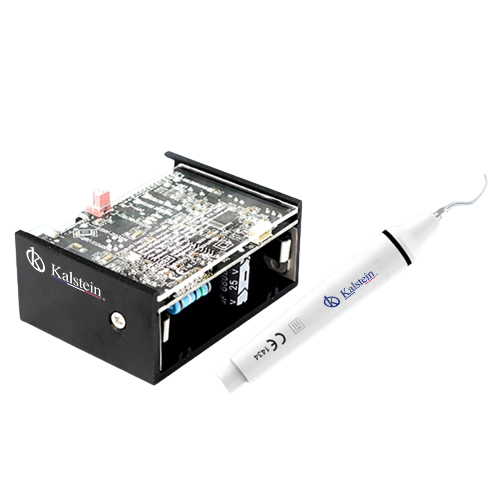
Customization and Advanced Configurations for the YR06012-OP4 Dental Accessory
The YR06012-OP4 dental accessory offers a myriad of customization and advanced configurations that cater to modern dental practices. Whether you're building a new clinic, updating an existing one, or expanding your services, understanding these options is crucial for optimizing the functionality of your equipment and enhancing patient care. This article delves into the various customizable elements and configurations associated with the YR06012-OP4.
Technical Specifications of YR06012-OP4
| Model | Brand | Category | Price (USD) | Weight | Dimensions |
|---|---|---|---|---|---|
| YR06012-OP4 | Kalstein | Dental Accessories | $100.00 | N/A | N/A |
Understanding Configuration Options
The YR06012-OP4 is designed to accommodate various configurations, making it suitable for different types of dental practices. The accessory includes multiple mounting options, customizable accessories, and advanced configurations to enhance its versatility in clinical settings. Here are some of the customization options:
- Mounting Options: The device supports both upper mounting and cart options, allowing for flexibility in setup.
- Integrated Features: Advanced features such as the built-in scaler with LED handpiece enhance operational efficiency.
- Optional Accessories: Accessories such as intraoral cameras and dental stools can be added to expand functionality.
Optional Accessories for Enhanced Functionality
The YR06012-OP4 can be equipped with various optional accessories that greatly enhance its utility:
| Accessory Code | Accessory Description | Compatibility |
|---|---|---|
| YR06012-op1 | Upper mounting option | All dental units |
| YR06012-op2 | Cart option | All dental units |
| YR06012-op6 | Intraoral camera with monitor | All dental units |
| YR06012-op10 | 110-piece hand tool set for dentistry | All dental units |
Advancements in Customization Technologies
Recent advancements in technology have allowed for unprecedented levels of customization in dental equipment. The YR06012-OP4 is equipped with state-of-the-art features such as LED lighting for improved visibility and enhanced user interface for better control. The integration of digital tools has made it easier for dental practitioners to tailor their use of the YR06012-OP4 according to specific procedural needs.
Setting Up Your YR06012-OP4
Properly setting up the YR06012-OP4 is crucial for maximizing its functionality. An unboxing checklist should include:
- Verify all components are included
- Check for any visible damages
- Prepare necessary tools for installation
Common Customization Mistakes to Avoid
While customizing the YR06012-OP4, several common mistakes can impact performance:
- Not adhering to compatibility guidelines when selecting accessories.
- Failing to calibrate the device after installation.
- Overloading the device with accessories beyond its specifications.
Frequently Asked Questions
What are the best accessories to use with the YR06012-OP4?
The best accessories for the YR06012-OP4 include the intraoral camera with monitor and the 110-piece hand tool set, as they enhance diagnostic and procedural capabilities significantly.
How can I customize the YR06012-OP4 for different dental procedures?
Customization for different procedures can be achieved by selecting appropriate accessories and configuration settings, which allow the operator to adjust the equipment according to the specific needs of the procedure being performed.
What is the installation process for the YR06012-OP4?
The installation process involves unboxing, ensuring all components are present, and following the setup guide for mounting and calibration to guarantee optimal operation.
Can the YR06012-OP4 be used in specialized dental fields?
Yes, the YR06012-OP4 is adaptable for use in specialized fields such as endodontics and oral surgery by integrating specialized accessories and configurations suited for those practices.
What troubleshooting steps should I take if my YR06012-OP4 isn't functioning correctly?
If the YR06012-OP4 is not functioning correctly, check for power supply issues, ensure that all accessories are correctly connected, and perform a system reset to troubleshoot.
How do I maintain the YR06012-OP4 for long-term use?
Regular maintenance includes cleaning the device, checking connections, replacing worn accessories, and ensuring all components are calibrated according to operational standards.
If you are looking for a fusion of innovation and quality, you have come to the right place. At Kalstein, we offer you the luxury of exploring our exclusive catalog of laboratory equipment. We manufacture every device to the highest standards of excellence. Our intuitive and seamless online purchasing channels are designed for your convenience, securing the most competitive prices. Hesitate no longer — we bring science to life, it is time to become part of our community.