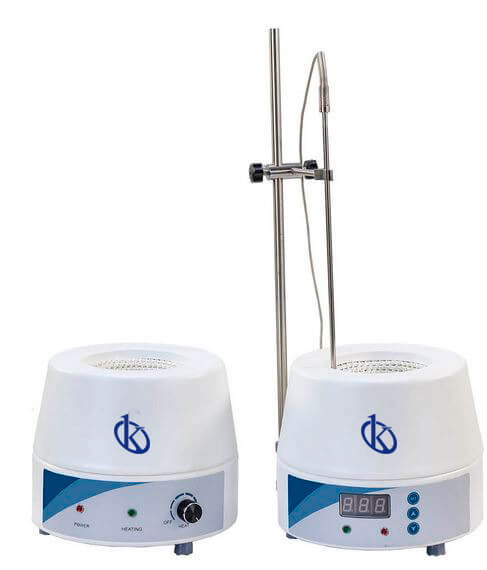
Environmental Conditions and Installation Requirements for the YR05029 Heating Blanket
The YR05029 heating blanket is a vital piece of laboratory equipment widely used for various applications, including sample heating and maintaining temperature consistency during experiments. To ensure that it operates efficiently and safely, understanding the environmental conditions and installation requirements is crucial.
Understanding the YR05029 Heating Blanket
The YR05029 model is designed with high precision in mind, featuring a durable cold-rolled steel shell and a nichrome heating wire that allows for rapid heating. This model can reach a maximum operating temperature of 380°C, making it suitable for high-temperature applications. The PID temperature control system ensures accurate temperature management, which is essential for sensitive experiments.
Technical Specifications of the YR05029
| Specification | Details |
|---|---|
| Model | YR05029 |
| Type | Analog |
| Voltage | 200 – 240V / 50 – 60Hz or 100 – 120V / 50 – 60Hz |
| Maximum Operating Temperature | 380°C |
| Power Ratings | 100W, 150W, 250W, 350W, 450W, 600W, 800W |
| Weight (Net) | 2.5kg |
| Weight (Gross) | 2.8kg |
| Outer Size (mm) | Ø200 x 160 |
Site Requirements for the YR05029 Heating Blanket
Proper installation of the YR05029 heating blanket is crucial to ensure its optimal performance. Here are the essential environmental conditions and site requirements:
- Temperature Range: The ambient temperature where the blanket is installed should be between 5°C and 40°C to ensure accurate temperature measurements.
- Humidity: Maintain relative humidity levels below 80% to prevent any adverse effects on electronic components.
- Ventilation: Ensure adequate ventilation around the heating blanket to prevent overheating and allow for efficient heat dissipation.
- Clearances: Maintain a minimum clearance of 15cm from other equipment to avoid heat buildup.
- Power Supply: Confirm that the power supply matches the voltage requirements (200 – 240V or 100 – 120V) and is on a dedicated circuit to prevent fluctuations.
- Drainage: If using the heating blanket in a wet environment, ensure proper drainage to avoid electrical hazards.
Installation Process for YR05029 Heating Blanket
Follow these steps for a successful installation of the YR05029 heating blanket:
- Unboxing: Carefully unpack the heating blanket and check for any visible damage.
- Location: Select a stable, flat surface that meets the temperature and humidity requirements stated above.
- Power Connection: Connect the heating blanket to the appropriate power supply, ensuring the voltage matches the specifications.
- First Run Calibration: Power on the device and conduct a calibration test to ensure the PID controller functions correctly.
- Safety Check: Verify that all safety mechanisms are in place and functional before commencing usage.
Troubleshooting Common Issues with YR05029
Equipment Does Not Power On
If the YR05029 does not power on, check the following:
- Ensure the power supply is functional and connected properly.
- Check for blown fuses or tripped circuit breakers.
Error Code E-03
This error typically indicates a temperature sensor failure. Possible solutions include:
- Inspect the sensor connection for damage or loose wires.
- Replace the temperature sensor if necessary.
Inconsistent Readings
Inconsistent temperature readings may result from:
- Insufficient clearance around the heating blanket.
- Calibration errors needing adjustment.
Frequently Asked Questions
What are the specific environmental conditions required for the YR05029 heating blanket?
The YR05029 heating blanket requires an ambient temperature of 5°C to 40°C, with humidity levels below 80%. Adequate ventilation must be ensured for optimal performance.
How do I install the YR05029 heating blanket correctly?
To install the YR05029, select a stable location, connect to the correct power supply, and conduct a first run calibration test after ensuring proper clearance and safety checks.
What should I do if the YR05029 heating blanket does not power on?
If the device does not power on, check the power supply connection, inspect for blown fuses or tripped breakers, and verify that the power outlet is functional.
How can I troubleshoot error code E-03 on the YR05029?
Error code E-03 indicates a temperature sensor issue. Check the sensor connections for damage, and replace the sensor if it is faulty.
What maintenance is required for the YR05029 heating blanket?
Regularly inspect the device for any damage, ensure that all connections are secure, and conduct periodic calibration to maintain accuracy.
Can the YR05029 be used in wet environments?
While the YR05029 can be used in wet environments, ensure that proper drainage and safety precautions are observed to prevent electrical hazards.
What is the maximum temperature the YR05029 heating blanket can reach?
The YR05029 heating blanket can reach a maximum operating temperature of 380°C, making it suitable for high-temperature applications.
If you are looking for a fusion of innovation and quality, you have come to the right place. At Kalstein, we offer you the luxury of exploring our exclusive catalog of laboratory equipment. We manufacture every device to the highest standards of excellence. Our intuitive and seamless online purchasing channels are designed for your convenience, securing the most competitive prices. Hesitate no longer — we bring science to life, it is time to become part of our community.