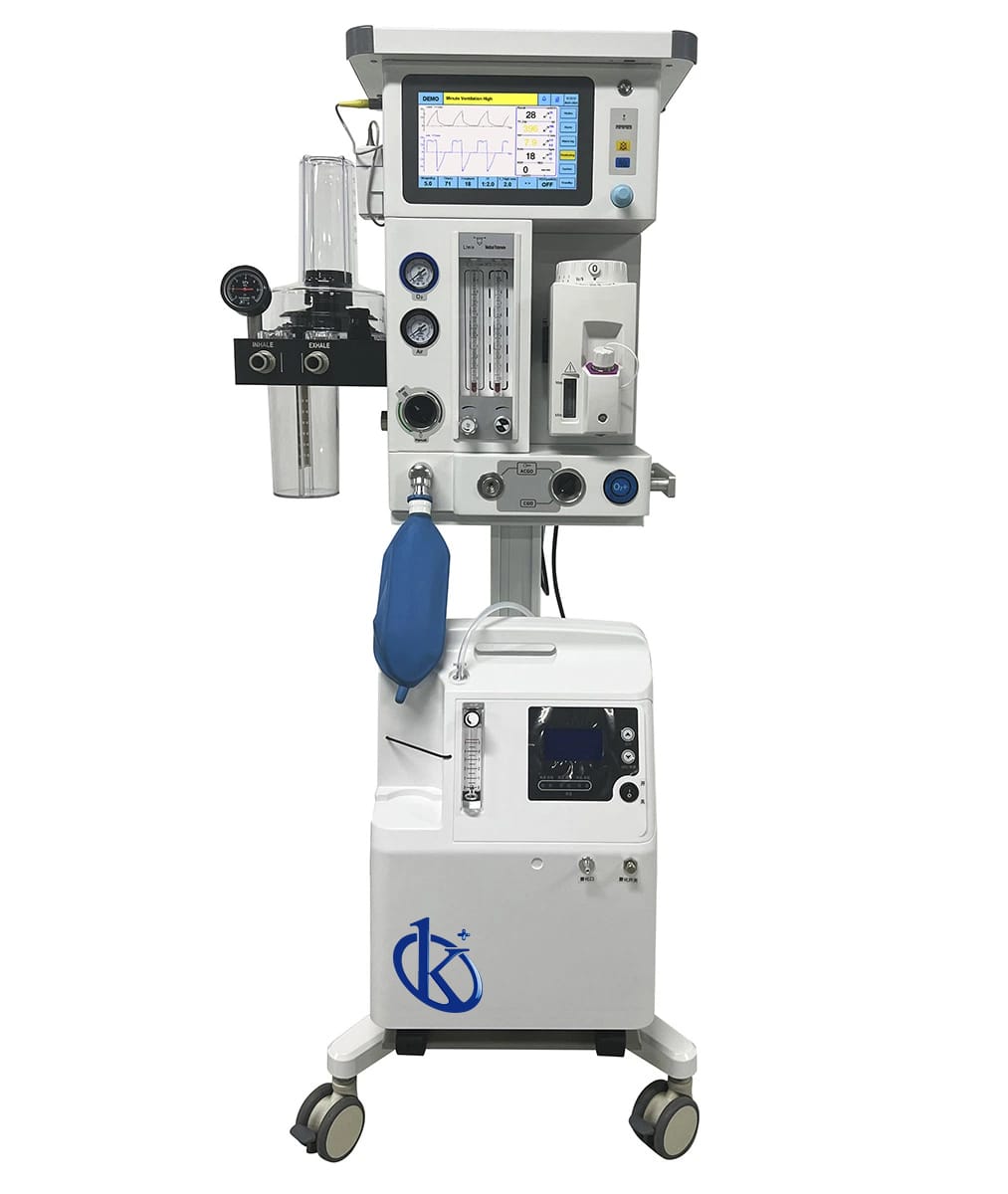
Installation and Commissioning Guide for the Turbo-driven Veterinary Anesthesia Machine YR06101
The Turbo-driven Veterinary Anesthesia Machine YR06101 is a sophisticated device designed for administering anesthesia to animals, ranging from small pets to larger animals. This guide aims to provide a detailed overview of the installation process, ensuring that operators can effectively set up and commission the machine for optimal use.
Understanding the YR06101 Anesthesia Machine
The YR06101 is designed to deliver precise anesthesia to animals whose respiratory systems may not be able to handle high pressure. By automatically calculating necessary parameters based on the weight of the animal, it optimizes the delivery of anesthetic gases. Two primary operating modes are available: SPONT (for spontaneous breathing) and MANUAL (for monitoring only).
| Specification | Details |
|---|---|
| Model | YR06101 |
| Main Unit | High-quality aluminum trolley |
| Application Range | Animal weight 0.8-120kg |
| CO2 Absorber | Integrated design of animal-specific integrated bellows and absorber with dedicated fresh gas connection. |
| Flowmeter | Animal-specific oxygen tube with flow rates of 0-10L/min for O2 and Air. |
| Ventilator Drive Mode | Turbine and electronic control |
| Breathing Rate | 1-100 bpm |
Unboxing and Initial Setup
When you receive the YR06101, ensure all components are intact. The unboxing checklist includes the main unit, power supply, manuals, and accessories. It is crucial to inspect for any damages during transit.
Power-Up Sequence
Begin by placing the unit on a stable surface. Follow these steps to power up:
- Connect the power supply to the machine and plug it into a suitable outlet.
- Turn on the main power switch located on the back of the unit.
- Wait for the system to perform self-diagnostics, ensuring all systems are operational.
Calibration and Configuration
Once powered up, the YR06101 must be calibrated for accurate measurements. The calibration process involves setting the weight of the animal, which allows the machine to auto-calculate other necessary parameters. Follow the user manual closely for detailed calibration steps.
Common Configuration Mistakes
Operators often overlook the following during the setup:
- Neglecting to verify that the fresh gas flow is properly connected.
- Failing to adjust the tidal volume settings according to the size of the patient.
Troubleshooting Common Issues
Even with careful setup, issues may arise. Below is a troubleshooting guide for some of the most common symptoms encountered with the YR06101.
| Symptom | Possible Causes | Solutions |
|---|---|---|
| Unit does not power on | Faulty power connection, damaged power supply | Check connections, replace power supply if necessary |
| Error code E-03 | Ventilator malfunction, blocked airway | Inspect ventilator settings, check for obstructions |
| Inconsistent readings | Calibration not set, faulty sensors | Recalibrate machine, inspect and replace sensors if needed |
Specific Applications of YR06101
This anesthesia machine is utilized in various veterinary applications:
- Clinical Settings: Ideal for surgeries in clinics where monitoring of anesthesia levels is critical.
- Emergency Situations: Useful in critical care where rapid and accurate administration of anesthetic gases is required.
Frequently Asked Questions
What are the key features of the YR06101 anesthesia machine?
The YR06101 features automatic parameter calculations based on animal weight, multiple ventilation modes (VCV, PCV, SPONT, MANUAL), and a high-quality aluminum trolley for mobility.
How do I maintain the YR06101 anesthesia machine?
Regular maintenance includes checking the CO2 absorber, cleaning the flowmeter, and ensuring all electronic components are functioning correctly. It is essential to follow the maintenance schedule outlined in the user manual.
What range of animal weights can the YR06101 accommodate?
The YR06101 is designed for animals weighing between 0.8 kg and 120 kg, making it suitable for a wide range of veterinary applications.
Can the YR06101 be used for critically ill patients?
Yes, the machine's ability to regulate pressure and monitor respiratory parameters makes it suitable for use in critical care situations where close supervision is necessary.
What should I do if I encounter error codes on the YR06101?
Refer to the user manual for a comprehensive list of error codes and troubleshooting steps. If the issue persists, contact customer service for assistance.
If you need a quote for the Turbo-driven Veterinary Anesthesia Machine YR06101, please reach out to us!
If you are looking for a fusion of innovation and quality, you have come to the right place. At Kalstein, we offer you the luxury of exploring our exclusive catalog of laboratory equipment. We manufacture every device to the highest standards of excellence. Our intuitive and seamless online purchasing channels are designed for your convenience, securing the most competitive prices. Hesitate no longer — we bring science to life, it is time to become part of our community.