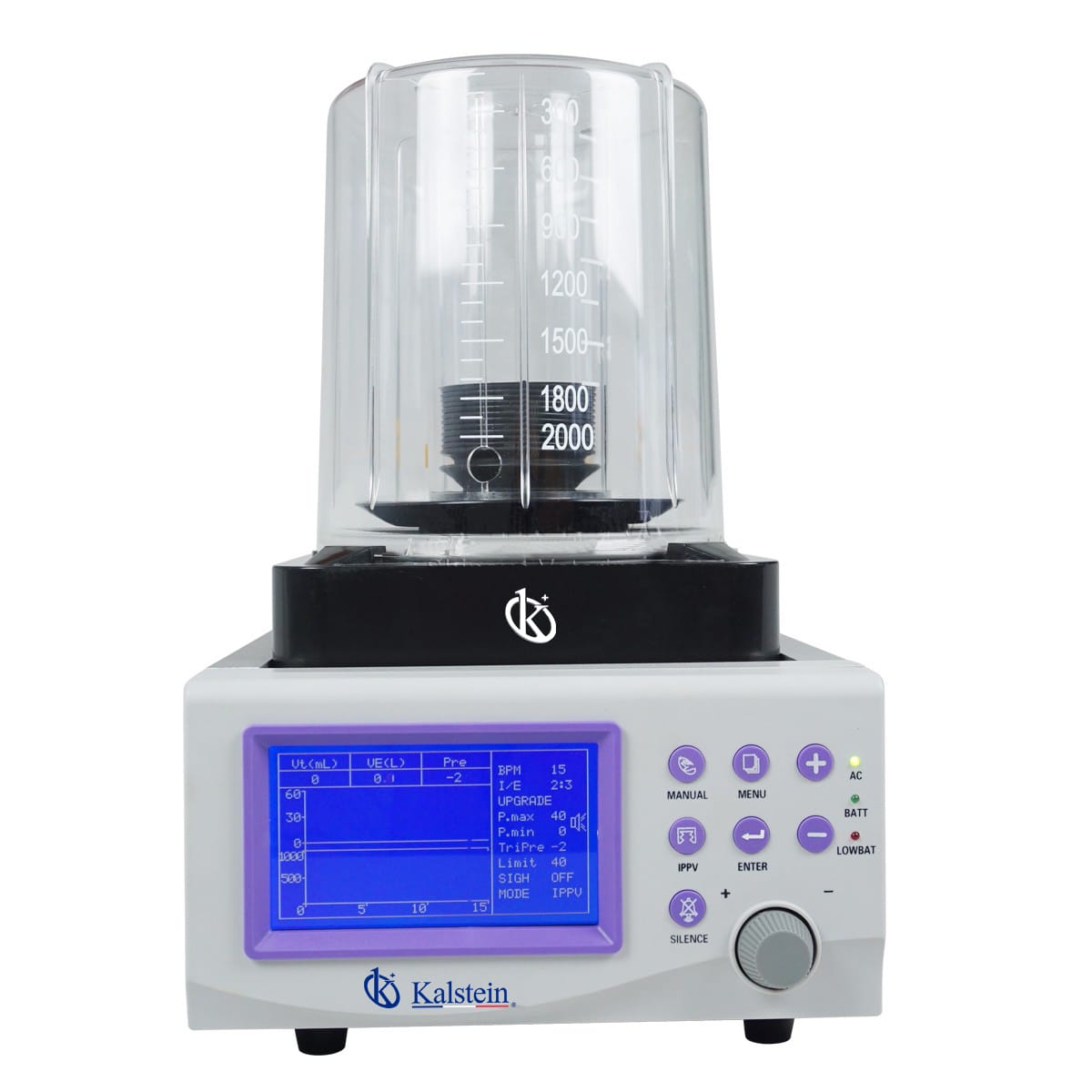
Installation and Commissioning Guide for the Veterinary Anesthesia Ventilator YR06102
The Veterinary Anesthesia Ventilator YR06102 is a critical device designed to assist in respiration for animals unable to ventilate independently. This guide provides detailed, step-by-step instructions for the installation and commissioning process, ensuring that the YR06102 is set up correctly for optimal performance in a veterinary setting.
Understanding the YR06102
The YR06102 is engineered to provide respiratory support through various modes including Intermittent Positive Pressure Ventilation (IPPV), Synchronized Intermittent Mandatory Ventilation (SIMV), and Manual mode. Each mode allows tailored support according to the patient's needs. This section will give an overview of the technical specifications and operational modes of the YR06102.
| Feature | Description |
|---|---|
| Model | YR06102 |
| Respiration Mode | IPPV, SIMV, MANUAL |
| Display | 5.5' SNT screen |
| Waveform | P-t, V-t |
| Tidal Volume | 0.50ml~1600ml |
| Respiratory Frequency | 1 to 65 BPM |
| I:E Ratio | 8:1~1:8 |
| Alarm Parameters | High pressure alarm, Low pressure alarm, O2 source lost alarm, AC power lost alarm |
| High Pressure Alarm Limit | 20~60cmH2O |
| Low Pressure Alarm Limit | 0~20cmH2O |
| Monitor Parameters | Tidal volume, MV, Ppeak, PEEP, respiratory frequency, I:E ratio |
| Safety Valve Pressure Limit | 6Kpa |
Installation Steps for the YR06102
Installing the YR06102 requires careful planning and execution to ensure safety and functionality. Below is a detailed checklist and step-by-step guide to aid in the installation process:
- Unboxing Checklist: Ensure all components are present, including the ventilator unit, power cable, user manual, and any additional accessories.
- Location Selection: Choose a stable, level surface away from excessive moisture and direct sunlight.
- Power Supply: Ensure that the electrical supply matches the device requirements (usually indicated in the user manual).
- Ventilation: Ensure proper ventilation around the device to prevent overheating.
- First-Time Calibration: Upon powering up the device, follow the calibration instructions in the manual to set the initial parameters.
Common Installation Mistakes
Even experienced operators can make mistakes during installation. Here are some common issues to watch for:
- Improper leveling of the device can lead to inaccurate measurements.
- Failure to secure the power connection may interrupt functionality.
- Neglecting to check alarm settings can result in undetected emergencies.
Commissioning the YR06102
Once installation is complete, commissioning the YR06102 involves validating its performance and ensuring it meets all operational standards. This process includes:
- Initial Testing: Conduct tests to verify that all operational modes function correctly.
- Monitoring Output: Ensure that tidal volume and respiratory frequency meet expected benchmarks.
- Alarm Functionality: Test all alarm parameters to confirm they are working correctly.
Environmental Considerations
The YR06102 must operate within specific environmental conditions to ensure optimal performance. Consider the following factors:
- Temperature Range: Typically, the device should operate in a temperature range of 10°C to 40°C.
- Humidity Levels: Relative humidity should be maintained between 30% and 75% for proper function.
- Electrical Supply: Ensure the device is connected to a stable power source with the appropriate voltage.
Frequently Asked Questions
What is the first step in setting up the YR06102?
The first step is to unbox the device and check that all components are present, followed by selecting an appropriate location for installation.
How do I calibrate the YR06102 after installation?
Calibration involves following the guidelines in the user manual to set the initial parameters after powering up the device, ensuring accurate readings and functionality.
What are the different operational modes available in the YR06102?
The YR06102 offers multiple operational modes including IPPV, SIMV, and Manual mode, allowing versatility in treating different patients.
How can I troubleshoot alarm issues with the YR06102?
To troubleshoot alarm issues, first confirm the alarm settings, check for any blockages or leaks, and ensure proper connections to the gas supply.
What maintenance does the YR06102 require?
Regular maintenance includes checking for software updates, cleaning the device, and ensuring that all parts are functioning and within their operational limits.
Can the YR06102 be used for different animal species?
Yes, the YR06102 is designed to accommodate various species, but settings may need to be adjusted according to the size and respiratory needs of the animal being treated.
Where can I request a quote for the YR06102?
You can request a quote by contacting our sales team or visiting our online catalog for pricing information.
If you are looking for a fusion of innovation and quality, you have come to the right place. At Kalstein, we offer you the luxury of exploring our exclusive catalog of laboratory equipment. We manufacture every device to the highest standards of excellence. Our intuitive and seamless online purchasing channels are designed for your convenience, securing the most competitive prices. Hesitate no longer — we bring science to life, it is time to become part of our community.