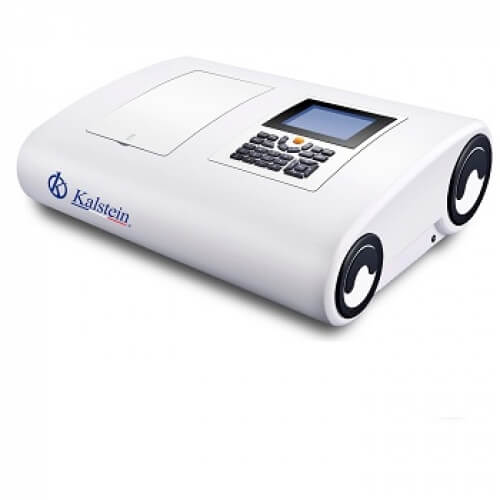
Installation and Commissioning Guide for the YR01864 Double Beam Spectrophotometer
The YR01864 double beam spectrophotometer is a powerful tool for various laboratory applications. This guide is designed to assist users in the installation and commissioning process, ensuring that the equipment operates at peak performance. Understanding the proper setup and calibration will enhance the reliability of the measurements obtained through this sophisticated device.
Overview of the YR01864 Spectrophotometer
The YR01864 features a dual beam optical design, which minimizes fluctuations and ensures stability during operation. This spectrophotometer is equipped with advanced software capabilities, including spectrum scanning, standard curves, and kinetics, all accessible directly on a PC. The instrument's unique 520 mm light path design significantly improves resolution, making it suitable for various analytical applications.
Technical Specifications of the YR01864
| Specification | Details |
|---|---|
| Model | YR01864 |
| Optical System | Double Beam, 1200 lines/mm grating |
| Wavelength Range | 190-1100 nm |
| Bandwidth | 1.0 nm |
| Wavelength Accuracy | ± 0.1 nm (at D2 656.1 nm), ± 0.3 nm across the range |
| Photometric Accuracy | ± 0.2% T (0-100% T) |
| Data Output | USB Port |
| Dimension | 625 x 430 x 206 mm |
| Weight | 32 kg |
Unboxing Checklist
Before beginning the setup process, ensure that all components are present. The unboxing checklist includes:
- YR01864 Spectrophotometer
- Power Cord
- USB Cable
- User Manual
- Calibration Standards
- Software Installation Disc
Installation Steps for the YR01864
Follow these steps to properly install the YR01864 in your laboratory:
- Choose a Suitable Location: Select a stable, level surface away from direct sunlight and vibrations.
- Level the Instrument: Utilize a spirit level to ensure that the spectrophotometer is perfectly horizontal.
- Connect Power Supply: Plug the power cord into a suitable socket that meets the voltage requirements (220V/50Hz or 110V/60Hz).
- USB Connection: Connect the USB cable to establish communication between the spectrophotometer and your PC.
First Power-Up Sequence
Once installed, power up the YR01864 by following these essential steps:
- Press the power button on the front panel.
- Allow the device to complete its self-diagnostic checks.
- Access the main menu displayed on the LCD screen.
Calibration Procedures
Calibration is crucial for ensuring accurate measurements. Follow these steps to calibrate the YR01864:
- Use calibration standards provided in the unboxing checklist.
- Navigate to the calibration option in the software interface.
- Follow on-screen prompts to input data from the calibration standards.
Common Setup Mistakes
During installation and commissioning, users might encounter pitfalls. Here are common mistakes to avoid:
- Improper Leveling: Not ensuring the spectrophotometer is level can lead to inaccurate readings.
- Neglecting Calibration: Skipping the calibration step can compromise measurement accuracy.
- Incorrect Power Supply: Using an incompatible power source can damage the instrument.
Frequently Asked Questions
What should I do if the YR01864 does not power on?
If the spectrophotometer does not power on, check the power connection and ensure the outlet is functioning. Replace the power cord if damaged.
How can I perform a wavelength calibration on the YR01864?
To perform a wavelength calibration, use certified calibration standards, navigate the software interface to the calibration section, and input the data as prompted.
What are the recommended maintenance practices for the YR01864?
Regular maintenance includes cleaning optical components, checking software updates, and routinely performing calibration to ensure accuracy.
Can the YR01864 be used for DNA and protein testing?
Yes, the YR01864 is equipped with specialized software that allows for direct testing of DNA and protein samples.
What should I do if I encounter an error code on the YR01864?
Refer to the user manual for an error code reference. Common codes often indicate issues with calibration or connection that can be resolved by following troubleshooting steps.
What type of data output is available with the YR01864?
The YR01864 features a USB port for data transfer, allowing users to connect it to a PC for data analysis and reporting.
How can I obtain replacement parts for the YR01864?
Replacement parts can be ordered through authorized distributors or directly from the manufacturer. Ensure to have the model code (YR01864) handy for accurate order processing.
If you are looking for a fusion of innovation and quality, you have come to the right place. At Kalstein, we offer you the luxury of exploring our exclusive catalog of laboratory equipment. We manufacture every device to the highest standards of excellence. Our intuitive and seamless online purchasing channels are designed for your convenience, securing the most competitive prices. Hesitate no longer — we bring science to life, it is time to become part of our community.