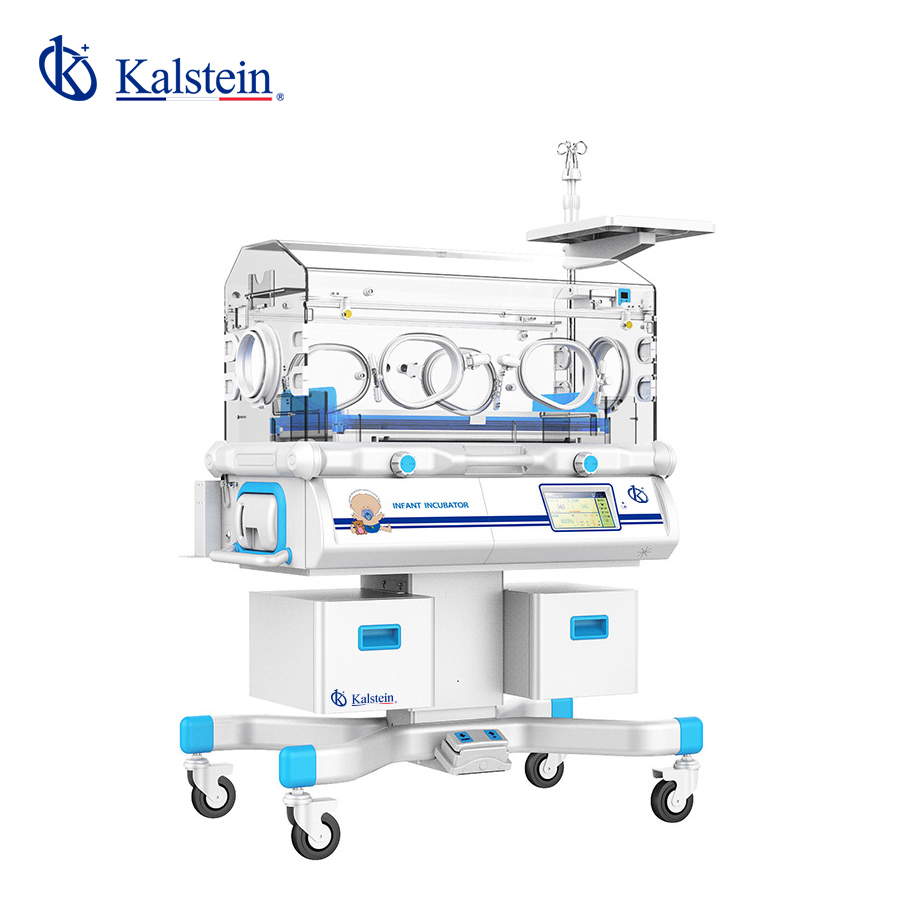
Installation and Commissioning Guide for the YR02188 Infant Incubator
The YR02188 Infant Incubator is a sophisticated device designed to provide a controlled environment for vulnerable newborns in neonatal intensive care units (NICUs). This guide aims to provide detailed instructions on the installation and commissioning of the YR02188, ensuring that the incubator operates at peak performance while maintaining patient safety.
Overview of the YR02188 Infant Incubator
The YR02188 Infant Incubator features advanced temperature regulation systems and ultrasonic humidification, maintaining a comfortable and safe atmosphere for infants. With adjustable humidity levels ranging from 40% to 80% and a dual-wall chamber design, the incubator minimizes heat and moisture loss. Understanding its features is crucial for effective installation.
Technical Specifications of YR02188
| Model | YR02188 |
|---|---|
| Temperature Control | Air and Skin |
| Air Temperature Control at 37 °C | Yes |
| Reclinable Cradle | Yes |
| Humidity Display | Yes |
| Humidity Control | Yes |
| Aluminum Heat Retention Tank | Yes |
| Operating Windows and Access Ports | 2 ports, 4 windows |
| Cabinet | Yes |
| Adjustable Working Height | No |
| Additional Rear Door | No |
| Infant Weighing Bed | No |
| Low Noise DC Motor | No |
Unboxing Checklist and Initial Setup
When you receive the YR02188 Infant Incubator, it is essential to ensure that all components are intact and ready for installation. The unboxing checklist includes:
- YR02188 Infant Incubator unit
- User manual and installation guide
- Power cord
- Humidifier reservoir
- Additional accessories (if ordered)
Inspect the packaging for any damage and verify that all parts are included before proceeding with the installation.
Site Requirements for Optimal Performance
Before installing the YR02188, ensure that the location meets the necessary environmental conditions:
- Temperature: 20-25 °C
- Humidity: 40% to 80%
- Voltage: 110-240 V
- Frequency: 50-60 Hz
Additionally, sufficient space should be maintained around the incubator for ventilation and ease of access for medical personnel.
Power-Up Sequence and Calibration
Once the incubator is set in place, follow these steps for powering up:
- Connect the power cord to a grounded outlet.
- Turn on the main power switch.
- Check the display for initial diagnostics.
- Set the desired temperature and humidity levels using the control panel.
After power-up, perform calibration to ensure accurate readings. This involves verifying the temperature and humidity against trusted measuring devices.
Common Setup Mistakes to Avoid
Here are potential pitfalls during the installation and setup process of the YR02188:
- Incorrect power outlet specifications leading to damage.
- Not allowing adequate space for airflow around the incubator.
- Failure to register the incubator for warranty purposes.
Addressing these issues can prevent operational failures and ensure the long-term functionality of the incubator.
Frequently Asked Questions
What are the key features of the YR02188 Infant Incubator?
The YR02188 features advanced temperature and humidity control, a dual-wall chamber design, ultrasonic humidification, and a microprocessor-controlled system, ensuring a stable environment for fragile newborns.
How do I calibrate the YR02188 for the first use?
Calibration involves setting the desired temperature and humidity levels, followed by checking these against reliable measuring instruments to ensure accuracy before placing infants inside.
What maintenance is required for the YR02188?
Regular cleaning of the humidifier reservoir, checking for any software updates, and ensuring the integrity of the electrical components are crucial for maintaining the incubator's performance.
How can I troubleshoot common errors on the YR02188?
Common errors can often be resolved by consulting the user manual for troubleshooting steps, checking connections, and ensuring the incubator is within the specified environmental conditions.
Are there any optional accessories for the YR02188?
Yes, optional accessories include an X-ray cassette, adjustable vertical height settings, and a unit for infant phototherapy, enhancing the functionality of the incubator.
What is the warranty period for the YR02188?
The typical warranty period for the YR02188 is one year from the date of purchase, covering manufacturing defects and ensuring peace of mind for buyers.
How do I request a quote for the YR02188?
You can request a quote on Kalstein Plus by navigating to the relevant section and providing the necessary details regarding your needs and specifications.
If you are looking for a fusion of innovation and quality, you have come to the right place. At Kalstein, we offer you the luxury of exploring our exclusive catalog of laboratory equipment. We manufacture every device to the highest standards of excellence. Our intuitive and seamless online purchasing channels are designed for your convenience, securing the most competitive prices. Hesitate no longer — we bring science to life, it is time to become part of our community.