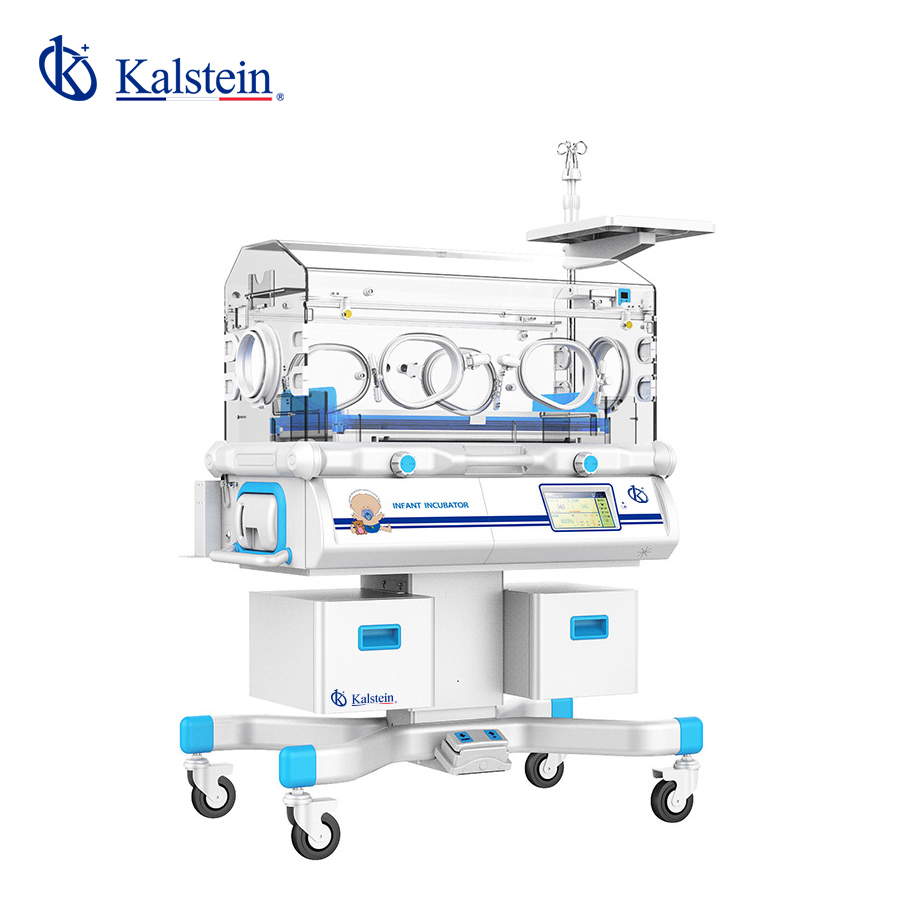
Installation and Commissioning Guide for the YR02188 Infant Incubator
The YR02188 Infant Incubator is a state-of-the-art device designed for neonatal intensive care units, providing an advanced thermal regulation system essential for the care of fragile newborns. This comprehensive guide covers everything from unboxing to first-run calibration, ensuring you have all the necessary information to set up this critical piece of equipment safely and effectively.
Overview of the YR02188 Infant Incubator
The YR02188 Infant Incubator features a dual-wall chamber design that minimizes heat and humidity loss, making it suitable for various clinical settings. It incorporates a microprocessor-controlled temperature system, ensuring precise temperature regulation. The ultrasonic humidifier adds moisture to the environment, maintaining humidity levels between 40% and 80% to protect the infant's delicate skin.
Technical Specifications
| Specification | Details |
|---|---|
| Model | YR02188 |
| Temperature Control | Air & Skin Temperature Monitoring |
| Humidity Control | Servo-controlled |
| Temperature Display | Monitors air and skin temperature |
| Material | Aluminum structure |
| Adjustable Incline | Up to 10° |
| RS-232 Connector | Yes |
Unboxing Checklist
Upon receiving your YR02188 Infant Incubator, an unboxing checklist can help avoid errors:
- Inspect the outer packaging for any damage.
- Ensure all accessories are included: user manual, power cable, and any optional modules.
- Check for any visible defects on the incubator.
- Verify the presence of calibration tools if necessary.
Installation Steps
The installation of the YR02188 must be carried out carefully to ensure that it operates effectively:
- Location: Choose a location that minimizes exposure to vibrations, direct sunlight, and drafts.
- Leveling: Use a leveling tool to ensure the incubator is perfectly level on its base.
- Power-Up Sequence: Connect the incubator to a power source, ensuring the voltage matches the specifications in the manual.
- Calibration: Follow the calibration instructions in the manual for temperature and humidity settings.
- First Run: Perform a test run to verify that all systems are functioning correctly.
Common Setup Mistakes
It’s vital to avoid these common pitfalls during installation:
- Failing to calibrate the incubator before use.
- Improper leveling leading to inaccurate readings.
- Using incompatible power sources.
- Blocking air circulation ports, which can lead to overheating.
Initial Calibration and Testing
Following installation, it is essential to calibrate the YR02188 to ensure accuracy:
- Set the desired temperature and humidity levels on the incubator's control panel.
- Monitor the readings for at least 30 minutes to ensure stability.
- Adjust settings as necessary based on the initial readings.
- Document all settings and adjustments made for future reference.
Frequently Asked Questions
What is the operating temperature range for the YR02188?
The operating temperature range for the YR02188 is adjustable and should be set according to the specific needs of the infant, typically between 32°C and 37°C.
How often should the YR02188 be calibrated?
The YR02188 should be calibrated every month or before any critical usage to maintain optimal performance.
What maintenance is required for the ultrasonic humidifier?
Regular cleaning and descaling of the ultrasonic humidifier are essential to prevent bacterial contamination and ensure consistent operation.
Can the YR02188 be used for multiple patients?
While the YR02188 is designed for individual use, it can be utilized sequentially for multiple patients with proper cleaning and disinfection protocols in place.
What should I do if the incubator displays an error code?
Refer to the user manual for troubleshooting steps specific to the error code displayed. Common steps include resetting the device and checking connections.
How can I ensure the safety of the infant in the incubator?
Regularly monitor the temperature and humidity levels, perform routine maintenance checks, and ensure emergency alarms are functioning correctly.
What optional accessories are compatible with the YR02188?
Optional accessories include an adjustable height stand, lateral access doors, and a phototherapy unit. These can enhance the incubator's functionality in various clinical settings.
If you are looking for a fusion of innovation and quality, you have come to the right place. At Kalstein, we offer you the luxury of exploring our exclusive catalog of laboratory equipment. We manufacture every device to the highest standards of excellence. Our intuitive and seamless online purchasing channels are designed for your convenience, securing the most competitive prices. Hesitate no longer — we bring science to life, it is time to become part of our community.