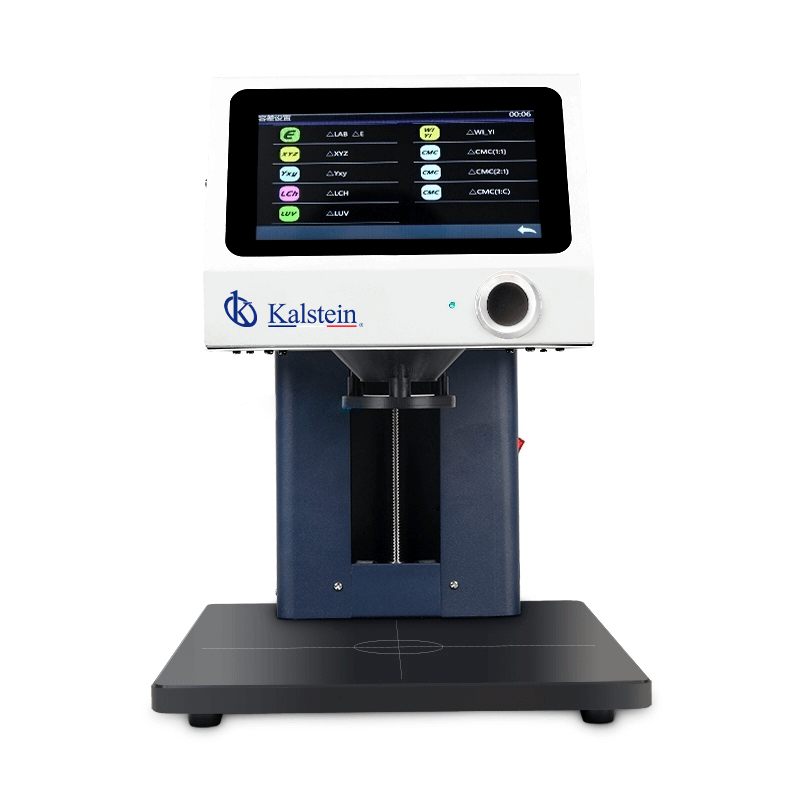
Installation and Commissioning Guide for the YR05482 Non-Contact Table Spectrophotometer
The YR05482 non-contact table spectrophotometer is a highly sophisticated instrument designed for accurate color measurement across various applications. This guide focuses on the detailed installation and commissioning process necessary to ensure optimal performance of the YR05482.
Understanding the YR05482 Spectrophotometer
The YR05482 utilizes a 45/0 optical geometry, which facilitates precise color measurement without physical contact with the sample. It is essential to familiarize yourself with the operational principles of this instrument, including its unique non-contact measurement feature, to fully harness its capabilities.
Unboxing Checklist and Initial Setup
Before beginning the installation of the YR05482, ensure you have the following items:
- YR05482 Spectrophotometer unit
- Power adaptor
- User manual
- Calibration standard plate
- USB cable
- Black calibration cavity
Once all items are confirmed, proceed to the installation site and check the following conditions:
- Stable table or surface
- Access to power supply
- Appropriate network connection if applicable
Anchoring and Leveling the YR05482
To prevent measurement errors, the YR05482 must be positioned on a level surface. Utilize a bubble level to check the surface; adjust with shims if necessary. Anchoring the device to prevent movement during operation is recommended for rigorous applications.
Power-Up Sequence and First-Run Calibration
Once the YR05482 is installed and leveled, plug in the power adaptor. Press the power button to turn on the unit. On the first-run calibration:
- Select the calibration mode from the touch interface.
- Use the provided calibration standard plate to calibrate the device according to the prompts on the screen.
This step is crucial to ensure that the device delivers accurate color measurements based on standardized criteria.
Network and USB Setup
If the YR05482 will be connected to a network or computer, follow these steps:
- Connect the USB cable to the appropriate port on the device and the computer.
- For network connectivity, access the network settings from the main menu and configure as required.
Ensure that all settings are saved before proceeding to the next step.
Validation of First Measurement
To validate the first measurement after setup:
- Select a test sample similar to those that will be measured in routine operation.
- Perform a measurement and record the output.
- Compare the results to standardized values to ensure accuracy.
Any discrepancies should be addressed by re-evaluating the calibration settings.
Common Installation Mistakes to Avoid
While installing the YR05482, watch out for the following common mistakes:
- Incorrect leveling leading to skewed readings.
- Failure to calibrate before first use.
- Neglecting to check environmental conditions such as temperature and humidity.
Technical Specifications of the YR05482
| Specification | Detail |
|---|---|
| Model | YR05482 |
| Light Source | Full-spectrum LED, UV light |
| Measurement Mode | Sample Mode, QC Mode, Continuous Statistics Mode |
| Measurement Range | Reflectance: 0-200% |
| Wavelength Range | 400~700 nm, output 10 nm |
| Display | 7-inch Capacitive TFT Touch Screen |
| Weight | Approximately 10 kg |
| Dimensions | 330 x 250 x 370 mm |
Frequently Asked Questions
What are the recommended environmental conditions for operating the YR05482?
The YR05482 operates best in a temperature range of 0 to 40 degrees Celsius and humidity levels between 0% to 85% (non-condensing). Ensure that the unit is placed away from direct sunlight and extreme environmental changes.
How do I maintain the YR05482 for optimal performance?
Regular maintenance includes cleaning the optical components, verifying calibration monthly, and ensuring that environmental conditions remain stable. Additionally, replace any worn components as recommended in the user manual.
What should I do if the YR05482 displays an error code?
Check the user manual for the specific error code. Common solutions include power cycling the unit, recalibrating, or resetting it to factory settings. If the issue persists, contact technical support.
Is the YR05482 suitable for all types of color measurement samples?
Yes, the YR05482 is designed to measure various samples, including liquids, powders, and coatings, without contact. However, ensure that samples meet the device's measuring specifications for accurate results.
What accessories are compatible with the YR05482?
Compatible accessories include the standard calibration plate, USB communication cable, and additional calibration cavities as specified in the user manual. Always check compatibility before purchase.
How often should I perform a calibration on the YR05482?
It is recommended to calibrate the YR05482 before its first use and at least once a month during regular operation. Frequent calibrations may be necessary if the unit is moved or exposed to different environmental conditions.
Where can I request a quote for the YR05482?
To request a quote for the YR05482, please contact our sales team through the provided channels in the catalog or website.
If you are looking for a fusion of innovation and quality, you have come to the right place. At Kalstein, we offer you the luxury of exploring our exclusive catalog of laboratory equipment. We manufacture every device to the highest standards of excellence. Our intuitive and seamless online purchasing channels are designed for your convenience, securing the most competitive prices. Hesitate no longer — we bring science to life, it is time to become part of our community.