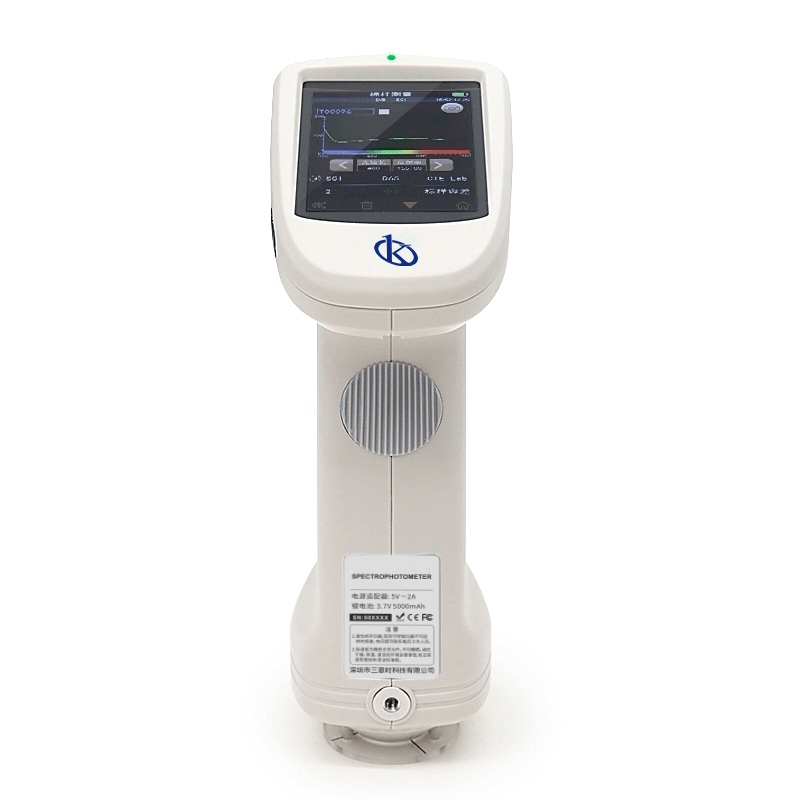
Installation and Commissioning Guide for the YR05495 Spectrophotometer
The YR05495 Spectrophotometer is a highly advanced instrument designed for precise color measurement across various industries including textiles, automotive, and food. This guide focuses on the installation and commissioning of the YR05495, enabling users to achieve optimal operational performance from the outset.
Unboxing and Initial Setup
Before proceeding with the installation, it is crucial to carefully unbox the YR05495 and review the items included in the package:
- YR05495 Spectrophotometer Unit
- Power Adapter
- User Manual
- USB Cable
- Calibration White and Black Tiles
- Protective Cover
- Measuring Aperture (8 mm or 4 mm)
- Wrist Strap
Once you have verified all components, move on to the installation process.
Anchoring and Leveling the Device
The YR05495 is designed to be used on a stable surface to ensure accurate measurements. Follow these steps for anchoring and leveling:
- Select a level surface close to a power source.
- Ensure that the surface is free from vibrations and direct sunlight.
- Use a spirit level to check the flatness of the surface; adjust if necessary.
- Position the YR05495 on the surface, making sure it is stable.
Power-Up Sequence
To power up the YR05495, follow these steps:
- Connect the power adapter to the device.
- Plug the adapter into a standard electrical outlet.
- Press the power button located on the front panel to turn on the device.
- Wait for the boot-up process to complete, indicated by the display lighting up.
First-Run Calibration
Calibration is vital for ensuring measurement accuracy. For the YR05495, follow these calibration steps:
- Ensure that the calibration white tile is clean and free from dust.
- Place the white tile in the measurement area.
- Select the calibration mode from the main menu on the device's touch screen.
- Follow the on-screen instructions to complete the calibration process.
Proper calibration allows the system to correct for any inherent instrument variability.
Network/USB Setup
The YR05495 can be connected to a computer for data management. To set up USB communication:
- Connect the USB cable from the YR05495 to your computer.
- Install the necessary software provided with the device on your computer.
- Follow the software instructions to establish a connection and transfer data.
Validation of First Measurement
Once the calibration is complete, validate the first measurement:
- Choose a standard sample that you are familiar with.
- Measure the sample using the YR05495.
- Compare the result with known values to ensure accuracy.
This step ensures that the device is operating correctly and provides reliable data.
Common Setup Mistakes to Avoid
During installation and commissioning, users may encounter common mistakes. Here are some to avoid:
- Not checking calibration regularly which can lead to inaccurate readings.
- Using the wrong type of sample aperture for measurement.
- Failing to level the instrument, which can affect measurement precision.
- Overlooking software installation, which may hinder data transfer.
Technical Data Table for the YR05495
| Specification | Details |
|---|---|
| Model | YR05495 |
| Optical Geometry | Reflect: d/8°, d/8° (diffuse illumination, 8-degree viewing angle) |
| Measurement Aperture | Custom aperture: MAV: φ8mm/φ10mm; SAV: φ4mm/φ5mm |
| Wavelength Range | 400-700 nm |
| Display | 3.5 inch color TFT LCD, capacitive touch screen |
| Power Supply | Li-ion battery, 3.7 V, 5000 mAh, 6000 measurements over 8 hours |
| Weight | Approximately 600 g |
| Operating Environment | 0-40℃, 0-85% RH (non-condensing) |
| Color Spaces | CIE LAB, XYZ, Yxy, LCh, CIE LUV, s-RGB |
Frequently Asked Questions
What initial steps should I take to install the YR05495 Spectrophotometer?
Begin by unboxing the unit and ensuring all components are present. Next, choose a stable, level surface to set up the device, followed by connecting it to a power source and performing initial calibrations.
How do I calibrate the YR05495 for accurate measurements?
Calibration involves placing a clean calibration white tile in the measurement area and selecting the calibration mode from the touch screen. Follow the prompts to complete the process.
What are the common mistakes to avoid during the setup of the YR05495?
Avoid not checking calibration regularly, using the wrong aperture for measurements, failing to level the device, and not installing the required software for data management.
How can I connect the YR05495 to my computer?
Connect the USB cable from the YR05495 to your computer and install the provided software. Follow the instructions within the software to establish a connection.
What is the power supply duration for the YR05495?
The YR05495 is powered by a lithium-ion battery that lasts for approximately 6000 measurements over an 8-hour period.
What are the essential parameters displayed during measurement?
The device displays spectral values, chromaticity values of samples, color difference values, and pass/fail results for each measurement cycle.
Where can I request a quote for the YR05495 Spectrophotometer?
You can request a quote for the YR05495 on Kalstein Plus for competitive pricing and tailored services.
If you are looking for a fusion of innovation and quality, you have come to the right place. At Kalstein, we offer you the luxury of exploring our exclusive catalog of laboratory equipment. We manufacture every device to the highest standards of excellence. Our intuitive and seamless online purchasing channels are designed for your convenience, securing the most competitive prices. Hesitate no longer — we bring science to life, it is time to become part of our community.