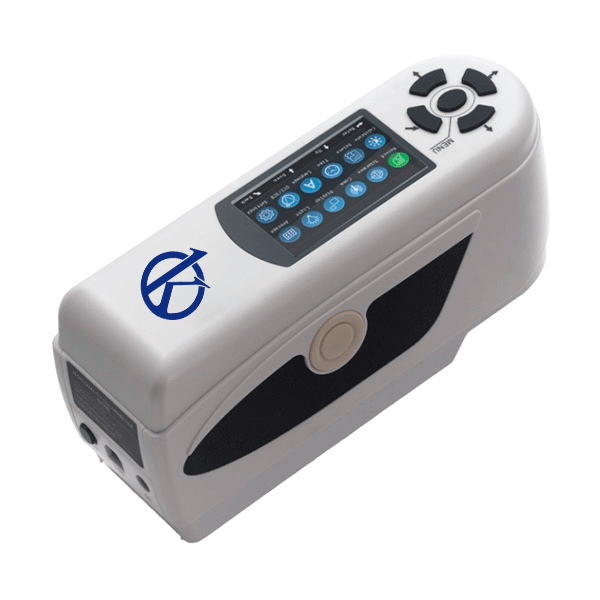
Installation and Commissioning Guide for the YR05508 Precision Colorimeter
The YR05508 Precision Colorimeter is engineered for accuracy and reliability in diverse applications such as textiles, plastics, and food analysis. This guide aims to assist operators in the effective installation and initial setup of the YR05508, ensuring optimal performance right from the start.
Unboxing and Initial Setup
When you receive your YR05508, it is essential to correctly unbox and check all components to avoid any initial issues. Follow these steps:
- Carefully remove the colorimeter from its packaging.
- Check for the following components: YR05508 unit, power adapter, USB cable, user manual, and calibration standards.
- Inspect for any visible damage that may have occurred during shipping.
Anchoring and Leveling the Device
To ensure accurate readings, the YR05508 must be installed on a stable surface. Here’s how you do it:
- Choose a flat, vibration-free surface to place the colorimeter.
- Use leveling tools to adjust the feet of the unit until it is perfectly level.
- Ensure there is adequate space around the device for ventilation and accessibility.
Power-Up Sequence
Powering up the YR05508 is straightforward but crucial for proper functioning. Follow these steps:
- Connect the power adapter to the device and plug it into a suitable power outlet.
- Press the power button to turn on the unit.
- Wait for the system to initialize and ensure the display is functioning correctly.
First-Run Calibration
Calibration is essential for maintaining the accuracy of measurements. The following outlines the calibration process:
- Select the calibration option from the main menu.
- Use the provided calibration standards to calibrate the device according to the specified procedures in the user manual.
- Perform at least two calibration runs to ensure consistency in readings.
Network and USB Setup
The YR05508 offers connectivity options that enhance its functionality. Setting up these connections is vital:
- For USB, connect the device to a computer using the supplied USB cable.
- Install any required software or drivers as indicated in the user manual.
- Ensure the device is recognized by the computer and that data transfer is functioning.
Validating the First Measurement
After everything is set up, it’s time to validate the first measurement:
- Select a known sample to measure and record the output.
- Compare the reading against expected values to confirm accuracy.
- If discrepancies arise, revisit the calibration steps or check for environmental factors affecting readings.
Common Setup Mistakes
As with any sophisticated equipment, certain common mistakes can affect performance. Here are some pitfalls to avoid:
- Failing to calibrate before the first use can result in inaccurate measurements.
- Not ensuring a level installation might lead to measurement errors.
- Overlooking the power requirements can lead to operational issues.
Technical Specifications of the YR05508
| Specification | Details |
|---|---|
| Model | YR05508 |
| Measurement Aperture | Φ8mm |
| Detector | Silicon photodiode |
| Color Space | CIEL*a*b*C*h*, CIEXYZ, CIERGB |
| Light Source | D65 |
| Storage Capacity | 100 standards, 20000 samples |
| Weight | 500g |
| Dimensions | 205×70×100mm |
| Power Supply | 3.7 V Lithium-ion rechargeable battery |
| Battery Life | 3 years, over 1 million measurements |
| Operating Temperature/Humidity | -10~40℃, relative humidity 0~85% without condensation |
Frequently Asked Questions
What are the initial steps for setting up the YR05508 Precision Colorimeter?
The initial steps include unboxing, checking all components, properly leveling the device, and ensuring a stable power source to avoid measurement errors.
How do I calibrate the YR05508 for the first time?
Calibration involves selecting the calibration option from the menu and using the provided calibration standards, ensuring that at least two runs are performed for accuracy.
What common mistakes should I avoid during the installation of the YR05508?
Avoid failing to calibrate before use, neglecting to level the device properly, and overlooking power requirements to ensure proper operation.
Can I connect the YR05508 to a computer for data transfer?
Yes, the YR05508 can be connected to a computer via USB for data transfer, provided that the necessary software is installed as per the user manual.
What is the expected battery life of the YR05508?
The expected battery life of the YR05508 is approximately 3 years, allowing for over 1 million measurements before requiring replacement.
What environmental conditions are suitable for operating the YR05508?
The YR05508 operates effectively within a temperature range of -10 to 40 degrees Celsius and 0 to 85% relative humidity without condensation.
Where can I find replacement parts or accessories for the YR05508?
Replacement parts and compatible accessories can typically be ordered through authorized distributors or directly from the manufacturer to ensure quality and compatibility.
If you are looking for a fusion of innovation and quality, you have come to the right place. At Kalstein, we offer you the luxury of exploring our exclusive catalog of laboratory equipment. We manufacture every device to the highest standards of excellence. Our intuitive and seamless online purchasing channels are designed for your convenience, securing the most competitive prices. Hesitate no longer — we bring science to life, it is time to become part of our community.