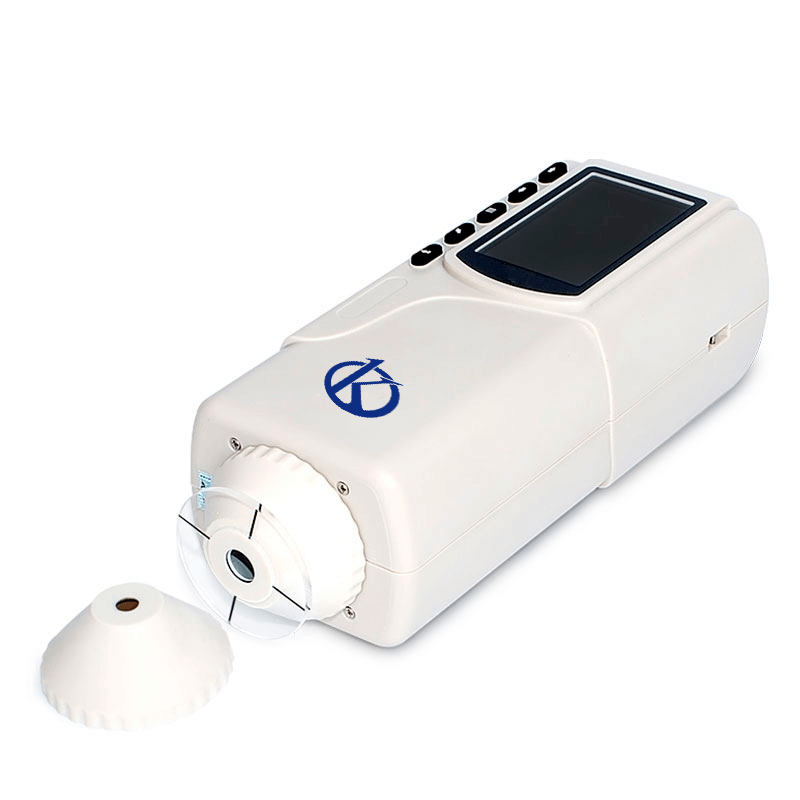
Installation and Commissioning Guide for the YR05510 Precision Colorimeter
The YR05510 Precision Colorimeter is a state-of-the-art device designed for accurate color measurement in various applications such as plastics, textiles, and food industries. This guide provides detailed instructions on the installation and commissioning process, ensuring that operators are equipped to achieve optimal performance from the device.
Unboxing Checklist
Before beginning the installation process, it is essential to ensure that all components are present and in good condition. The following checklist outlines what to expect in the box:
- YR05510 Precision Colorimeter
- Power adapter for charging
- USB cable for data transfer
- User manual
- Calibration standards
- Protective carrying case
Anchoring and Leveling
For accurate measurements, it is crucial to position the YR05510 on a stable, level surface. Follow these steps to ensure proper anchoring and leveling:
- Select a sturdy table or bench that minimizes vibrations.
- Use a spirit level to check the surface; adjust if necessary by using leveling feet or shims.
- Ensure the area is free of direct sunlight and extreme temperatures.
Power-Up Sequence
Once the device is correctly positioned, follow these steps to power it up for the first time:
- Connect the power adapter to the YR05510 and plug it into a wall outlet.
- Press the power button located on the device to turn it on.
- Allow the device to initialize; this may take a few moments.
First-Run Calibration
Calibration is critical for achieving accurate measurements. Perform the following steps for the first-run calibration:
- Ensure that the device has been powered on for at least 30 minutes to stabilize the internal components.
- Access the calibration menu on the display.
- Use the provided calibration standards to calibrate the device according to the user manual.
- Verify calibration results and make adjustments if necessary.
Network and USB Setup
The YR05510 can be connected to a computer for data recording and analysis. Follow these steps to set up the USB connection:
- Connect the USB cable from the YR05510 to your computer.
- Install any necessary drivers or software as described in the user manual.
- Open the software to verify the connection and ensure data transfer capabilities.
Validation of First Measurement
After setup and calibration, it is important to validate the first measurement to confirm the device is functioning correctly:
- Use a known color reference standard to take an initial measurement.
- Compare the reading with the expected value for accuracy.
- If discrepancies arise, recheck the calibration and setup.
Common Setup Mistakes
While setting up the YR05510, operators may encounter common mistakes. Here are some to watch out for:
- Insufficient warm-up time before calibration.
- Incorrect leveling of the device leading to measurement errors.
- Neglecting to use calibration standards that are compatible with the YR05510.
Technical Specifications of YR05510
| Model | YR05510 |
|---|---|
| Measurement Geometry | 45°/0° |
| Measurement Aperture | Φ20mm |
| Special Function | Especially suitable for testing surface stripes and wet products. |
| Detector | Silicon photodiode |
| Color Space | CIEL*a*b*C*h*; CIEL*a*b*; CIEXYZ |
| Color Difference Formula | △E*ab; △L*a*b*; △E*C*h* |
| Light Source | D65 |
| Weight | 500g |
| Dimensions | 205×67×80mm |
| Power Supply | Rechargeable lithium-ion battery 3.7 V 3200 mAh. |
Frequently Asked Questions
What should I do if the YR05510 does not power on?
If the YR05510 does not power on, check the following:
- Ensure the power adapter is securely connected to both the device and the power outlet.
- Check if the rechargeable battery needs charging.
- Look for any signs of damage to the power adapter or the device.
How can I troubleshoot error code E-03 on the YR05510?
Error code E-03 may indicate measurement instability. To troubleshoot, try the following:
- Ensure the device is properly leveled and stable during measurements.
- Verify that the measurement environment is free from vibrations or disturbances.
- Recalibrate the device using known standards.
What are the recommended accessories for the YR05510?
Recommended accessories for the YR05510 include:
- Calibration standards
- Protective carrying case
- USB cables for data transfer
- Optional thermal printer for hard copy results
What is the expected lifespan of the YR05510's light source?
The expected lifespan of the YR05510's light source is approximately 5 years, or over 1.6 million measurements. Regular checks and usage will help determine the optimal replacement time.
How do I maintain the YR05510 for accurate measurements?
To maintain the YR05510, perform the following:
- Regularly calibrate using known standards.
- Keep the device clean and free of dust.
- Store in a protective case when not in use.
What types of samples are suitable for measurement with the YR05510?
The YR05510 is suitable for measuring various samples including plastics, textiles, food products, and paints. It is specially designed to handle both flat and curved surfaces.
If you are looking for a fusion of innovation and quality, you have come to the right place. At Kalstein, we offer you the luxury of exploring our exclusive catalog of laboratory equipment. We manufacture every device to the highest standards of excellence. Our intuitive and seamless online purchasing channels are designed for your convenience, securing the most competitive prices. Hesitate no longer — we bring science to life, it is time to become part of our community.