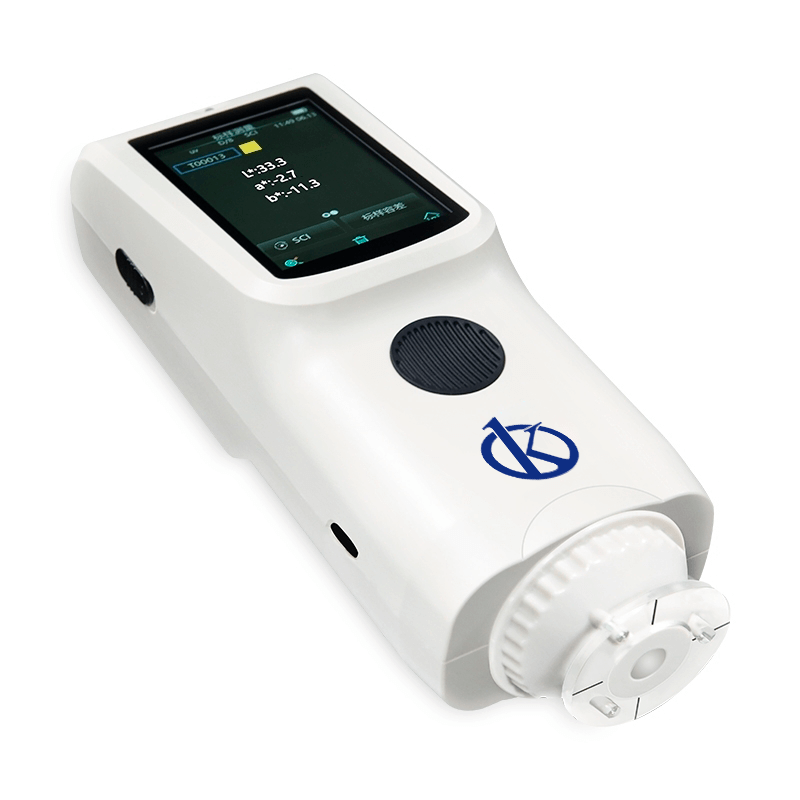
Installation and Commissioning Guide for the YR05518 Spectrocolorimeter
The YR05518 spectrocolorimeter is a precision instrument designed for accurate color measurement in various applications, including industries such as plastics, textiles, and coatings. Proper installation and commissioning are crucial for ensuring the device operates at its peak performance. This guide covers everything from unboxing to first-run calibration, enabling users to set up their YR05518 efficiently and effectively.
Unboxing Checklist
Before starting the installation process, ensure that all components are present. The unboxing checklist includes:
- YR05518 Spectrocolorimeter Unit
- Power Adapter
- USB Cable
- User Manual
- White and Black Calibration Cavity
- Protective Cover
- Wrist Strap
- 8 mm Flat Aperture
Location and Setup Requirements
Choosing the right location for the YR05518 is essential to achieve accurate measurements. Follow these guidelines:
- Temperature range: 0~40°C
- Humidity: 0~85% RH (non-condensing)
- Altitude: < 2000m
- Surface: Stable and flat to prevent vibrations
Make sure the device is not exposed to direct sunlight, harsh chemicals, or excessive dust, as these factors could affect its performance.
Power-Up Sequence
The process of powering up the YR05518 is straightforward. Follow these steps:
- Connect the power adapter to the device.
- Plug the power adapter into a wall outlet.
- Press the power button located on the unit.
- Wait for the display to turn on, indicating that the device is ready for use.
First-Run Calibration
Calibration is vital for ensuring accuracy in color measurement. Follow these steps for first-run calibration:
- Perform a white calibration by placing the white calibration cavity on the measurement port.
- Access the calibration menu on the device display.
- Select the option for white calibration and follow the prompts.
- Once completed, repeat the process using the black calibration cavity.
A successful calibration will ensure that the measurements taken are reliable and precise.
Initial Measurement Validation
To validate the initial measurements, conduct a test measurement:
- Place a standard color sample under the measurement port.
- Select the measurement mode on the device.
- Press the measure button to obtain a reading.
- Compare the displayed result with the expected value for the standard sample.
If the readings are consistent with known values, the YR05518 is ready for operational use.
Common Setup Mistakes
To avoid common pitfalls, be aware of the following errors:
- Improper calibration may lead to inaccurate results.
- Not adhering to environmental conditions can affect performance.
- Neglecting to secure the area around the device may cause disturbances during measurements.
Technical Specifications of YR05518
| Specification | Details |
|---|---|
| Model | YR05518 |
| Geometry | D/8 (diffuse illumination, 8-degree viewing angle) |
| Light Source | Full spectrum LED light source |
| Measurement Method | Single measurement, average measurement (2-99 times) |
| Measurement Aperture | Φ8mm |
| Battery Life | 6000 measurements in 8 hours |
| Dimensions | 81x71x214 mm |
| Weight | Approximately 460g |
| Storage Capacity | Standard 500 samples, 10000 samples maximum |
Frequently Asked Questions
What should I do if the YR05518 does not power on?
If the YR05518 does not power on, first check if the power adapter is correctly connected to the device and the power outlet. Ensure that the outlet is functional by testing it with another device. If the problem persists, consider checking the power cable for damage or contacting technical support.
How do I calibrate the YR05518 after the initial setup?
To recalibrate the YR05518, access the calibration menu on the device, place the white and black calibration cavities in sequence, and follow the prompts on the display. Ensure that the device is in a stable environment during this process for accurate calibration.
Can I use the YR05518 in high humidity environments?
While the YR05518 can operate in environments up to 85% Relative Humidity, it is essential that the humidity is non-condensing. Prolonged exposure to high humidity conditions may affect the internal components and measurements.
What are the recommended maintenance practices for the YR05518?
Regular maintenance for the YR05518 includes keeping the device clean, recalibrating periodically, and checking the condition of the power adapter and cables. Additionally, storing the spectrocolorimeter in a protective case when not in use will help prolong its lifespan.
How can I interpret the measurement results from the YR05518?
The YR05518 displays results in various color measurement units such as L*, a*, and b*. It is essential to understand these units to interpret the data correctly. Familiarize yourself with standard values for the materials you are measuring to gauge if the results are within acceptable limits.
What accessories are available for the YR05518?
The YR05518 has optional accessories including a micro USB printer and a dust test box. These can enhance the device's functionality and user experience. Check the product documentation for specific compatibility and integration instructions.
If you are looking for a fusion of innovation and quality, you have come to the right place. At Kalstein, we offer you the luxury of exploring our exclusive catalog of laboratory equipment. We manufacture every device to the highest standards of excellence. Our intuitive and seamless online purchasing channels are designed for your convenience, securing the most competitive prices. Hesitate no longer — we bring science to life, it is time to become part of our community.