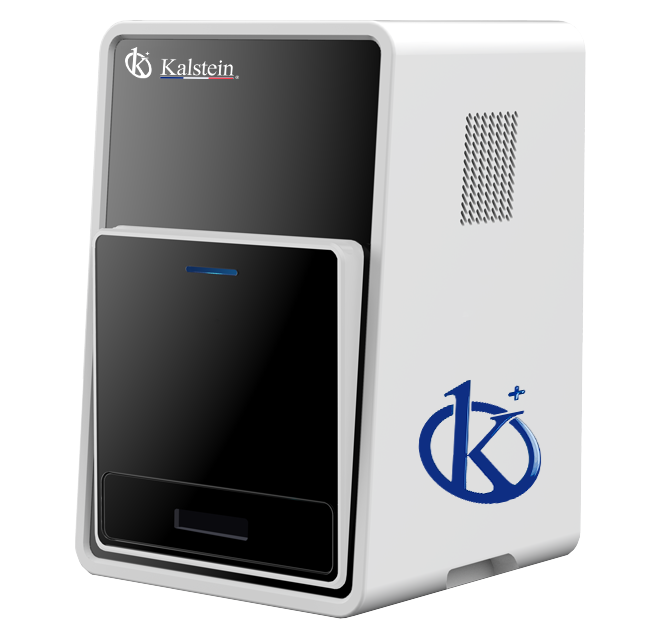
Installation and Commissioning Guide for the YR06066 Chemiluminescence Imager
The YR06066 Chemiluminescence Imager is a cutting-edge instrument designed for high-resolution imaging in various laboratory applications, notably in Western blotting with enhanced chemiluminescence (ECL). This guide aims to provide detailed instructions for the installation and commissioning process, ensuring that operators can utilize the device to its full potential.
Unboxing and Initial Setup Checklist
Before commencing the installation of the YR06066, it’s essential to perform an unboxing checklist. Ensure that all components are included and undamaged:
- YR06066 Chemiluminescence Imager
- Power adapter and cable
- USB connection cable
- Software installation CD
- User manual
- Warranty registration card
Physical Setup and Location Requirements
Choosing the correct location for the YR06066 is crucial for optimal performance. Please consider the following site requirements:
- Temperature Range: The device should be operated at ambient temperatures ranging between 18°C to 25°C.
- Humidity: Relative humidity should be maintained below 70% to prevent condensation damage.
- Ventilation: Ensure adequate ventilation to keep the cooling system functioning efficiently.
- Space: Allow for at least 20 cm of clearance around the device for airflow.
Power-Up Sequence and First Calibration
To power up the YR06066 and perform initial calibration, follow these steps:
- Connect the power adapter and cable to the device, then to a power outlet.
- Press the power button located at the front panel.
- Wait for the device to initialize; the status indicator will turn green when ready.
- Run the calibration procedure as detailed in the user manual, ensuring to follow the prompts on-screen.
Software Installation
The YR06066 comes with user-friendly software designed for image acquisition and analysis. To install the software, follow these steps:
- Insert the software installation CD into your computer's drive.
- Follow the on-screen instructions to install the software.
- Connect the YR06066 to your computer via the USB cable provided.
- Launch the software and ensure the device is recognized.
Common Setup Mistakes and Solutions
During the installation and commissioning phase, several common mistakes can occur. Here are some potential issues and their solutions:
| Mistake | Potential Cause | Solution |
|---|---|---|
| Device does not power on | Improper power connection | Check power cable and outlet connection. |
| Software does not recognize the imager | Missing driver installation | Reinstall software and check for updates. |
| Calibration fails | Incorrect initialization process | Repeat the calibration steps carefully as per manual. |
Technical Specifications of the YR06066
| Attribute | Specification |
|---|---|
| Model | YR06066 |
| Camera | Cooling CCD camera |
| Physical Resolution | 6 Megapixels, 2750 x 2200 |
| Pixel Density and A/D | 16 bits |
| Gray Scales | 65536 |
| Dynamic Range | ≥4.6OD |
| Cooling Temperature | -60°C ambient, -30°C regulated |
| Scientific Lens | Ultra-sensitive F0.8 objective |
| Image Acquisition Software | No dongle required, unlimited users, free updates |
| Image Analysis Software | No dongle required, unlimited users, free updates |
Frequently Asked Questions
What are the key features of the YR06066 Chemiluminescence Imager?
The YR06066 features a compact design, ease of use, a focus on chemiluminescence imaging for Western blots with ECL, a cooled digital camera with a sensitive CCD chip, and unlimited software access with free downloads and updates.
How should I maintain the YR06066 for optimal performance?
Regular maintenance involves keeping the equipment clean, ensuring proper ventilation, and periodically checking the cooling system. Following the manufacturer’s maintenance guidelines will prolong the lifespan of the device.
What common troubleshooting steps can I take if the YR06066 is not functioning properly?
First, check for any error codes displayed and refer to the troubleshooting section in the user manual. Common issues may include power connection problems or software installation errors, which can usually be resolved by following the provided solutions.
Can the YR06066 be used for applications outside of Western blotting?
Yes, while the YR06066 is optimized for Western blot applications, its advanced imaging capabilities make it suitable for other chemiluminescent assays, providing versatility in laboratory settings.
How do I ensure the accuracy of results obtained from the YR06066?
To ensure accuracy, it is essential to perform regular calibrations, use high-quality reagents, and adhere to standardized protocols for sample preparation and imaging techniques. Documenting results and comparing them with control samples can also help maintain data integrity.
What is the warranty period for the YR06066 and what does it cover?
The YR06066 comes with a standard one-year warranty covering manufacturing defects and parts. Additional warranty options may be available; please consult the user manual for details.
How can I request a quote for the YR06066?
You can request a quote for the YR06066 directly through our dedicated sales teams or online platforms, ensuring you receive competitive pricing and support tailored to your needs.
If you are looking for a fusion of innovation and quality, you have come to the right place. At Kalstein, we offer you the luxury of exploring our exclusive catalog of laboratory equipment. We manufacture every device to the highest standards of excellence. Our intuitive and seamless online purchasing channels are designed for your convenience, securing the most competitive prices. Hesitate no longer — we bring science to life, it is time to become part of our community.