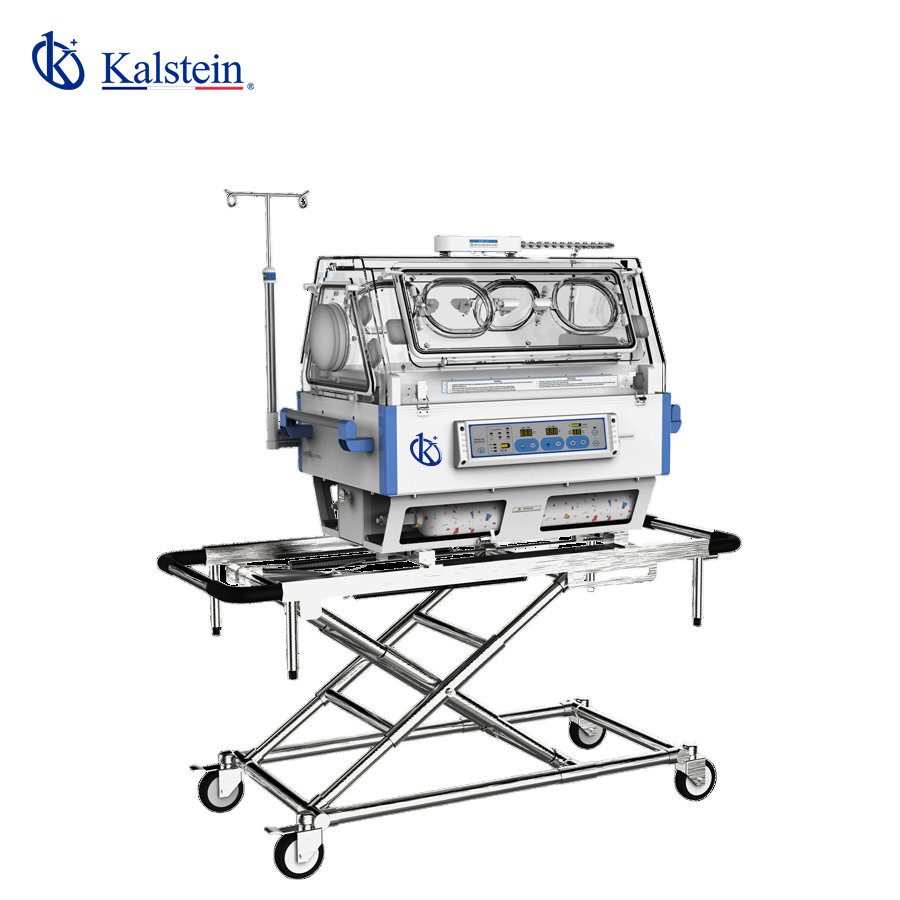
Installation and Commissioning Guide for the YR06215 Infant Incubator
The YR06215 Infant Incubator is an essential medical device designed to provide a controlled environment for the care of premature or ill newborns. This guide aims to provide an in-depth look at the installation and commissioning process of the YR06215, ensuring that operators can set up and utilize the incubator effectively.
Unboxing Checklist
When unboxing the YR06215, it is crucial to ensure that all components are present and undamaged. Below is a checklist of items to look for:
- YR06215 Incubator Unit
- Oxygen supply bottles (2 units)
- Oxygen flow meter
- Power cable
- User manual
- Warranty card
Installation Steps
Proper installation of the YR06215 is essential for optimal performance. Follow these steps carefully:
- Determine Location: Choose a location that meets the environmental conditions detailed in the specifications.
- Level the Incubator: Ensure the incubator is level to maintain accurate temperature control.
- Connect to Power Supply: Plug the incubator into a proper power source, ensuring it meets the voltage requirements (AC110/220V 60/50Hz).
- Install Oxygen Supply: Connect the oxygen supply bottles to the flow meter and ensure they are secured.
Power-Up Sequence
Once installed, the power-up sequence is the next step:
- Switch on the incubator using the main power button.
- Set the desired air temperature and skin temperature using the front panel controls.
- Allow the incubator to warm up, which should take no more than 40 minutes.
First-Run Calibration
Calibration is vital for ensuring the YR06215 operates correctly:
- Check the internal noise level to ensure it is within the acceptable limit (<60dB(A)).
- Verify the temperature readings using an external calibrated thermometer.
- Adjust settings if temperature deviation exceeds ±3°C for air temperature and ±1°C for skin temperature.
Troubleshooting Common Setup Mistakes
Even with careful installation, issues may arise. Here are some common mistakes and how to troubleshoot them:
| Symptom | Probable Causes | Recommended Fixes |
|---|---|---|
| Equipment does not power on | Power supply issues or damaged cable | Check connections and replace the power cable if necessary |
| Inconsistent temperature readings | Calibration errors or sensor malfunction | Recalibrate the incubator and check sensor connections |
| High internal noise level | Fan malfunction or obstruction | Inspect the fan for debris and ensure it is functioning correctly |
Technical Specifications of YR06215
| Specification | Details |
|---|---|
| Model | YR06215 |
| Power Supply | AC110/220V 60/50Hz |
| Power Input | 450VA |
| Environment Temperature | 10°C~30°C |
| Environment Relative Humidity | 30%~75% |
| Air Temperature Control Range | 25°C-37°C, 37.1°C~38°C |
| Skin Temperature Control Range | 32°C~37°C, 37.1°C-38°C |
| Warm-Up Time | ≤40min |
| Battery Use Time | 2 hours |
Frequently Asked Questions
What are the key features of the YR06215 infant incubator?
The YR06215 features a long-life silent fan, adjustable temperature deviation settings, dual side-access windows, and a dual wall canopy with white LED lighting. It also includes two oxygen supply bottles and a flow meter.
How can I ensure the incubator maintains optimal temperature?
To maintain optimal temperature, regularly calibrate the incubator, ensure it is leveled, and monitor the surrounding environmental conditions to avoid fluctuations outside the specified range.
What should I do if the incubator alarms for temperature deviation?
If the incubator alarms for temperature deviation, first check the settings and ensure they are correct. Then inspect the temperature sensors for any malfunction and recalibrate if necessary.
How often should the YR06215 be serviced?
The YR06215 should be serviced according to the manufacturer's recommendations, typically involving annual maintenance checks to ensure all components are functioning correctly and safely.
What type of oxygen supply is compatible with the YR06215?
The YR06215 is compatible with standard medical oxygen tanks and includes two oxygen supply bottles and a flow meter for precise control.
Is there a warranty for the YR06215 incubator?
Yes, the YR06215 comes with a standard warranty, which details coverage for parts and labor for any manufacturing defects. Be sure to register your product to activate the warranty.
If you are looking for a fusion of innovation and quality, you have come to the right place. At Kalstein, we offer you the luxury of exploring our exclusive catalog of laboratory equipment. We manufacture every device to the highest standards of excellence. Our intuitive and seamless online purchasing channels are designed for your convenience, securing the most competitive prices. Hesitate no longer — we bring science to life, it is time to become part of our community.