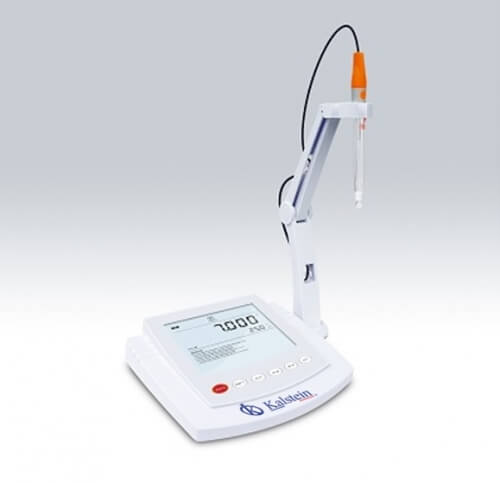
Installation and Setup Guide for the YR01823-2 Desktop pH Meter
The YR01823-2 Desktop pH Meter is a precision instrument designed for accurate pH measurements across various settings. This guide will walk you through the installation and initial setup procedures to ensure optimal performance. Understanding how to properly set up your device is crucial for achieving accurate and reliable measurements.
Unboxing and Initial Inspection
When you receive your YR01823-2, begin by unboxing the device carefully. Check for the following items in the package:
- YR01823-2 Desktop pH Meter
- pH Electrode E201-BNC
- Temperature Probe TP-10K
- Power Adapter DC5V
- USB Cable
- Buffer Solutions (pH 4.01, 7.00, 10.01)
- User Manual
Ensure that there are no visible damages to the components. If any items are missing or damaged, contact the supplier immediately.
Site Requirements and Preparation
Before setting up the YR01823-2, it's essential to prepare the site according to the specifications. Here are the requirements:
- Temperature Range: 0 to 50 °C (32 to 122 °F)
- Humidity: 20% to 80%
- Voltage: DC 5V adapter with 220V/50Hz power supply
- Ventilation: Ensure proper air circulation to avoid overheating.
Additionally, maintain a tidy workspace to prevent any interference with measurements.
Device Setup and Anchoring
Position the YR01823-2 on a stable, flat surface where it is easily accessible for use. Level the device using a spirit level to ensure accurate readings. Secure the meter using the provided screws if necessary, depending on your workspace layout.
Power-Up Sequence
To power up the YR01823-2, follow these steps:
- Connect the power adapter to the device.
- Plug the adapter into a power outlet.
- Press the power button on the device.
Once powered on, the device will perform a self-diagnostic test to verify the functionality of its components.
Initial Calibration Procedure
Calibration is critical for precise measurements. The YR01823-2 allows for 1 to 5-point calibration using recognized buffer solutions. Here’s how to calibrate:
- Immerse the pH electrode in the first buffer solution (pH 7.00).
- Access the calibration menu and select the corresponding buffer.
- Wait for the reading to stabilize, then confirm the calibration.
- Repeat this process with the remaining buffer solutions (pH 4.01 and pH 10.01).
After calibration, the device will automatically recognize the buffer for future measurements.
Validation of First Measurement
After the calibration is complete, validate your first measurement:
- Rinse the electrode with distilled water.
- Immerse the electrode in the sample solution.
- Allow a moment for the reading to stabilize on the display.
Compare the reading to known values to ensure accuracy. If discrepancies are noted, repeat the calibration procedure.
Troubleshooting Common Setup Issues
During setup, you may encounter some issues. Here are common symptoms and solutions:
| Symptom | Probable Cause | Solution |
|---|---|---|
| Device does not power on | Power adapter not connected | Check connections and try another outlet |
| Inconsistent readings | Electrode not calibrated | Calibrate the electrode again |
| Calibration error | Incorrect buffer solution | Ensure correct buffer solution is used |
Technical Specifications for YR01823-2
| Model | YR01823-2 |
|---|---|
| pH Range | -2.000 to 20.000 pH |
| Resolution | 0.001, 0.01, 0.1 pH selectable |
| Accuracy | ± 0.002 pH |
| Calibration Points | 1 to 5 points |
| Temperature Compensation | 0 to 100 °C, manual or automatic |
| Memory | Stores up to 500 data sets |
| Weight | 1.5 kg |
| Dimension | 210 × 188 × 60 mm |
Frequently Asked Questions
What buffer solutions can be used for calibrating the YR01823-2?
The YR01823-2 supports calibration with standard buffer solutions, including pH 4.01, 7.00, and 10.01. These buffers are essential to ensure accuracy across a wide pH range.
How do I maintain the electrode of the YR01823-2?
Regular maintenance of the pH electrode includes rinsing it with distilled water after each use and storing it properly in a storage solution when not in use. Periodic cleaning with a gentle cleaning solution may also be necessary.
What should I do if I receive an error code on the YR01823-2?
Error codes indicate specific issues. Refer to the user manual for the respective error code interpretation and follow troubleshooting steps outlined to resolve the issue.
How often should I calibrate the YR01823-2?
Calibration frequency depends on usage; however, it is recommended to calibrate the YR01823-2 at least once a day or before each measurement session for precise results.
Can the YR01823-2 be used in different environmental conditions?
Yes, the YR01823-2 can operate in various environmental conditions, but it is essential to keep within the specified temperature and humidity ranges for optimal performance.
What is the warranty period for the YR01823-2?
The YR01823-2 typically comes with a one-year warranty covering manufacturing defects. Please refer to the warranty document for detailed terms and conditions.
For any inquiries or to request a quote, feel free to reach out through our contact channels. We are here to assist you.
If you are looking for a fusion of innovation and quality, you have come to the right place. At Kalstein, we offer you the luxury of exploring our exclusive catalog of laboratory equipment. We manufacture every device to the highest standards of excellence. Our intuitive and seamless online purchasing channels are designed for your convenience, securing the most competitive prices. Hesitate no longer — we bring science to life, it is time to become part of our community.