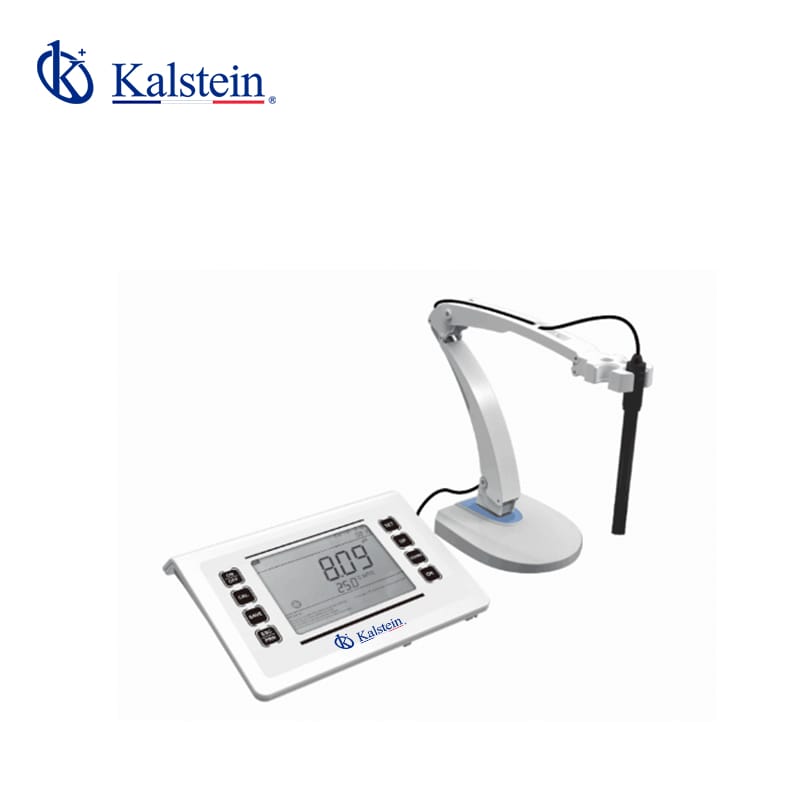
Installation and Startup Guide for the YR01821 Desktop pH Meter
The YR01821 Desktop pH Meter is a powerful tool designed for accurate pH measurements in various applications. This guide aims to assist users in the correct installation and startup process, ensuring optimal performance from the device.
Unboxing Checklist
Upon receiving the YR01821, ensure that the following items are included in the packaging:
- YR01821 pH Meter Unit
- Power Adapter (DC 12V/1A)
- User Manual
- Calibration Solutions (if provided)
- Data Transfer USB Cable
Installation Steps
To properly install the YR01821, follow these steps:
1. Location and Leveling
Select a stable surface for placing the pH meter. Ensure that the surface is level to avoid inaccurate readings. The ideal ambient temperature for operation is between 5 to 40 °C, with humidity levels below 85%.
2. Connecting the Power Supply
Connect the power adapter to the YR01821 and plug it into a standard electrical outlet. Ensure that the power source matches the specified voltage and current (DC 12V/1A).
3. Power-Up Sequence
Once connected, press the power button to turn on the device. The LED display will light up, indicating that the unit is powered.
4. Initial Calibration
For accurate readings, perform an initial calibration using the calibration solutions provided. The YR01821 supports automatic calibration for 1, 2, or 3 points. Follow the instructions in the user manual for the calibration process.
5. Data Transfer Setup
To utilize the data storage features, connect the USB cable to the YR01821 and your computer. Ensure the software for data transfer is properly installed on your computer if required.
6. Validation of First Measurement
After calibration, test the meter with a known pH solution to validate the accuracy of the readings. This step ensures that the device is functioning correctly.
Common Setup Mistakes
Avoid these common mistakes to ensure a smooth startup:
- Neglecting to level the instrument, which can lead to inaccurate readings.
- Using the wrong calibration solution, which can result in faulty calibration.
- Not connecting the power supply securely, causing intermittent power issues.
Technical Specifications of YR01821
| Specification | Details |
|---|---|
| Model | YR01821 |
| Measuring Range | (-2.00~20.00) pH |
| Resolution | 0.1/0.01 pH |
| Accuracy | 0.01/0.001 pH |
| Auto Calibration | 1, 2, 3 points |
| Buffer | Europe & USA, NIST, China standards |
| Data Storage | 1000 sets |
| Display | 6.5-inch LCD screen |
Frequently Asked Questions
How do I perform the initial calibration for the YR01821?
To perform the initial calibration, use the provided calibration solutions. Follow the steps in the user manual for 1, 2, or 3 points calibration based on your requirements.
What should I do if the YR01821 does not power on?
If the device does not power on, check the power connection to ensure it is secure and try plugging it into a different outlet. If the issue persists, consult the troubleshooting section in the user manual.
Why are my readings inconsistent on the YR01821?
Inconsistent readings can be caused by several factors, including electrode wear, improper calibration, or environmental conditions. Ensure the electrode is clean and properly calibrated, and verify that the ambient conditions meet the operational specifications.
Can I connect the YR01821 to my computer for data transfer?
Yes, you can connect the YR01821 to your computer using the USB cable. Ensure you have the necessary software installed for data management.
What maintenance is required for the YR01821?
Regular maintenance includes cleaning the electrode, verifying calibration, and storing the device properly when not in use. Consult the user manual for detailed maintenance procedures.
What kind of battery does the YR01821 use?
The YR01821 operates on an external power supply (DC 12V/1A) and does not use a battery for operation.
How can I request a quote for the YR01821?
You can request a quote for the YR01821 by contacting our sales department or visiting the appropriate section on our website.
If you are looking for a fusion of innovation and quality, you have come to the right place. At Kalstein, we offer you the luxury of exploring our exclusive catalog of laboratory equipment. We manufacture every device to the highest standards of excellence. Our intuitive and seamless online purchasing channels are designed for your convenience, securing the most competitive prices. Hesitate no longer — we bring science to life, it is time to become part of our community.