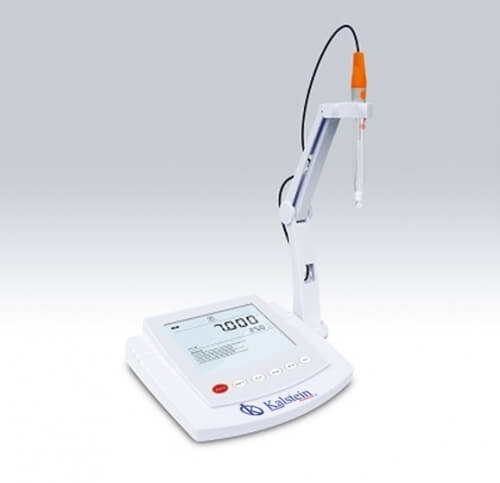
Installation and Startup Guide for the YR01823-2 Desktop pH Meter
The YR01823-2 Desktop pH Meter is a precision instrument designed for accurate pH measurements in various laboratory settings. This guide outlines the necessary steps for installation and initial setup, ensuring optimal performance from your device.
Unboxing and Initial Setup
Upon receiving your YR01823-2, carefully unbox the equipment and verify that all components are present. This includes the pH meter, electrodes, calibration solutions, USB cable, power adapter, and user manual. Here’s a quick checklist:
- pH Meter (YR01823-2)
- pH Electrode E201-BNC
- Temperature Probe TP-10K
- Calibration Solutions (pH 4.01, 7.00, 10.01)
- USB Cable
- DC5V Power Adapter
- User Manual
Locating the Meter
Place the YR01823-2 on a stable, flat surface in a controlled environment. Ensure that the area is free from vibrations and electromagnetic interference, which can affect measurement accuracy. Maintaining a consistent temperature between 0 to 105 °C (32 to 221 °F) is crucial for optimal functionality.
Powering Up the YR01823-2
Connect the power adapter to the YR01823-2 and plug it into a suitable electrical outlet. Make sure the voltage corresponds to the meter's requirements (DC5V). Upon powering up, the LCD display will illuminate, indicating readiness for calibration and measurement.
Calibrating the pH Meter
The YR01823-2 features a 1 to 5-point calibration system with automatic buffer recognition (USA, NIST, and DIN). To ensure accuracy, it is essential to calibrate the meter before its first use and periodically thereafter. Follow these steps for calibration:
- Prepare the calibration solutions.
- Navigate to the calibration menu on the display.
- Select the number of calibration points (1-5).
- Submerge the electrode in the first buffer solution (pH 7.00) and allow the reading to stabilize.
- Press the calibration button to save the value.
- Repeat the process with the remaining buffer solutions.
First Measurement Validation
After calibration, perform a test measurement using a sample solution. Insert the electrode into the sample and wait for the display to stabilize. Verify the reading against expected values to ensure the meter is functioning correctly. Any unexpected readings may require recalibration or further troubleshooting.
Common Setup Mistakes to Avoid
- Failing to calibrate before the first use can lead to inaccurate readings.
- Not allowing the electrode to stabilize in the solution may result in fluctuating values.
- Using contaminated calibration solutions can compromise accuracy.
Technical Specifications of the YR01823-2
| Model | YR01823-2 |
|---|---|
| pH Range | -2.000 to 20.000 pH |
| Resolution | 0.001, 0.01, 0.1 pH, selectable |
| Accuracy | ± 0.002 pH |
| Calibration Points | 1 to 5 points |
| Buffer Options | USA, NIST, DIN, 2 custom buffers |
| ORP Range | ± 1999.9 mV |
| Temperature Range | 0 to 105 °C / 32 to 221 °F |
| Power Supply | DC5V |
| Dimensions | 210 mm × 188 mm × 60 mm |
| Weight | 1.5 kg |
Frequently Asked Questions
What should I do if the YR01823-2 does not power on?
If the meter does not power on, check the power connection and ensure the adapter is functioning. Confirm that the outlet is operational by testing it with another device. Replace the power adapter if necessary.
How often should I calibrate the YR01823-2?
Calibration should be performed before the first measurement of the day and at regular intervals throughout usage, especially if the device is moved between locations or if temperature conditions change significantly.
What is the significance of the automatic temperature compensation feature?
The automatic temperature compensation feature adjusts measurements based on the temperature of the sample, ensuring accuracy across varying temperatures. This is essential for maintaining precise pH readings.
How do I store the pH electrode?
To maintain the pH electrode's performance, store it in a suitable storage solution or a damp environment when not in use. Avoid letting the electrode dry out, as this can damage the sensing element.
What indicators show that the YR01823-2 needs maintenance?
Signs that the meter may require maintenance include inconsistent readings, slow response times, or a persistent calibration error message. Regularly check electrode condition and perform maintenance as specified in the user manual.
Can the YR01823-2 measure ORP values?
Yes, the YR01823-2 can measure Oxidation-Reduction Potential (ORP) values with a dedicated calibration for accurate readings. Ensure to follow calibration steps specific to ORP measurements for best results.
Closing Remarks
If you are looking for a fusion of innovation and quality, you have come to the right place. At Kalstein, we offer you the luxury of exploring our exclusive catalog of laboratory equipment. We manufacture every device to the highest standards of excellence. Our intuitive and seamless online purchasing channels are designed for your convenience, securing the most competitive prices. Hesitate no longer — we bring science to life, it is time to become part of our community.