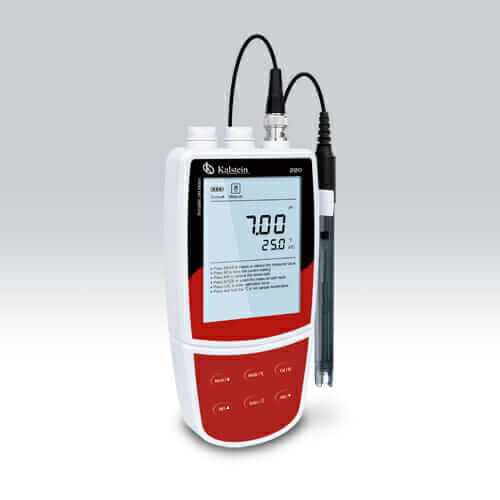
Comprehensive Installation and Startup Guide for the YR0220A pH Meter
The YR0220A pH meter is a sophisticated instrument designed for accurate pH measurements in various settings, including laboratories, educational institutions, and industrial applications. This guide serves to assist users in the installation and initial setup of the YR0220A, ensuring that they achieve optimal performance from the device.
Unboxing and Initial Setup
Upon receiving the YR0220A pH meter, it is essential to perform a thorough unboxing to ensure all components are present and undamaged. Here is an unboxing checklist:
- YR0220A pH meter unit
- Calibration buffers (4.01, 7.00, 10.01 pH solutions)
- Power adapter or battery pack
- User manual
- USB communication cable
Once the components are verified, the next step is to prepare for installation:
- Choose a stable and dry surface to place the meter.
- Ensure adequate space around the meter for easy access to controls and connections.
Power-Up Sequence
To power up the YR0220A and prepare it for operation, follow these steps:
- Connect the power adapter to the meter and a power outlet, or install the required batteries.
- Press the power button to turn on the device.
- Allow the meter to boot up; the display should show the initial calibration information.
Calibration Process
The calibration process is crucial for accurate pH measurements. The YR0220A allows for a 1 to 5 point calibration using automatic recognition for USA, NIST, and DIN buffers. To calibrate the meter:
- Prepare calibration buffers and immerse the electrode in the first buffer solution.
- Select the calibration mode on the device.
- Follow the on-screen prompts to complete the calibration for each buffer.
- Verify the calibration by measuring the buffer solutions again.
Common Setup Mistakes
During the installation and startup of the YR0220A pH meter, users may encounter some common mistakes. To prevent these issues, consider the following:
- Ensure that the electrode is correctly installed and securely connected.
- Use fresh calibration buffers to avoid inaccurate readings.
- Check that the meter is set to the correct temperature compensation settings for precise measurements.
Technical Specifications of the YR0220A
| Specification | Details |
|---|---|
| Model | YR0220A (current) |
| pH Range | -2.00 to 20.00 pH |
| Resolution | 0.01 pH |
| Accuracy | ±0.01 pH |
| Calibration Points | 1 to 5 points |
| Buffer Options | USA (4.01/7.00/10.01), NIST (4.01/6.86/9.18) |
| ORP Range | ±1999 mV |
| Temperature Compensation | 0~100°C, manual or automatic |
| Memory | Stores up to 500 data sets |
| Power Requirements | 3 AA batteries or DC 5V adapter |
Frequently Asked Questions
What is the best way to calibrate the YR0220A pH Meter?
The best way to calibrate the YR0220A pH Meter is to use fresh calibration buffers, ensuring that you follow the calibration sequence as guided on the display. Immerse the electrode fully in each buffer solution for accurate readings.
How can I troubleshoot common issues with the YR0220A?
Common issues include inconsistent readings and power failures. To troubleshoot, ensure that the electrode is clean, check battery levels, and verify that the calibration is accurate. Additionally, refer to the user manual for specific error codes.
Can the YR0220A store measurements, and how do I access them?
Yes, the YR0220A can store up to 500 measurement data sets. To access stored data, navigate to the memory function on the menu and select the desired entries for review.
What are the environmental conditions suitable for the YR0220A?
The YR0220A operates optimally within a temperature range of 0 to 105°C and a humidity level of 0 to 100%. Ensure that the device is not exposed to direct sunlight or extreme vibrations during operation.
What maintenance is required for the YR0220A pH Meter?
Regular maintenance includes cleaning the electrode with distilled water, recalibrating the meter frequently, and storing the electrode in a proper storage solution when not in use to prolong its lifespan.
How do I connect the YR0220A to a computer?
To connect the YR0220A to a computer, use the USB communication cable included in the package. Ensure that the relevant software on the computer is installed to facilitate data transfer.
Conclusion
If you are looking for a fusion of innovation and quality, you have come to the right place. At Kalstein, we offer you the luxury of exploring our exclusive catalog of laboratory equipment. We manufacture every device to the highest standards of excellence. Our intuitive and seamless online purchasing channels are designed for your convenience, securing the most competitive prices. Hesitate no longer — we bring science to life, it is time to become part of our community.