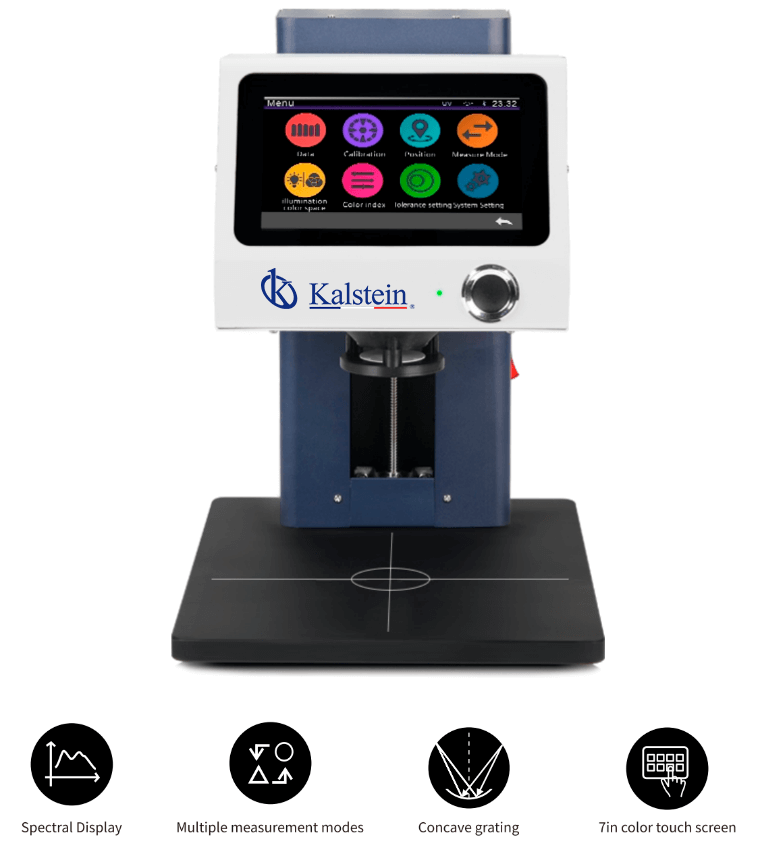
Installation and Start-Up Guide for the YR05481 Contactless Desktop Spectrophotometer
The YR05481 Contactless Desktop Spectrophotometer is a cutting-edge solution for color measurement designed to provide precision in chromatic analysis without direct contact. This guide details the installation and start-up processes, ensuring optimal performance right from the first measurement.
Understanding the YR05481 Spectrophotometer
The YR05481 utilizes D/8 optical geometry, making it suitable for various industry applications including cosmetics, food, and ceramics. It boasts a full-spectrum LED light source and a high-precision CMOS image sensor, delivering stable and high-fidelity results. Understanding its features and capabilities is essential for successful operation.
Technical Data of YR05481
| Model | YR05481 |
|---|---|
| Optical Geometry | D/8 (diffuse illumination, 8° reception) |
| Light Source | Full Spectrum LED Light Source |
| Measuring Range | 0-200% |
| Wavelength Range | 400-700 nm |
| Measurement Distance | 3.0 mm (+0.2 mm) |
| Sample Height | 0-160 mm |
| Data Storage Capacity | Up to 48,000 measurements |
| Display | 7-inch capacitive LCD touchscreen |
| Power Supply | AC 24V, 3A |
Unboxing Checklist
Unboxing the YR05481 should be done carefully to ensure that all components are accounted for. Here’s a checklist to guide you:
- YR05481 Spectrophotometer unit
- Power adapter
- Data cable
- Calibration standard plate
- Black calibration box
- User manual
Installation Steps
Follow these steps for optimal installation of the YR05481:
- Location: Ensure the spectrophotometer is placed on a stable, level surface free from vibrations and direct sunlight.
- Power Connection: Connect the power adapter to the spectrophotometer and plug it into a suitable power outlet.
- Data Connection: If applicable, connect the data cable to the relevant device or computer.
- Calibration Setup: Prepare the calibration standard and ensure it is clean before placing it on the measuring platform.
First Run Calibration
Before using the YR05481 for measurements, a calibration routine must be performed:
- Turn on the unit and allow it to warm up according to the manufacturer's instructions.
- Access the calibration settings on the touchscreen interface.
- Follow the on-screen prompts to perform the calibration routine using the calibration standard.
Common Setup Mistakes to Avoid
To ensure a successful start-up, avoid these common errors:
- Not leveling the instrument properly can lead to inaccurate readings.
- Neglecting to clean the sample holder can impact results.
- Failing to perform the calibration sequence could lead to measurement errors.
Sector Adaptations for YR05481
The YR05481 is versatile and can be configured for various sectors including:
- Cosmetics: Used for color consistency in products.
- Food Industry: Measures color consistency in packaged foods.
- Ceramics: Ensures that glazes meet color standards.
Frequently Asked Questions
What is the optimal environment for operating the YR05481?
The YR05481 should be operated in an environment with controlled temperature (0~40°C) and humidity (0-85% RH, non-condensing) to ensure accurate measurements.
How do I interpret the measurement results from the YR05481?
The results are displayed in various color spaces, including CIE LAB and XYZ, allowing for detailed color analysis. Familiarize yourself with these metrics to understand the results fully.
What kind of maintenance does the YR05481 require?
Regular calibration and cleaning of the measurement area are necessary to maintain accuracy. Additionally, check for any software updates periodically.
Can the YR05481 be integrated into automated production lines?
Yes, the YR05481 is designed to integrate seamlessly into automated production processes due to its contactless measurement capability.
What is the expected lifespan of the light source in the YR05481?
The light source typically lasts around 5 years or over 3 million measurements, ensuring longevity and reliability.
How can I request a quote for the YR05481?
You can request a personalized quote by contacting Kalstein directly through their inquiry form.
If you are looking for a fusion of innovation and quality, you have come to the right place. At Kalstein, we offer you the luxury of exploring our exclusive catalog of laboratory equipment. We manufacture every device to the highest standards of excellence. Our intuitive and seamless online purchasing channels are designed for your convenience, securing the most competitive prices. Hesitate no longer — we bring science to life, it is time to become part of our community.