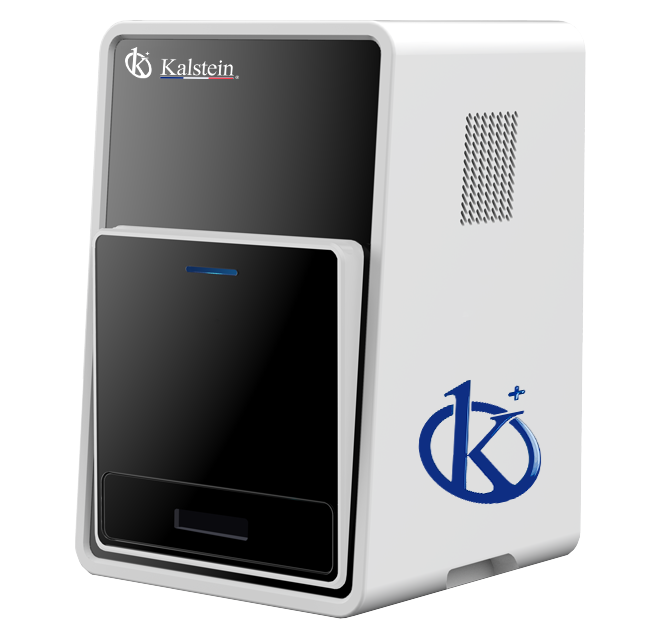
Installation and Startup Guide for the YR06066 Chemiluminescence Imager
The YR06066 Chemiluminescence Imager is designed for high-performance applications, particularly in Western blotting and ECL (enhanced chemiluminescence) detection. This compact and powerful device promises reliability and ease of use for laboratory professionals. In this guide, we will cover the essential steps for installing and starting up your YR06066 for the first time, ensuring you achieve the best results from this sophisticated piece of equipment.
Unboxing Checklist
Before starting the installation process, ensure that you have all components required for setup. Here is a checklist of items included in the YR06066 package:
- YR06066 Chemiluminescence Imager
- Power cord
- USB cable
- User manual
- Software installation package (downloadable)
- Calibration standard (if applicable)
Site Preparation Requirements
Proper site preparation is crucial for the optimal performance of the YR06066. Ensure the following environmental conditions are met before installation:
- Temperature: Maintain ambient temperature within the operating range of 15°C to 30°C.
- Humidity: Relative humidity should be below 80% to prevent condensation.
- Power Supply: Ensure a stable power supply with a voltage of 110V/220V and a frequency of 50/60Hz.
- Ventilation: Adequate space around the imager for ventilation is necessary to prevent overheating.
- Clearance: Allow at least 30 cm around the device for maintenance access.
| Site Requirement | Specification |
|---|---|
| Temperature Range | 15°C - 30°C |
| Humidity | Below 80% |
| Power Supply | 110V/220V, 50/60Hz |
| Ventilation | Adequate space around the device |
| Clearance | At least 30 cm |
Installation Steps
Follow these steps to install the YR06066:
- Placement: Position the YR06066 on a stable, vibration-free surface, ensuring it is leveled using a spirit level.
- Power Connection: Connect the power cord to the imager and plug it into a grounded outlet.
- USB Connection: Connect the USB cable from the imager to your computer.
- Software Installation: Install the software package on your computer as per the user manual instructions.
- Calibration: Perform initial calibration using the calibration standard provided (if applicable).
- Power-Up Sequence: Switch on the device and allow it to initialize. Follow prompts on the screen for initial settings.
First Run Calibration
Calibration is essential for ensuring accuracy in your results. After installation:
1. Power on the YR06066. The device will go through its self-check protocols.
2. Follow the on-screen instructions for calibration. This may involve using a calibration standard.
3. After calibration, validate the first measurement to ensure correct operation.
Common Installation Mistakes
To avoid issues during installation, be aware of these common pitfalls:
- Improper power supply connection, leading to device failure.
- Insufficient clearance around the device, causing overheating.
- Neglecting to calibrate the device before the first use.
- Inadequate environmental conditions, such as high humidity or extreme temperatures.
Technical Specifications of the YR06066
| Parameter | Specification |
|---|---|
| Model | YR06066 |
| Camera Type | Cooling CCD Camera |
| Physical Resolution | 6 Megapixels, 2750*2200 |
| Pixel Density and A/D | 16 bits |
| Gray Scale | 65536 |
| Dynamic Range | ≥4.6OD |
| Cooling Temperature | -60℃ ambient, -30℃ controlled |
| Scientific Lens | Ultra-sensitive F0.8 lens |
| Image Acquisition Software | No dongle required, unlimited users, free upgrade |
| Image Analysis Software | No dongle required, unlimited users, free upgrade |
Frequently Asked Questions
What is the maximum resolution of the YR06066 Chemiluminescence Imager?
The YR06066 has a physical resolution of 6 Megapixels with dimensions of 2750x2200 pixels, providing high-quality imaging for chemiluminescence assays.
How do I troubleshoot issues during the initial setup of the YR06066?
If you encounter issues during setup, ensure that all connections are secure, check the environmental conditions meet specifications, and verify that the software is correctly installed.
What calibration procedures are necessary for the YR06066?
Calibration involves using a provided standard to ensure accuracy. Follow the on-screen prompts during the first run to complete this process.
Can the YR06066 software be upgraded for free?
Yes, the YR06066 includes software that can be upgraded for free, allowing users to benefit from the latest features and improvements without additional costs.
What are the environmental conditions required for operating the YR06066?
The YR06066 operates best in an environment with temperatures between 15°C and 30°C and relative humidity below 80% to prevent condensation and ensure effective cooling.
How can I ensure the longevity of my YR06066 Chemiluminescence Imager?
To prolong the lifespan of your YR06066, follow proper operational guidelines, ensure regular calibration, and maintain the device clean and free from dust. Regular servicing can also aid in maintaining its functionality.
What should I do if I encounter error codes on the YR06066?
Refer to the user manual for a list of error codes and their meanings. Most errors can be resolved by following recommended troubleshooting steps provided in the documentation.
If you are looking for a fusion of innovation and quality, you have come to the right place. At Kalstein, we offer you the luxury of exploring our exclusive catalog of laboratory equipment. We manufacture every device to the highest standards of excellence. Our intuitive and seamless online purchasing channels are designed for your convenience, securing the most competitive prices. Hesitate no longer — we bring science to life, it is time to become part of our community.