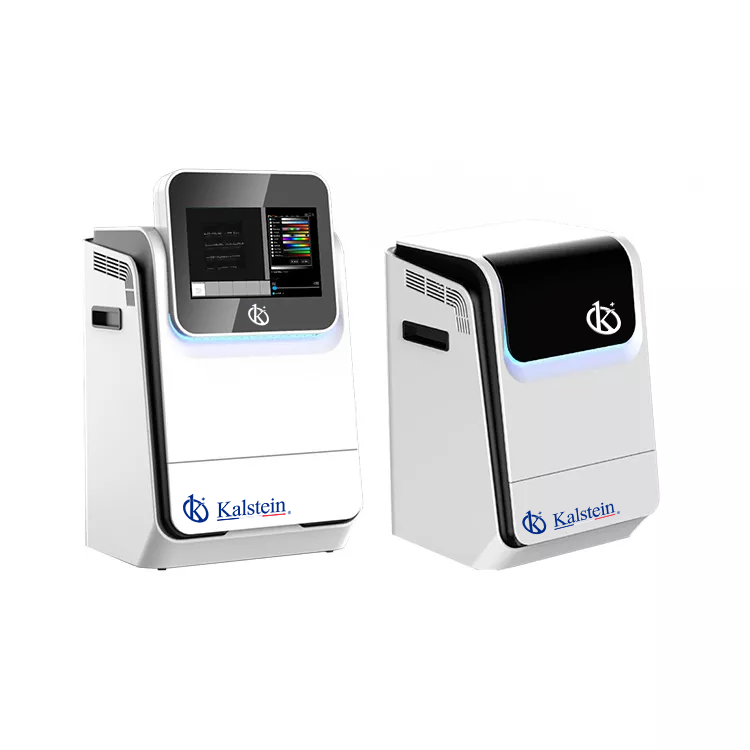
Installation and Start-Up Guide for the YR06207 Gel Documentation System
The YR06207 Gel Documentation System is a compact and intelligent solution tailored for DNA and protein gel documentation needs. To ensure optimal performance and longevity, proper installation and initial startup are crucial. This guide outlines the necessary steps, considerations, and common pitfalls to help operators seamlessly integrate the YR06207 into their laboratory workflow.
Understanding the YR06207 Gel Documentation System
The YR06207 model features a user-friendly interface and an optional removable industrial computer that enhances user experience and operational efficiency. Its high-resolution digital camera and LED blue transmission provide superior imaging capabilities.
Technical Specifications of the YR06207
| Specification | Details |
|---|---|
| Model | YR06207 |
| Gel Doc Application | YES |
| Application | Protein Gel, SDS Pages |
| Fluorescence Imaging | YES |
| Resolution | 6.3 Megapixels, 3072×2048 |
| Quantum Efficiency | 97% |
| Pixel Density | 16 bits (65536 Grey scales) |
| Lens | F1.2 motorized lens |
| Software | SHST Capture and Analysis Software for unlimited number of users |
Unboxing and Initial Setup
Upon receiving the YR06207, carefully unbox the unit and inspect for any visible damage. Ensure all components are included as specified in the user manual. This typically includes the main unit, power supply, and optional accessories.
Next, find an appropriate location in the laboratory that meets environmental requirements. The installation area should be stable, free from vibration, and have sufficient space for operation.
Anchoring and Leveling the YR06207
Ensure that the YR06207 is placed on a flat, stable surface to maintain accuracy in measurements. For further stability, consider anchoring the system if placed on mobile carts or surfaces susceptible to movement.
Electrical Connections and Power-Up Sequence
Connect the power supply to the YR06207 and ensure that the electrical specifications meet the requirements outlined in the technical specifications. After ensuring secure connections, power on the unit and check for any error codes.
Calibration and Initial Test Runs
Calibration ensures that the YR06207 operates within its specified parameters. Follow the manufacturer's guidelines for calibration procedures, which may include running test images and adjusting settings. After calibration, perform initial test runs to verify operational integrity.
Common Setup Mistakes to Avoid
- Neglecting to level the apparatus which can lead to inaccurate readings.
- Improper electrical connections causing power issues or unit failure.
- Forgetting calibration steps, which can result in incorrect image documentation.
Frequently Asked Questions
What are the key features of the YR06207 Gel Documentation System?
The YR06207 features a high-resolution digital camera, removable industrial computer, and optional fluorescent module for enhanced imaging capabilities. Its compact design allows for space-saving in the laboratory.
How do I ensure the YR06207 is installed correctly?
To ensure correct installation, follow the unboxing, leveling, electrical connection, and calibration steps outlined in this guide. Pay close attention to environmental conditions and reference the technical manual for specific requirements.
What common mistakes can lead to operational issues with the YR06207?
Common mistakes include failing to level the system, improper electrical connections, and skipping calibration steps. Each of these can negatively impact performance and accuracy.
How often should the YR06207 be calibrated?
Calibration should be performed before initial use and regularly scheduled afterward based on the frequency of use and the manufacturer's recommendations, typically every few months.
Can I upgrade the YR06207 with additional accessories?
Yes, the YR06207 supports various optional accessories, including modules for enhanced fluorescence detection and upgrades to its software for advanced functionalities.
What is the warranty period for the YR06207 Gel Documentation System?
The warranty details can vary, but typically it includes coverage for manufacturing defects for a specified period. Refer to the warranty documentation provided with the YR06207 for specific terms.
If you are looking for a fusion of innovation and quality, you have come to the right place. At Kalstein, we offer you the luxury of exploring our exclusive catalog of laboratory equipment. We manufacture every device to the highest standards of excellence. Our intuitive and seamless online purchasing channels are designed for your convenience, securing the most competitive prices. Hesitate no longer — we bring science to life, it is time to become part of our community.