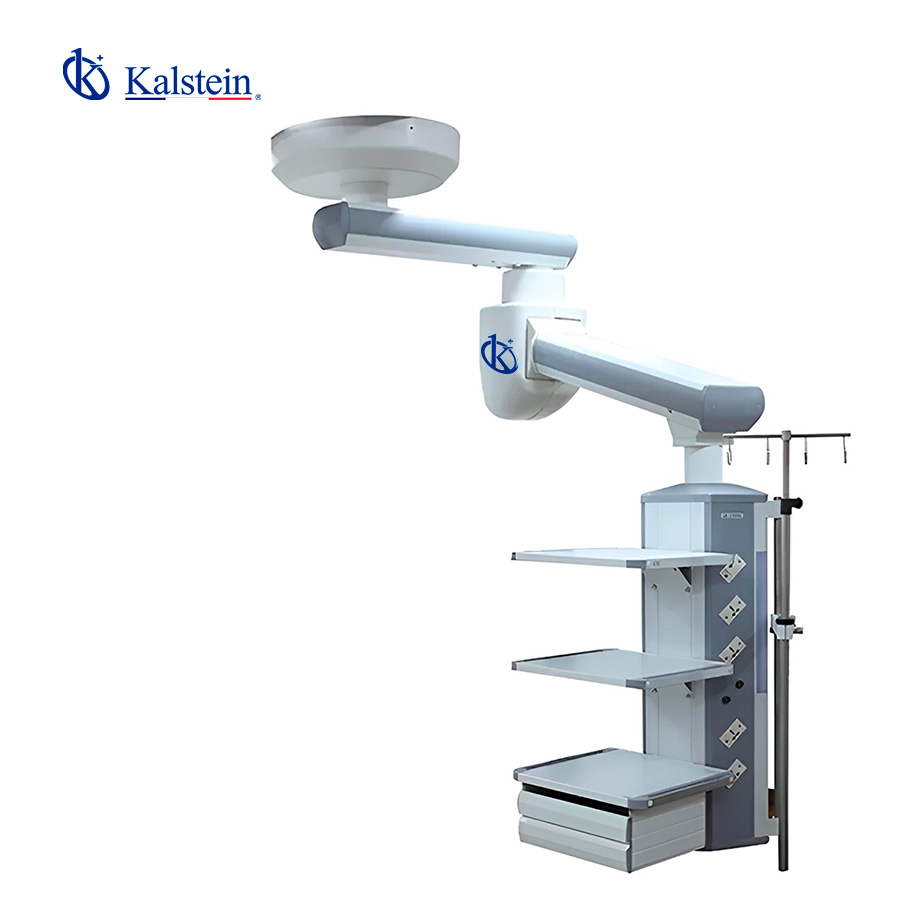
Understanding Measurement Interpretation and Results Reading with the YR02088 Endoscopy Pendant
The YR02088 Double Arm Endoscopy Pendant is an essential component in various medical settings, including operating rooms, intensive care units, and recovery areas. This article will explore the interpretation of measurement results and how to read the data effectively using the YR02088. Understanding these aspects is crucial for medical personnel to ensure accurate diagnoses and patient safety.
Overview of the YR02088 Endoscopy Pendant
The YR02088 is designed to provide flexible support for medical devices while ensuring easy access for healthcare professionals. Its features include a rotation capability of 340 degrees, adjustable height, and a lightweight construction using aluminum alloy to prevent oxidation. The pendant is compatible with multiple gas and electrical outlets, making it a versatile option in any clinical environment.
Technical Specifications of the YR02088
| Specification | Detail |
|---|---|
| Model | YR02088 |
| Arm Rotating Radius | 1000 mm |
| Arm Rotating Angle | 340° |
| Maximum Load Capacity | 160 kg |
| Electrical Socket | 2 earth studs |
| Standard Configuration | 2 O2, 1 Air, 1 Vacuum (VAC), 10*10A Power Outlets, 1 Network Socket |
Interpreting Measurement Results from the YR02088
Effective interpretation of measurement results requires understanding the units and scales relevant to the devices used with the YR02088. The pendant supports multiple devices that measure various parameters including oxygen levels, vacuum pressure, and electrical outputs. Each measurement has a specific unit and expected range, which is crucial for accurate interpretation.
For instance, oxygen levels are typically measured in percentage (%), and it’s vital to understand the normal physiological range, which is generally between 94% to 100%. Values outside this range could indicate potential hypoxia or hyperoxia, necessitating immediate medical attention.
Common Misinterpretations of Results
Misinterpretations can lead to critical errors in patient care. For instance, a reading of 93% for oxygen saturation may seem alarming; however, it must be evaluated within the context of the patient’s condition. Factors such as altitude, patient history, and concurrent medications can influence readings and must be considered during analysis.
Another common misinterpretation involves the vacuum pressure readings. If a vacuum system shows low pressure, operators must ensure there are no obstructions in the tubing before concluding that the equipment is malfunctioning.
Best Practices for Reading Measurements
To enhance accuracy in reading measurements from the YR02088, follow these best practices:
- Routine Calibration: Ensure that all attached devices are calibrated regularly to maintain accuracy.
- Documentation: Maintain records of measurements over time to identify trends and potential anomalies.
- Cross-Verification: Whenever possible, cross-verify readings with alternative equipment.
- Clear Visibility: Ensure that the display is clean and free from obstructions to avoid misreading the results.
Common Issues and Troubleshooting
When dealing with the YR02088, operators may encounter various issues affecting measurement interpretation. Below is a troubleshooting matrix to address frequent symptoms:
| Symptom | Probable Causes | Solutions |
|---|---|---|
| Equipment does not power on | - Disconnected power supply - Faulty electrical outlet | - Check connections - Test outlet with another device |
| Inconsistent readings | - Equipment calibration needed - Faulty measurement device | - Recalibrate equipment - Replace faulty device |
| Error codes displayed | - Software malfunction - Hardware failure | - Restart the system - Contact technical support |
Frequently Asked Questions
How can I ensure accurate measurements with the YR02088?
To ensure accurate measurements, always calibrate your devices regularly, maintain clear visibility of displays, and cross-verify values with alternative equipment when possible.
What are the standard operating procedures for using the YR02088?
Standard operating procedures include ensuring proper installation and calibration, regular maintenance checks, and thorough documentation of readings.
What should I do if I encounter an error code on the YR02088?
If an error code displays, restart the system and refer to the user manual for specific troubleshooting steps. If the issue persists, contact technical support for assistance.
Can the YR02088 be adapted for different medical environments?
Yes, the YR02088 can be configured with various accessories and settings to suit different medical environments, including operating rooms and ICU settings.
What is the maximum load capacity of the YR02088?
The YR02088 has a maximum load capacity of 160 kg, making it suitable for various medical devices and instruments.
Request a Quote
If you are considering the YR02088 for your medical facility, explore customization options and request a quote to get started.
If you are looking for a fusion of innovation and quality, you have come to the right place. At Kalstein, we offer you the luxury of exploring our exclusive catalog of laboratory equipment. We manufacture every device to the highest standards of excellence. Our intuitive and seamless online purchasing channels are designed for your convenience, securing the most competitive prices. Hesitate no longer — we bring science to life, it is time to become part of our community.