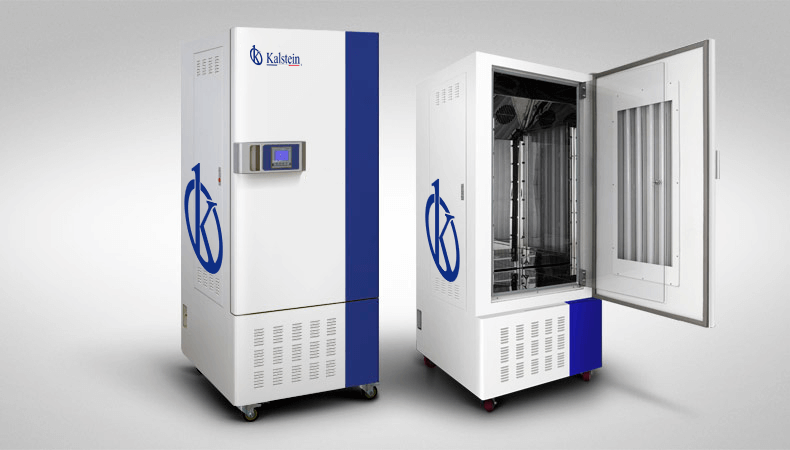
Troubleshooting Common Errors by Symptoms for the YR05348 Climate Simulation Camera
The YR05348 climate simulation camera is renowned for its advanced capabilities in simulating natural lighting conditions and climate scenarios, making it an invaluable tool in research and development across various fields. However, like any sophisticated equipment, it may present challenges. This article focuses on common errors and troubleshooting methods categorized by symptoms to ensure optimal performance and reliability.
Understanding the YR05348 Climate Simulation Camera
The YR05348 model is designed to replicate day and night light changes along with climatic conditions that support diverse experiments, including biological tissue, cell cultures, and plant growth. This section discusses its operational principles that underpin troubleshooting.
Utilizing a world-class compressor and advanced PID control system, the camera maintains precise temperature and humidity levels. Its automatic defrost feature is essential for continuous operation, preventing ice accumulation. By understanding these fundamentals, users can better diagnose and resolve issues as they arise.
Technical Specifications of the YR05348
| Parameter | Details |
|---|---|
| Model | YR05348 |
| Convection Mode | Forced Convection |
| Temperature Range | 10~65 ℃ (with lighting)/0~60 ℃ (without lighting) |
| Humidity Range | 50~90% RH |
| Dimensions (mm) | 1780×770×815 |
| Weight (kg) | 183 |
| Power Supply | AC220V/50Hz |
Common Symptoms Encountered with the YR05348
Despite its sophisticated technology, users may experience various symptoms that indicate underlying issues. This section categorizes these symptoms and provides troubleshooting steps to resolve them.
Equipment Does Not Power On
If the YR05348 fails to power on, it may be due to several reasons, including power supply issues or internal faults. Here are the steps to diagnose the problem:
- Check the Power Source: Ensure the power supply is functioning correctly and that the power cord is securely connected.
- Inspect Fuse: Check for any blown fuses within the unit which may prevent it from receiving power.
- Examine Internal Connections: Open the unit to inspect internal connections for signs of wear or damage.
Error Code E-03
Error code E-03 might indicate a temperature sensor malfunction. Follow these steps to troubleshoot:
- Reset the Device: Turn off and then turn on the YR05348 to reset the error code.
- Check Sensor Connections: Inspect the temperature sensor connections for any loose wires.
- Replace Sensor: If problems persist, consider replacing the faulty temperature sensor.
Inconsistent Readings
Inconsistent readings may result from improper calibration or environmental interference. Here’s how to address it:
- Calibrate the Unit: Follow the calibration procedure as specified in the user manual.
- Eliminate Environmental Factors: Ensure no external factors (like drafts or direct sunlight) affect readings.
- Perform a Diagnostic Check: Utilize the built-in diagnostic tools to assess performance.
Symptom-Cause-Solution Matrix for YR05348
| Symptom | Probable Cause | Solution |
|---|---|---|
| Equipment Does Not Power On | Power supply issue | Check power source and connections |
| Error Code E-03 | Temperature sensor malfunction | Reset and inspect sensor connections |
| Inconsistent Readings | Calibration issue | Recalibrate and check environmental factors |
Frequently Asked Questions
What should I do if the YR05348 displays an error code?
When the YR05348 displays an error code, refer to the user manual for specific error definitions and troubleshooting steps. Resetting the device or checking sensor connections often resolves the issue.
How can I maintain optimal performance of the YR05348?
To maintain optimal performance, regularly clean the internal components, calibrate the device as per the manual guidelines, and ensure that the surrounding environment is stable.
What is the warranty period for the YR05348?
The warranty period for the YR05348 is typically one year, covering parts and labor. Refer to the warranty documentation for specific terms and conditions.
Are there any specific environmental conditions required for the YR05348?
Yes, the YR05348 operates best in environments with ambient temperatures between 10 to 30 degrees Celsius and humidity levels below 70%.
How can I request a quote for the YR05348?
You can request a quote for the YR05348 through our official channels, where our sales representatives will assist you with pricing and availability.
Conclusion
If you are looking for a fusion of innovation and quality, you have come to the right place. At Kalstein, we offer you the luxury of exploring our exclusive catalog of laboratory equipment. We manufacture every device to the highest standards of excellence. Our intuitive and seamless online purchasing channels are designed for your convenience, securing the most competitive prices. Hesitate no longer — we bring science to life, it is time to become part of our community.