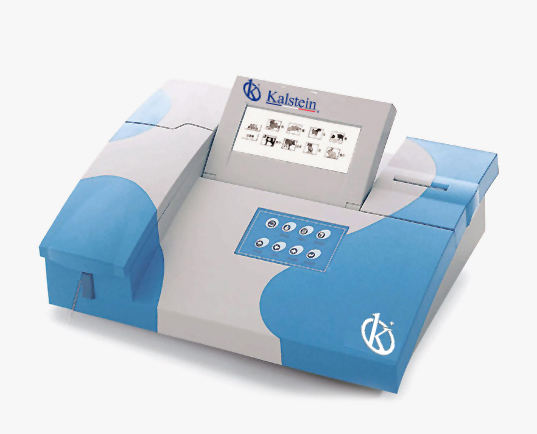
Troubleshooting Symptoms for the YR06077 Veterinary Analyzer: Common Errors and Solutions
The YR06077 Veterinary Analyzer is an advanced instrument designed to enhance diagnostic capabilities in veterinary laboratories. With its extensive support for various animal types and a wide range of tests, it is crucial for operators to understand how to effectively troubleshoot issues that may arise during its operation. This article provides a comprehensive guide to identifying common symptoms, probable causes, and actionable solutions related to the YR06077.
Technical Overview of the YR06077
| Property | Specification |
|---|---|
| Model | YR06077 |
| Principle | Absorbance |
| Photometric Range | -0.500-3.500 Abs |
| Resolution | 0.001 Abs (displayed), 0.0001 Abs (calculated) |
| Light Source | Halogen lamp |
| Wavelengths | 340, 405, 500, 546, 578, 620, 670 nm |
| Wavelength Accuracy | ±2 nm |
| Bandwidth | 10 nm |
| Memory | 200 test parameters, up to 3000 sample results |
| Dimensions (L x W x H) | 460 x 330 x 190 mm |
| Power Supply | AC 110V/220V, 50Hz/60Hz |
Common Symptoms and Troubleshooting Steps
Below are common symptoms encountered with the YR06077 Veterinary Analyzer, along with probable causes and their corresponding solutions.
Equipment Does Not Power On
If the YR06077 does not power on, check the following:
- Power Source: Ensure the unit is plugged in and the outlet is functioning.
- Fuse: Inspect the internal fuse for any damages.
- Power Cable: Verify that the power cable is intact and securely connected.
Error Code E-03
Error code E-03 can indicate a calibration issue. Follow these steps to resolve it:
- Calibration Check: Re-calibrate the device according to the user manual.
- Check Sample Size: Ensure that the proper sample volume is used for tests.
- Component Integrity: Inspect optical components for cleanliness and proper functioning.
Inconsistent Readings
Inconsistent readings can be frustrating. Here are potential causes to investigate:
- Dirty Cuvette: Ensure that the cuvette is clean and free of any obstructions.
- Reagent Quality: Use only high-quality reagents that are not expired.
- Temperature Fluctuations: Maintain the analyzer at a stable temperature to ensure accurate results.
| Symptom | Probable Cause | Solution |
|---|---|---|
| Equipment Does Not Power On | Power source issues, fuse damage, power cable malfunction | Check power source, replace fuse, inspect power cable |
| Error Code E-03 | Calibration issue | Re-calibrate, check sample size, inspect components |
| Inconsistent Readings | Dirty cuvette, poor reagent quality, temperature fluctuations | Clean cuvette, use quality reagents, stabilize temperature |
FAQs about the YR06077 Analyzer
What should I do if my YR06077 Analyzer shows an error code?
First, consult the user manual for specific error code meanings. Common steps include resetting the device, checking connections, and ensuring proper calibration. If the issue persists, consider contacting technical support.
How can I maintain my YR06077 Veterinary Analyzer for optimal performance?
Regular maintenance is key. This includes cleaning optical components, checking for software updates, and ensuring that all reagents and consumables are in good condition. Performing routine checks can help prolong the life of the analyzer.
Are there specific reagents recommended for use with the YR06077?
Yes, it is recommended to use reagents that are specifically designed for the YR06077 to ensure accuracy and reliability. Refer to the user manual for a list of compatible reagents.
What are the common causes of inaccurate results in the YR06077?
Inaccurate results can stem from several factors, including poor sample handling, dirty cuvettes, contaminated reagents, or incompatible settings. Ensure all protocols are followed carefully to minimize errors.
How often should I calibrate the YR06077?
Calibration frequency can depend on usage, but it is generally recommended to calibrate the YR06077 before each significant testing session or at regular intervals as stipulated in the user manual.
Can I customize the YR06077 for specific tests?
Yes, the YR06077 supports custom test definitions, allowing users to tailor the analyzer for specific veterinary needs. Refer to the manual for instructions on how to set this up.
How do I request a quote for the YR06077 Veterinary Analyzer?
You can easily request a quote by reaching out via Kalstein's official channels or by visiting their product catalog online.
If you are looking for a fusion of innovation and quality, you have come to the right place. At Kalstein, we offer you the luxury of exploring our exclusive catalog of laboratory equipment. We manufacture every device to the highest standards of excellence. Our intuitive and seamless online purchasing channels are designed for your convenience, securing the most competitive prices. Hesitate no longer — we bring science to life, it is time to become part of our community.