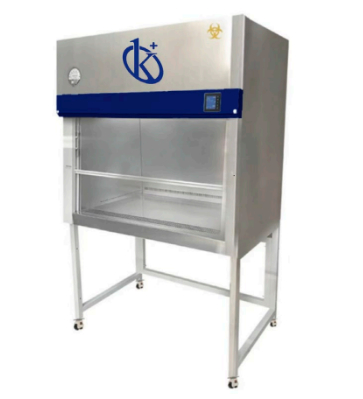
Troubleshooting Common Issues with the YR0090D-SS Biological Safety Cabinet
The YR0090D-SS Biological Safety Cabinet is an essential instrument in laboratories that handle biological agents. Designed for maximum protection of the operator, samples, and the environment, understanding how to troubleshoot common issues is vital for maintaining its efficiency. This article focuses on frequent errors and their solutions associated with the YR0090D-SS, ensuring that users can swiftly address any concerns and continue their important work.
Technical Specifications of YR0090D-SS
| Parameter / Model | YR0090D-SS |
|---|---|
| Voltage | 220 V |
| Frequency | 50 Hz |
| General Dimensions | 1500 * 765 * 2000 mm |
| Operating Space | 1300 * 630 * 700 mm |
| Nominal Power | 1800 W |
| Total Exhaust System | 500 m³/h |
| Noise Level | < 67 dB (A) |
Troubleshooting by Symptom
Understanding the symptoms that indicate issues with the YR0090D-SS can greatly enhance the efficiency of troubleshooting. Below are common symptoms, their probable causes, and actionable solutions.
Equipment Does Not Power On
If the YR0090D-SS does not power on, the following reasons may apply:
- Power Supply Issues: Ensure the cabinet is properly plugged in and that the outlet is functioning. Test the outlet with another device.
- Tripped Circuit Breaker: Check the circuit breaker to ensure it has not tripped and reset it if necessary.
- Internal Component Failure: Inspect for any visible damage or loose connections inside the unit.
Solution: Start with checking power connections and fuses. If all appears well, consult the technical manual or contact support for further assistance.
Error Code E-03
This error code typically indicates a filter issue. The possible causes include:
- Clogged HEPA Filter: A clogged filter can cause airflow issues, triggering the error.
- Improper Installation of Filters: If the filters are not correctly positioned, it might lead to sensor errors.
Solution: Replace or clean the HEPA filter according to the manufacturer's guidelines, ensuring proper installation to prevent recurrence.
Inconsistent Airflow
Inconsistent airflow can compromise the safety of biological procedures. Here are common causes:
- Blocked Ventilation: Ensure that there are no obstructions in the airflow paths.
- Fan Malfunction: Check if the cabinet’s fan is operational and not making unusual sounds.
Solution: Clear any obstructions and test the fan; replace it if it’s malfunctioning.
Symptom-Cause-Solution Table
| Symptom | Probable Cause | Solution |
|---|---|---|
| Equipment Does Not Power On | Power Supply Issues, Tripped Circuit Breaker, Internal Component Failure | Check power connections and test the outlet, reset circuit breaker. |
| Error Code E-03 | Clogged HEPA Filter, Improper Installation of Filters | Replace or clean HEPA filter, ensure proper installation. |
| Inconsistent Airflow | Blocked Ventilation, Fan Malfunction | Clear obstructions, check and replace fan if necessary. |
Preventive Maintenance Tips
Regular maintenance is crucial for the longevity and functionality of the YR0090D-SS. Here are some tips to keep in mind:
- Regular Filter Replacement: Change HEPA filters as per the manufacturer's recommendations to avoid clogging and maintain optimal airflow.
- Routine Calibration: Schedule calibration checks for the airflow system to ensure it operates within specified parameters.
- Cleaning Procedures: Maintain a regular cleaning schedule for both the interior and exterior of the cabinet to prevent contamination.
Frequently Asked Questions
What should I do if the YR0090D-SS displays an error code?
If the YR0090D-SS displays an error code, refer to the user manual for specific troubleshooting steps related to that error. Common codes may indicate filter issues or airflow problems.
How often should I replace the HEPA filters in the YR0090D-SS?
The HEPA filters in the YR0090D-SS should be replaced every 6-12 months, depending on usage. Regular checks will help determine the right replacement schedule.
Can I perform maintenance on the YR0090D-SS myself?
Basic maintenance, such as cleaning and filter checks, can be performed by the user. However, for complex issues, it is best to consult a qualified technician.
What is the expected lifespan of the YR0090D-SS?
The expected lifespan of the YR0090D-SS is typically around 10 years with proper maintenance. Regular servicing can extend its life significantly.
Is there a warranty for the YR0090D-SS?
Yes, the YR0090D-SS comes with a standard warranty that covers manufacturing defects. Be sure to check the warranty terms for specifics regarding coverage and duration.
What environmental conditions are required for the YR0090D-SS?
The YR0090D-SS operates best in an environment with a temperature range of 15 to 35 °C and a relative humidity of less than 75%. Proper ventilation is key.
Request a Quote
If you are interested in enhancing your laboratory operations with the YR0090D-SS Biological Safety Cabinet, request a quote today. Our team is ready to assist you in acquiring this essential tool.
If you are looking for a fusion of innovation and quality, you have come to the right place. At Kalstein, we offer you the luxury of exploring our exclusive catalog of laboratory equipment. We manufacture every device to the highest standards of excellence. Our intuitive and seamless online purchasing channels are designed for your convenience, securing the most competitive prices. Hesitate no longer — we bring science to life, it is time to become part of our community.