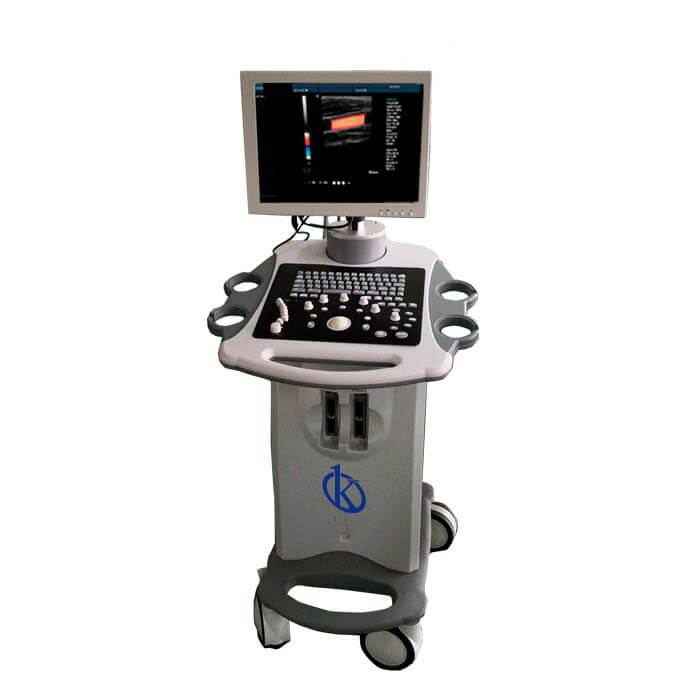
Troubleshooting Common Errors on the YR05154: A Comprehensive Guide
The YR05154 ultrasound system is a sophisticated piece of diagnostic equipment that can encounter various errors during operation. Understanding these errors and knowing how to address them is crucial for maintaining the efficiency and reliability of the device. In this guide, we will explore common symptoms of malfunction, their probable causes, and effective solutions to ensure optimal performance of the YR05154.
Common Symptoms and Their Causes
| Symptom | Probable Causes |
|---|---|
| Device does not power on | Check power supply connection, blown fuse, faulty power button. |
| Error code E-03 | Software malfunction, hardware fault, improper configuration. |
| Inconsistent readings | Calibration issues, probe malfunction, environmental interference. |
| No display output | Connection issues, display hardware failure, software crash. |
| Overheating | Poor ventilation, excessive workload, internal component failure. |
Equipment Does Not Power On
If your YR05154 ultrasound system does not power on, it can be frustrating. The first step is to ensure that the power supply is correctly connected. Check the power cable for any visible damage. If the power cable is intact, the next step is to inspect the fuse. A blown fuse will prevent the device from receiving power.
Additionally, verify the functionality of the power button. Sometimes, mechanical failures in the button may lead to power issues. If all these checks are in order and the device still does not power on, it may require professional servicing to address potential internal faults.
Error Code E-03
Error code E-03 can indicate a malfunction within the YR05154 software or hardware components. Begin troubleshooting by restarting the device. If the error persists, it’s essential to check the software version and update it if necessary. Outdated software can often cause operational errors.
If updating the software does not resolve the issue, examine the hardware for any signs of damage or misconfiguration. In some cases, a reset to factory settings may be required, but ensure all data is backed up before proceeding.
Inconsistent Readings
Inconsistent readings can be attributed to several factors, such as improper calibration of the YR05154. Regular calibration is essential for accurate measurements. If calibration has not been performed recently, recalibrate the device following the manufacturer’s protocols.
Additionally, examine the probe for any signs of wear or damage, as faulty probes can lead to erroneous readings. Environmental factors such as electromagnetic interference may also affect performance, so ensure the device is used in a suitable environment.
No Display Output
When the display output fails, troubleshoot by checking all connection cables. Loose connections can result in a blank screen. If the connections are secure, test the device with a different monitor if possible to rule out display issues.
In cases where the display remains non-functional after checking connections and trying a different monitor, it may indicate a deeper hardware failure, requiring professional repair service.
Overheating Issues
Overheating can significantly affect the performance and lifespan of the YR05154. To prevent overheating, ensure that the device has adequate ventilation and is not placed in an enclosed space. Regularly check for dust accumulation in the vents and clean them as necessary.
Monitor the workload; long operating hours without breaks can lead to overheating. If overheating continues, the device may require internal checks for faulty components that could be causing excessive heat generation.
Technical Specifications of the YR05154
| Model | Brand | Category | Subcategory | Price (USD) | Weight (kg) | Dimensions | Package Size (cm) |
|---|---|---|---|---|---|---|---|
| YR05154 | Kalstein | Ultrasound Scanner | Ultrasonic Diagnostic Equipment | $850.00 | 2.5 | x x | 18 x 24 x 9 |
Frequently Asked Questions
What should I do if my YR05154 displays an error message?
First, reference the user manual to identify the error message. Many errors can be resolved through simple troubleshooting steps like restarting the device, checking connections, or recalibrating. If the error persists, consult technical support for further assistance.
How often should I calibrate the YR05154?
The YR05154 should be calibrated regularly, at least once a month, or more frequently if used in demanding conditions. Regular calibration ensures accurate readings and maintains the integrity of the diagnostic results.
Can I use third-party probes with the YR05154?
It is recommended to use only authorized probes compatible with the YR05154 to ensure accuracy and prevent damage. Using non-compatible probes can lead to incorrect readings and potential harm to the device.
What are the signs that my YR05154 needs service?
Signs of needing service include persistent error messages, failure to power on, and frequent overheating. Additionally, if the ultrasound images appear unclear or inconsistent, it's advisable to seek professional servicing.
How can I extend the lifespan of my YR05154 ultrasound system?
To extend the lifespan, ensure regular maintenance, calibration, and proper usage according to manufacturer guidelines. Keep the device clean and in a well-ventilated area to prevent overheating.
Is there a warranty on the YR05154, and what does it cover?
The YR05154 typically comes with a standard warranty covering manufacturer defects. Always check the warranty terms for specific details regarding coverage duration and the process for claims.
If you are looking for a fusion of innovation and quality, you have come to the right place. At Kalstein, we offer you the luxury of exploring our exclusive catalog of laboratory equipment. We manufacture every device to the highest standards of excellence. Our intuitive and seamless online purchasing channels are designed for your convenience, securing the most competitive prices. Hesitate no longer — we bring science to life, it is time to become part of our community.