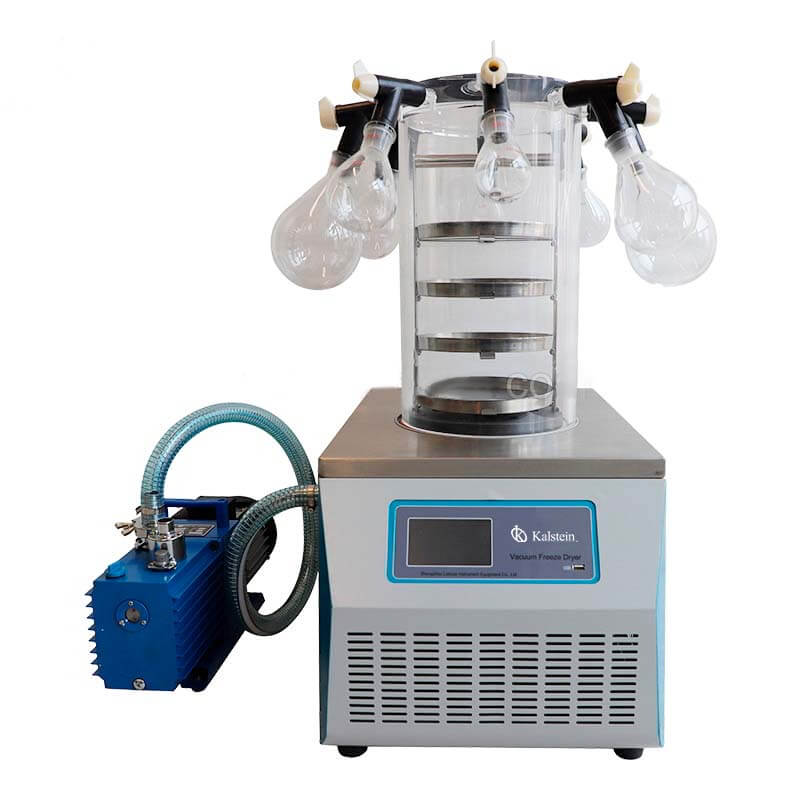
Troubleshooting Common Errors in the YR05188 Lyophilizer: Symptoms and Solutions
The YR05188 lyophilizer is a versatile benchtop laboratory freeze dryer used across multiple sectors, including medicine, pharmacy, and food production. However, like any sophisticated equipment, it can exhibit errors that may hinder optimal performance. This guide will help you identify common symptoms associated with the YR05188 and provide actionable solutions.
Technical Specifications of the YR05188
| Specification | Details |
|---|---|
| Model | YR05188 |
| Lyophilization Area | 0.12㎡ |
| Condenser Capacity | 3-4 L/24h |
| Condenser Temperature | -55 ℃ (-80 ℃ optional) |
| Vacuum Degree | < 10 Pa |
| Tray Material Diameter | Ф200mm, 4 layers |
| Bulk Capacity | 1.2 L, 10 mm thickness |
| Vial Capacity (Φ12mm) | 920 pieces |
| Vial Capacity (Φ16mm) | 480 pieces |
| Vial Capacity (Φ22mm) | 260 pieces |
| Collector | with 8 ports |
| Flask Sizes | 1000 ml, 500 ml, 250 ml, 100 ml |
| Cooling Method | Air, with ambient temperature ≤25 ℃ |
| Voltage | 220 V, 50 Hz; 110 V, 50 Hz; 110 V, 60 Hz |
| Power | 700W |
| Dimensions | 460×625×(370+465) mm |
| Weight | 41 kg |
Troubleshooting by Symptoms
Equipment Does Not Power On
This is a critical issue that may arise during the operation of the YR05188. Possible causes include:
- Power source failure
- Defective power cable or plug
- Internal circuit malfunction
To troubleshoot: check the power outlet, inspect the power cord for visible damage, and verify that the unit's internal wiring is intact. If the issue persists, contact technical support for further assistance.
Error Code E-03
Error code E-03 typically indicates a temperature sensor malfunction. Potential causes include:
- Sensor disconnection or failure
- Incorrect calibration
To resolve this issue, inspect the sensor connections to ensure they are secure and recalibrate the sensor according to the manual instructions.
Inconsistent Readings
Inconsistent readings during the freeze-drying process can lead to unreliable results. Possible reasons include:
- Improper sample placement
- Dirty sensors or trays
- Equipment malfunction
To correct this, ensure samples are correctly placed in the trays, clean the sensors and trays regularly, and perform a diagnostic check on the equipment.
Symptom-Cause-Solution Matrix
| Symptom | Probable Cause | Solution |
|---|---|---|
| Equipment Does Not Power On | Power source failure | Check power outlet and cable |
| Error Code E-03 | Temperature sensor malfunction | Inspect connections and recalibrate |
| Inconsistent Readings | Improper sample placement | Ensure correct placement |
Common Usage Errors
Users might encounter frequent errors related to improper use. Awareness and knowledge of correct operating procedures can greatly reduce these errors. Here are common usage errors:
- Not pre-freezing samples before placing them in the YR05188, which can affect the quality of the drying process.
- Failing to regularly clean and maintain the equipment, leading to contamination and performance degradation.
- Overloading the trays beyond recommended capacity, which may disrupt airflow and drying efficiency.
To mitigate these issues, follow the manufacturer's instructions for sample preparation, maintenance schedules, and load capacities.
Maintaining Your YR05188 Lyophilizer
Proper maintenance is crucial for the longevity and performance of the YR05188. Here are essential maintenance tips:
- Regularly inspect and clean the condenser and trays to prevent residue buildup.
- Check electrical connections and ensure all components are securely installed.
- Keep the cooling system free from obstructions to ensure optimal performance.
Implementing a routine maintenance schedule can help in identifying potential issues before they escalate.
Frequently Asked Questions
What should I do if the YR05188 displays an error code?
If the YR05188 displays an error code, consult the user manual for specific troubleshooting steps related to that error. If you cannot resolve the issue, consider contacting technical support for assistance.
How can I ensure optimal performance from my YR05188 lyophilizer?
To ensure optimal performance, regularly maintain the unit by cleaning components, calibrating sensors, and monitoring operation conditions. Always follow the manufacturer's guidelines for best practices.
Is there a warranty for the YR05188 lyophilizer?
Yes, the YR05188 typically comes with a warranty. Check the warranty documentation for details on coverage length and what is included.
Can I use the YR05188 for food preservation?
Absolutely! The YR05188 is widely used in food production for preservation purposes, allowing for long-term storage of various food items.
How often should I perform maintenance on the YR05188?
A regular maintenance schedule should be established, ideally every few months, depending on usage frequency and conditions. Regular checks can help prolong the life of the equipment.
What are the common mistakes to avoid with the YR05188?
Common mistakes include overloading trays, failing to pre-freeze samples, and neglecting regular cleaning. Adhering to proper protocols will enhance performance and reliability.
If you are looking for a fusion of innovation and quality, you have come to the right place. At Kalstein, we offer you the luxury of exploring our exclusive catalog of laboratory equipment. We manufacture every device to the highest standards of excellence. Our intuitive and seamless online purchasing channels are designed for your convenience, securing the most competitive prices. Hesitate no longer — we bring science to life, it is time to become part of our community.