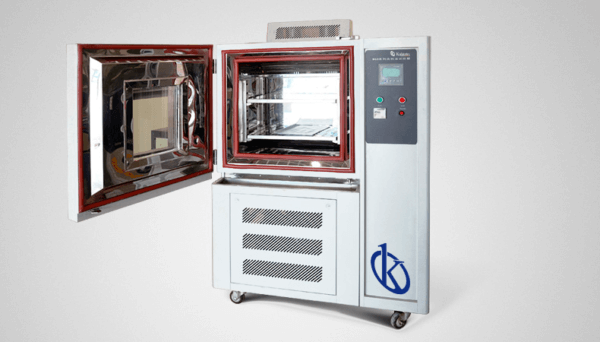
Troubleshooting Common Symptoms of the YR05344 Environmental Chamber
The YR05344 Environmental Chamber is an advanced laboratory device designed to simulate a range of environmental conditions. While it is engineered for high reliability and performance, users may encounter common issues that require troubleshooting. This article aims to provide a detailed guide on diagnosing and resolving these symptoms effectively.
Understanding the YR05344 Environmental Chamber
The YR05344 is a sophisticated environmental chamber featuring a wide range of temperature and humidity regulation capabilities. It serves as an ideal option for laboratory environmental testing due to its precise temperature control and advanced monitoring systems. Understanding its components and functionalities can greatly assist in troubleshooting potential issues.
Technical Specifications of the YR05344
| Model | Description | Humidity Range | Cooling - Heating Range | Power (W) | Internal Dimensions (mm) | External Dimensions (mm) |
|---|---|---|---|---|---|---|
| YR05344 | 380±10% (-20/0 – 150℃) | 20-98% | 0.7~1.0 ℃/min - 1~3 ℃/min | 6500 | 850x800x600 | 1860x1320x1270 |
Troubleshooting by Symptoms
Equipment Does Not Power On
If the YR05344 does not power on, check the following:
- Power Supply: Ensure that the power supply is connected and functional.
- Fuse: Inspect the internal fuse for any signs of damage or failure.
- Circuit Breaker: Reset the circuit breaker if it has tripped.
To resolve the issue, replace any faulty components or confirm proper connections.
Error Code E-03
The E-03 error code may indicate a temperature sensor malfunction. Consider the following steps:
- Sensor Connection: Verify that the temperature sensor is correctly connected.
- Calibration: Recalibrate the temperature settings as per the user manual.
- Replacement: If the error persists, consider replacing the temperature sensor.
Inconsistent Readings
If the chamber displays inconsistent readings, the following factors may be contributing:
- Calibration: Ensure regular calibration of the chamber to maintain accuracy.
- Environmental Factors: Check for external influences affecting the chamber's performance.
- Sensor Issues: Inspect sensors for damage or misalignment.
Condensation Inside the Chamber
Condensation can occur due to high humidity levels. Address the issue by:
- Humidity Control: Adjust humidity settings to within the recommended range.
- Ventilation: Ensure proper ventilation for the chamber to minimize moisture build-up.
- Seal Integrity: Check door seals for any leaks that may allow external moisture to enter.
Unexpected Alarms Triggered
Unexpected alarms may arise from various factors:
- Temperature Fluctuations: Monitor for rapid changes in temperature that may trigger alarms.
- Power Interruptions: Investigate any recent power outages or fluctuations.
- Sensor Malfunctions: Regularly check sensor functionality to prevent alarm triggers.
Symptom to Solution Matrix
| Symptom | Probable Cause | Action |
|---|---|---|
| Equipment Does Not Power On | Power supply issues | Check connections and replace fuses |
| Error Code E-03 | Temperature sensor malfunction | Calibrate or replace sensor |
| Inconsistent Readings | Calibration issues | Recalibrate the chamber |
| Condensation Inside Chamber | High humidity levels | Adjust humidity and check seals |
| Unexpected Alarms Triggered | Power interruptions or sensor malfunctions | Monitor and check sensors |
Frequently Asked Questions
What should I do if my YR05344 Environmental Chamber shows an error code?
If your YR05344 displays an error code, refer to the user manual for specific troubleshooting steps related to that code. Common solutions include checking sensor connections, recalibrating the device, or ensuring the power supply is stable.
How often should I calibrate the YR05344?
Calibration frequency depends on usage, but it is recommended to calibrate the YR05344 at least every six months or after any significant temperature variations are detected.
Can I operate the YR05344 in a high-humidity environment?
Yes, the YR05344 is designed to handle a humidity range of 20-98%, but ensure that the settings are adjusted properly to maintain optimal performance.
What maintenance is required for the YR05344 Environmental Chamber?
Regular maintenance includes cleaning the internal components, checking seals for integrity, and verifying sensor functionality to ensure accurate readings.
How do I reset the YR05344 after an alarm?
To reset the YR05344 after an alarm, follow the instructions in the user manual, typically involving pressing a reset button or adjusting settings to clear the alarm condition.
Where can I find spare parts for the YR05344?
Spare parts for the YR05344 can be obtained through official suppliers or manufacturers specializing in laboratory equipment, ensuring compatibility and quality.
How can I request a quote for the YR05344 Environmental Chamber?
You can request a quote for the YR05344 Environmental Chamber by contacting authorized distributors or our sales team for detailed pricing and availability.
If you are looking for a fusion of innovation and quality, you have come to the right place. At Kalstein, we offer you the luxury of exploring our exclusive catalog of laboratory equipment. We manufacture every device to the highest standards of excellence. Our intuitive and seamless online purchasing channels are designed for your convenience, securing the most competitive prices. Hesitate no longer — we bring science to life, it is time to become part of our community.