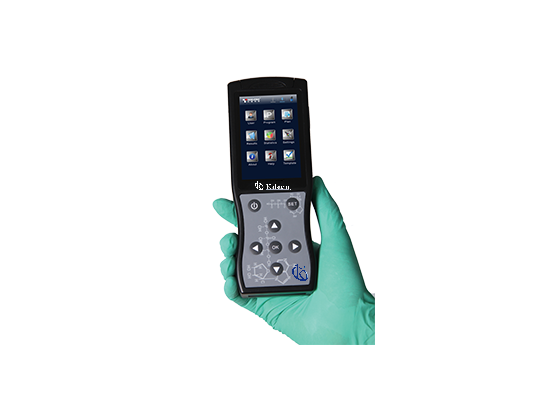
Troubleshooting Common Errors in the YR06071 Portable ATP Hygiene Monitoring System
The YR06071 Portable ATP Hygiene Monitoring System is a cutting-edge tool designed to effectively and accurately monitor hygiene across various environments. While this system is engineered for precision, users may encounter occasional errors. This comprehensive guide focuses on identifying common symptoms, diagnosing issues, and providing concrete solutions to enhance the operational reliability of the YR06071.
Understanding the YR06071: Technical Overview
| Model | YR06071 |
|---|---|
| Dimensions | 189mm x 70mm x 35mm |
| Weight | 280g |
| Detection Limit | 10-16 moles ATP |
| Detection Deviation | ±5% or ±5 RULs |
| Self-calibration on Start | 15s or 60s |
| Real-time Detection Time | 10s/test |
| Memory Capacity | 256 test plans, 256 user IDs, 2000 test programs, and 10,000 results |
| Communication Interface | USB, Bluetooth |
| Test Repeatability | 8%-20% |
| Correlation Coefficient | R2≥0.995 |
| Power Source | Rechargeable battery |
| Duration | 8 hours of continuous operation, 600 hours standby |
| Operating Temperature | 5-40℃ |
| Operating Humidity Range | 20-80% |
Common Symptoms and Troubleshooting Steps
Equipment Does Not Power On
If the YR06071 fails to power on, check the following potential causes:
- Ensure the device is charged. Connect the charger and look for any indicator lights.
- Inspect the battery for any signs of damage or wear.
- Verify that the power switch is in the "on" position.
To resolve the issue:
- Charge the device for at least 30 minutes and then attempt to power it on again.
- If it remains unresponsive, consider replacing the battery.
Error Code E-03
Error code E-03 signifies a connectivity issue, usually related to Bluetooth or USB connections. Potential causes include:
- Device is out of range of the Bluetooth device.
- Loose USB connection.
- Software compatibility issues with connected devices.
To fix this error:
- Ensure that the YR06071 is within the recommended range of connected devices.
- Check and secure all cable connections.
- Update the software of the connected device if necessary.
Inconsistent Readings
Inconsistent readings can often lead to confusion and mistrust in the system's capabilities. This can be caused by:
- Improper calibration of the device.
- Environmental factors such as temperature and humidity outside the operating range.
- Contaminated testing surfaces or reagents.
To remedy inconsistency:
- Recalibrate the device following the user manual instructions.
- Ensure the testing environment is compliant with specified conditions.
- Clean the testing area and ensure all materials are fresh and uncontaminated.
Symptom-Cause-Solution Table
| Symptom | Possible Cause | Recommended Solution |
|---|---|---|
| Equipment does not power on | Dead battery | Charge or replace the battery |
| Error code E-03 | Bluetooth/USB connectivity issue | Check connections and update software |
| Inconsistent readings | Calibration issues | Recalibrate according to the manual |
Maximizing Performance of YR06071
To optimize the performance of the YR06071, users are encouraged to implement regular maintenance and calibration schedules. This includes:
- Daily cleaning of the testing surfaces and device components.
- Weekly checks of the battery and charging systems.
- Monthly calibration to ensure consistent accuracy.
Frequently Asked Questions
What types of tests can the YR06071 perform?
The YR06071 conducts tests to measure the presence of ATP on surfaces, allowing for rapid assessment of hygiene levels and detection of potential biological contaminants.
Is the YR06071 easy to use?
Yes, the YR06071 is designed to be user-friendly. Its display shows results in seconds, and it includes Bluetooth and USB connectivity options, making it convenient for use in any professional environment.
How long does the battery of the device last?
The device features a rechargeable battery that offers up to 8 hours of continuous operation or 600 hours on standby, making it ideal for extended work shifts.
What are the ideal operational conditions for the YR06071?
The YR06071 operates optimally within a temperature range of 5°C to 40°C and a humidity level of 20% to 80%. These conditions are crucial for ensuring accurate readings.
How can I ensure the longevity of my YR06071?
To extend the lifespan of the YR06071, perform regular maintenance, keep it clean, and store it in suitable environmental conditions. Additionally, avoid exposing the device to extreme temperatures and humidity levels.
If you are seeking to enhance your monitoring processes, we invite you to request a quote on Kalstein Plus for competitive pricing and expert support.
If you are looking for a fusion of innovation and quality, you have come to the right place. At Kalstein, we offer you the luxury of exploring our exclusive catalog of laboratory equipment. We manufacture every device to the highest standards of excellence. Our intuitive and seamless online purchasing channels are designed for your convenience, securing the most competitive prices. Hesitate no longer — we bring science to life, it is time to become part of our community.