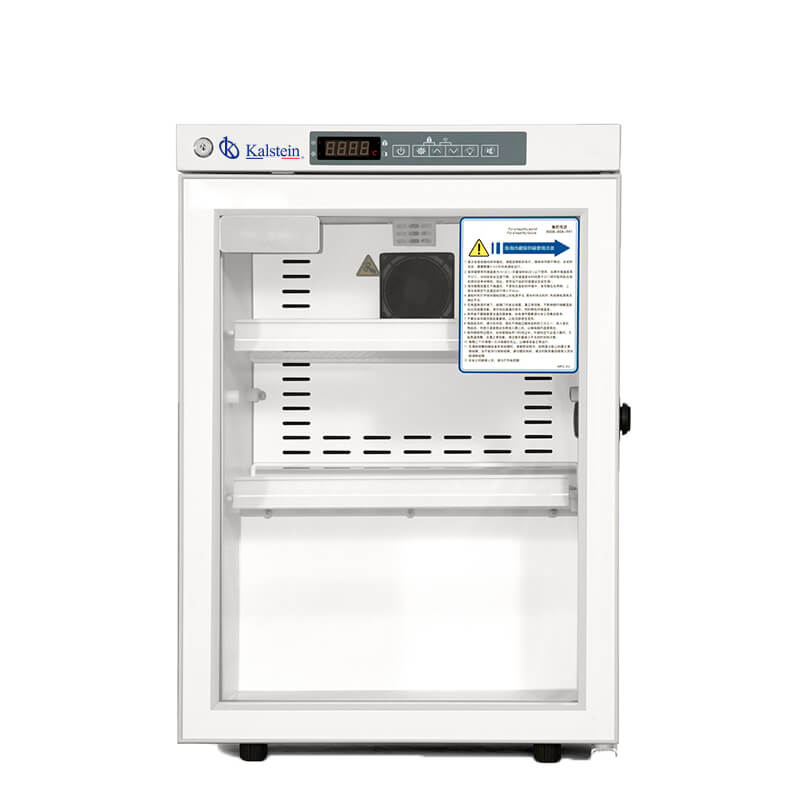
Installation and Commissioning Guide for the YR05083 Medical Refrigerator
The YR05083 Medical Refrigerator is designed to maintain a controlled environment for pharmaceutical and medical products. Proper installation and commissioning are critical to ensure this equipment operates efficiently to meet storage requirements. This guide will walk you through the essential steps to set up your YR05083 for maximum performance.
Unpacking and Preparing the YR05083
Before installation, carefully unpack the YR05083 Medical Refrigerator and check for any damage during transportation. Here’s a checklist of items to ensure everything is in order:
- Check the exterior for dents or scratches.
- Verify that all components are present, including shelves and instruction manuals.
- Ensure the unit is clean and free of packing materials.
After the refrigerator is unpacked, keep it upright for at least 24 hours before plugging it in to allow the compressor oil to settle, which is crucial for optimal refrigerant flow.
Site Requirements for Optimal Operation
Setting up the YR05083 Medical Refrigerator requires consideration of environmental conditions. Here are the site requirements:
| Parameter | Requirements |
|---|---|
| Ambient Temperature | 10 ~ 32 °C |
| Voltage / Frequency | 220V / 50 Hz |
| Clearance Around Unit | At least 15 cm on all sides for ventilation |
| Humidity Level | Less than 80% |
Ensure that the site is away from direct sunlight and drafts to maintain stable internal temperatures.
Leveling and Anchoring the Refrigerator
Correct leveling is crucial to ensure that the YR05083 operates efficiently. Follow these steps:
- Use a spirit level to ensure the unit is perfectly level from left to right and front to back.
- Adjust the leveling feet as necessary to achieve horizontal alignment.
- For safety, consider anchoring the unit to prevent tipping.
Power-Up Sequence and First Run Calibration
Once the YR05083 is level and anchored, follow this sequence to power up:
- Plug the refrigerator into a grounded outlet.
- Turn on the power switch, usually located at the back of the unit.
- Allow the unit to run for a minimum of 24 hours before placing any items inside to ensure it reaches the desired temperature.
After powering on, check the temperature display. The desired range for storage is between 2 °C and 8 °C. Adjust the temperature settings if necessary using the microprocessor controller.
Common Installation Mistakes
During installation or initial setup, some common mistakes can hinder performance:
- Failing to check the unit for damage before setup.
- Not allowing enough clearance around the unit for proper ventilation.
- Placing the refrigerator in a location with extreme temperatures or humidity levels.
- Neglecting to level the unit properly, which can affect refrigerant circulation.
By avoiding these pitfalls, you can ensure that your YR05083 operates effectively right from the start.
Technical Specifications of YR05083
| Specification | Details |
|---|---|
| Model | YR05083 |
| Cooling Method | Forced Air Cooling |
| Temperature Range | 2 ~ 8 °C |
| Energy Consumption (kWh/24h) | 0.84 |
| Noise Level (dB) | 50 |
| Weight (Net/Gross) | 33 kg / 37 kg |
| Dimensions (External) | 495 x 450 x 710 mm |
Frequently Asked Questions
What should I do if the YR05083 does not power on?
If the YR05083 Medical Refrigerator does not power on, first check that it is properly plugged into a functioning outlet. Verify that the circuit breaker has not tripped. If the unit is still unresponsive, contact a technician for further support.
How can I adjust the temperature settings on the YR05083?
The YR05083 features a microprocessor temperature controller. To adjust the settings, use the digital display to navigate through the menu and set your desired temperature within the specified range of 2 °C to 8 °C.
What are the common error codes for the YR05083?
The YR05083 may display error codes related to temperature sensor failures, power outages, or high/low temperature alerts. Refer to the user manual for a comprehensive list of error codes and troubleshooting tips.
How often should I clean the YR05083 Medical Refrigerator?
It is recommended to clean the interior and exterior surfaces of the YR05083 at least once a month. Regular maintenance will prevent dust accumulation and ensure efficient operation.
What type of maintenance does the YR05083 require?
The YR05083 requires regular checks of its temperature settings, cleaning of the condenser coils, and inspection of the door seals for proper sealing. If any discrepancies are noted, immediate action should be taken to rectify the situation.
Can I connect the YR05083 to a remote alarm system?
Yes, the YR05083 is equipped with a remote alarm port, allowing you to connect it to a monitoring system for enhanced alert capabilities.
How do I know if my YR05083 is functioning correctly?
Regular monitoring of the internal temperature display, along with ensuring that the alarm system functions properly, will help verify that the YR05083 is operating correctly. Conduct routine checks on performance indicators as well.
If you are looking for a fusion of innovation and quality, you have come to the right place. At Kalstein, we offer you the luxury of exploring our exclusive catalog of laboratory equipment. We manufacture every device to the highest standards of excellence. Our intuitive and seamless online purchasing channels are designed for your convenience, securing the most competitive prices. Hesitate no longer — we bring science to life, it is time to become part of our community.