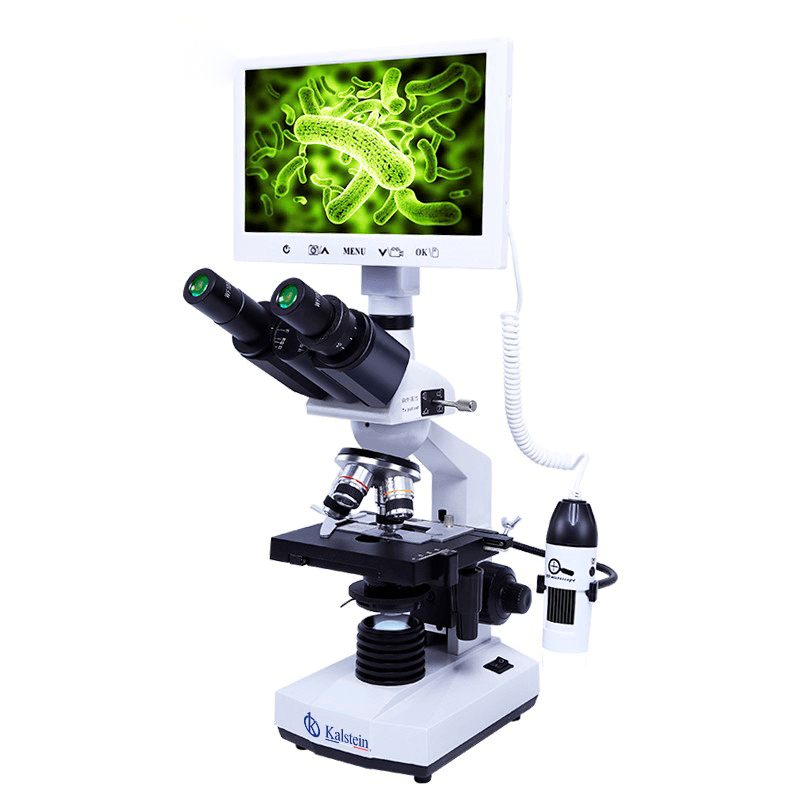
Installation and Commissioning Guide for the YR05783 Digital Biological Microscope
The YR05783 Digital Biological Microscope is designed for various applications in educational, clinical, and research environments. This guide offers comprehensive instructions for installation and commissioning, ensuring optimal performance and longevity of the device.
Unboxing the YR05783 Microscope
Upon receiving the YR05783 Digital Biological Microscope, carefully unbox the equipment. Ensure that the following components are included:
- YR05783 Microscope Unit
- Prepared slide kit (10 slides)
- Power Adapter
- USB Cable
- CD with Software
- User Manual
- Handheld Carry Case
Inspect all components for any signs of damage during shipment. If any items are missing or damaged, contact the supplier for replacements.
Anchoring and Leveling the Microscope
Position the microscope on a stable, level surface to minimize vibrations that could affect image quality. Use the leveling feet to adjust the height of the microscope so that it is perfectly horizontal. This step is crucial for ensuring accurate observations and measurements.
Power-Up Sequence
Follow these steps to power up the YR05783 Microscope:
- Connect the power adapter to the microscope and plug it into a power outlet.
- Press the power button located at the base of the unit.
- Wait for the LCD to display the software interface.
Ensure that the power supply is stable and meets the specifications of 5V DC/2A for optimal performance.
Calibration and Initial Setup
Before using the microscope, it is essential to calibrate the optical systems:
- Adjust the focus knobs (coarse and fine) to ensure the optical path is clear.
- Set the resolution settings according to the type of samples you will be observing.
- Adjust the brightness of the LED light source for optimal illumination.
The microscope's menu allows for adjustments in color, contrast, and white balance. Familiarize yourself with these features to enhance image clarity.
Validating First Measurement
Once the YR05783 is powered on and calibrated, conduct a test observation:
- Place a prepared slide on the mechanical stage.
- Secure the slide using the stage clips.
- Use the focus knobs to bring the sample into view.
- Capture an image using the one-touch photo function.
This process will help validate that the microscope is functioning correctly and will allow you to familiarize yourself with its operation.
Common Setup Mistakes
While setting up the YR05783, avoid these common mistakes:
- Failing to level the microscope properly, which can lead to inaccurate observations.
- Not adjusting the LED brightness according to the sample type.
- Inadequate calibration of focus knobs resulting in blurred images.
- Ignoring software installation from the provided CD, which is essential for measurement compatibility.
By being mindful of these issues, you can ensure a successful setup process.
Technical Specifications of YR05783
| Specification | Detail |
|---|---|
| Model | YR05783 |
| Display | 7 inch IPS LCD, Resolution 800×480 |
| Camera Sensor | CMOS 1/2.75" |
| Resolution | 2.0M 1920x1080p |
| Frame Rate | 30fps |
| Power Supply | 5V DC/2A |
| Storage | Micro SD card, max 32G |
Frequently Asked Questions
What should I do if the YR05783 does not power on?
If the microscope does not power on, check the power supply connection and ensure that the outlet is functioning. Also, verify that the power adapter is compatible with the YR05783 specifications.
How do I adjust the LED brightness on the YR05783?
The LED brightness can be adjusted through the microscope's menu settings. Access the menu and locate the brightness control to set the desired level for optimal viewing.
Can I use the YR05783 with a laptop for data analysis?
Yes, the YR05783 is compatible with PCs and laptops. Install the provided software from the CD to enable data analysis and image capturing directly on your computer.
What is the maximum storage capacity for images taken with YR05783?
The YR05783 supports Micro SD cards with a maximum capacity of 32GB. Ensure you use a Class 10 card for optimal performance.
Is there a warranty for the YR05783 microscope?
Yes, the YR05783 comes with a manufacturer warranty. Review the warranty terms in the user manual for details on coverage and duration.
How do I troubleshoot image quality issues?
If you experience image quality issues, check for proper focus adjustment, ensure the LED brightness is set appropriately, and verify that the optical components are clean and free from obstructions.
Where can I find additional resources for using the YR05783?
Additional resources, including user manuals and troubleshooting guides, can typically be found on the manufacturer’s website or within the accompanying documentation of the microscope.
If you are looking for a fusion of innovation and quality, you have come to the right place. At Kalstein, we offer you the luxury of exploring our exclusive catalog of laboratory equipment. We manufacture every device to the highest standards of excellence. Our intuitive and seamless online purchasing channels are designed for your convenience, securing the most competitive prices. Hesitate no longer — we bring science to life, it is time to become part of our community.