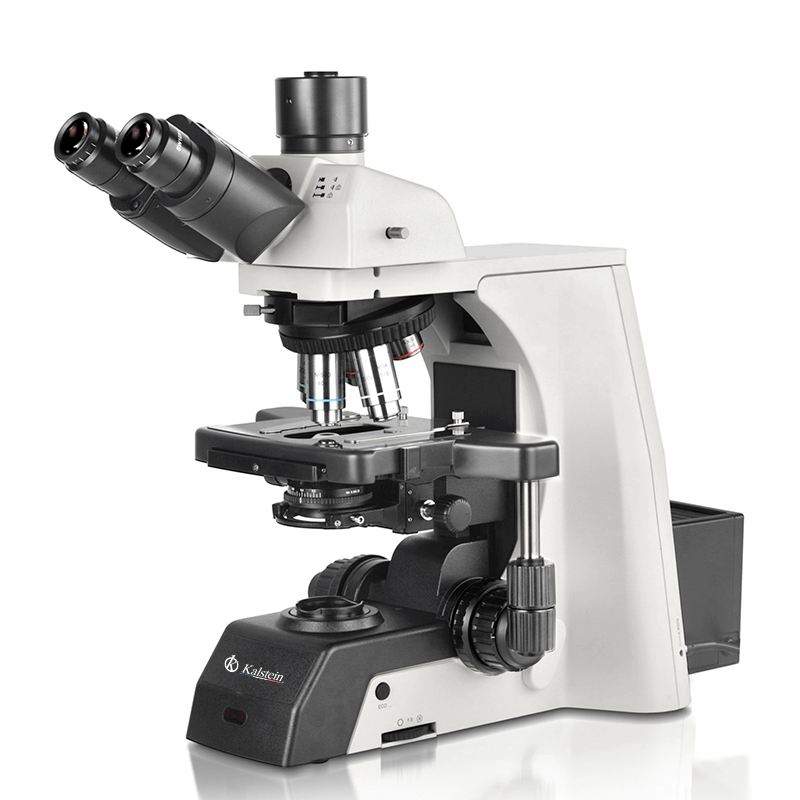
Installation and Startup Guide for the YR0266B Trinocular Microscope
The YR0266B Trinocular Microscope represents a significant advancement in laboratory microscopy, providing researchers with an automated and ergonomically designed tool for various applications. This article serves as a detailed guide for the installation and startup of the YR0266B microscope to ensure optimal performance and reliability.
Understanding the YR0266B Microscope
The YR0266B is a fully automated research-grade laboratory microscope that integrates advanced features such as an electric platform, automatic focusing, electric objective conversion, and a user-friendly touch screen controller. This microscope is designed to facilitate precise observation, image acquisition, and processing while minimizing repetitive tasks.
The unique connection between its components contributes to improved stability and accuracy in imaging, making it essential for researchers who require high-quality results in clinical and laboratory settings.
Technical Specifications of the YR0266B
| Model | Brand | Category | Price (USD) | Weight (kg) | Dimensions (mm) |
|---|---|---|---|---|---|
| YR0266B | Kalstein | Microscope | 7026.00 | 24 | 79 x 58 x 52 |
Unboxing and Initial Setup
Before beginning the installation of the YR0266B microscope, ensure that the workspace is clean and organized. Unbox all components carefully to avoid any damage. The following items should be included:
- Microscope body
- Power supply and cable
- Objective lenses
- Eyepieces
- Manual
- Calibration kit
Once the items are verified, proceed with the following steps:
- Positioning: Place the microscope on a stable, flat surface. Ensure it is at eye level to reduce strain during use.
- Leveling: Use a spirit level to ensure the microscope is perfectly level. Adjust the feet of the microscope if necessary.
- Power Connection: Connect the power supply to the microscope and plug it into an electrical outlet. Make sure the voltage setting corresponds to the local requirements.
- Initial Calibration: Follow the manual for initial calibration of the objectives and eyepieces. This step may include adjusting the focus and obtaining clear images.
First Power-Up and Calibration
After connecting the microscope to power, switch it on using the power button. The touchscreen interface will activate, displaying the main menu. Perform the following steps for first-time calibration:
- Access the calibration section of the software.
- Follow prompts to calibrate the automatic focus feature.
- Check the alignment of the light source and objectives.
- Perform a test observation using a calibration slide.
It is important to ensure all settings are adjusted according to the specifications provided in the user manual for optimal performance.
Common Installation Mistakes
During the installation and setup of the YR0266B microscope, several common mistakes may occur. Being aware of these can aid in achieving a successful installation:
- Incorrect Leveling: Failing to level the microscope can lead to inaccurate measurements and observations.
- Improper Power Settings: Ensure that the voltage settings match the local power supply to prevent damage.
- Skipping Calibration Steps: Never skip calibration; it is crucial for achieving precision in measurements.
- Neglecting Safety Precautions: Always ensure that the area is safe and free from hazards that may interfere with microscope operation.
Post-Installation Testing
Once the microscope is set up, it is important to conduct a series of tests to confirm that all systems are functioning correctly:
- Image Quality Test: Use a test slide to observe the clarity and resolution of images at different magnifications.
- Automatic Focusing Test: Activate the automatic focusing feature and ensure it correctly identifies the focal point.
- Light Intensity Adjustment: Test the adjustable brightness settings to ensure they respond appropriately.
Document any irregularities or issues during these tests for further troubleshooting.
Frequently Asked Questions
What are the key features of the YR0266B microscope?
The YR0266B microscope features a fully automated platform, automatic focusing, electric objective conversion, a touch screen controller, and advanced imaging software. These features enhance user experience and increase efficiency in laboratory settings.
How do I maintain my YR0266B microscope?
Regular maintenance involves cleaning the optical components, ensuring the light source is functioning properly, and recalibrating the microscope periodically. Follow the guidelines in the user manual for specific maintenance recommendations.
What types of samples can be observed with the YR0266B?
The YR0266B microscope can observe various biological and non-biological samples, including tissue sections, cell cultures, and prepared slides. Its versatility makes it suitable for multiple fields such as clinical, industrial, and educational applications.
How do I troubleshoot common issues with the YR0266B?
Common issues can include power failure, blurry images, and software errors. Refer to the troubleshooting section of the user manual for a detailed symptom-cause-solution matrix to help resolve these issues effectively.
Can I upgrade the YR0266B with additional accessories?
Yes, the YR0266B microscope is compatible with a range of optional accessories, including additional lenses, filters, and software upgrades that can enhance its functionality and adaptability to various research needs.
How does the YR0266B compare to other microscope models?
The YR0266B stands out due to its fully automated features, user-friendly interface, and advanced imaging capabilities, making it superior to many traditional models in terms of performance and ease of use.
What warranty and support are available for the YR0266B microscope?
The YR0266B microscope comes with a manufacturer’s warranty that covers defects in materials and workmanship. For specific warranty duration and support details, please refer to the warranty section of the user manual.
If you are looking for a fusion of innovation and quality, you have come to the right place. At Kalstein, we offer you the luxury of exploring our exclusive catalog of laboratory equipment. We manufacture every device to the highest standards of excellence. Our intuitive and seamless online purchasing channels are designed for your convenience, securing the most competitive prices. Hesitate no longer — we bring science to life, it is time to become part of our community.