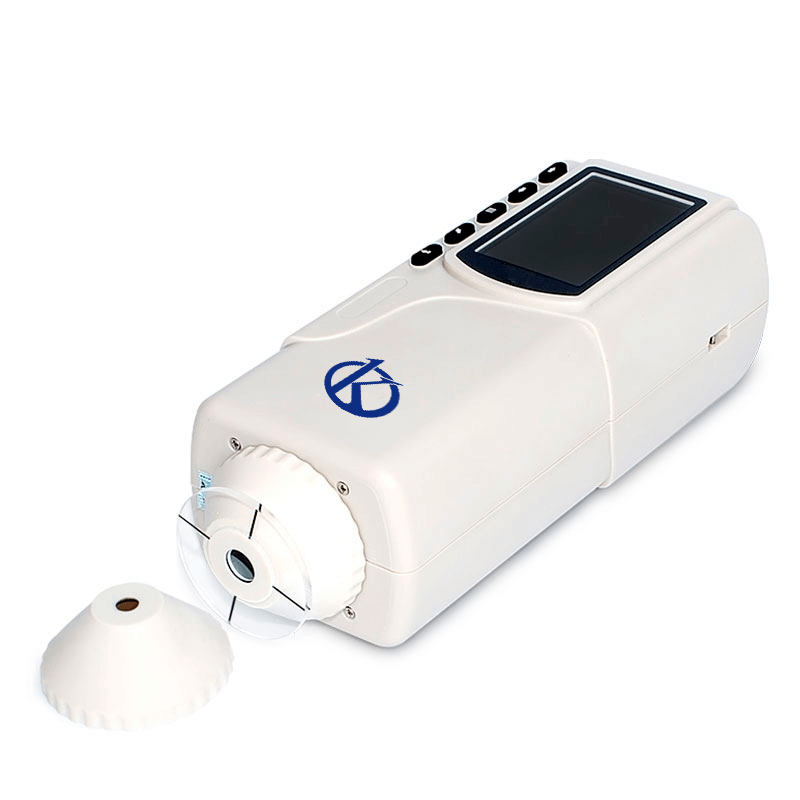
Installation and Startup Guide for the YR05515 Precision Colorimeter
The YR05515 Precision Colorimeter is engineered for high accuracy and low cost, making it a valuable tool in various industries such as plastics, electronics, paints, and food. This guide will cover the essential steps for the installation and startup of the YR05515, ensuring optimal performance from the outset.
Understanding the YR05515
The YR05515 Colorimeter employs dual openings: a flat aperture of Φ8 mm and a tip aperture of Φ4 mm. Its design allows for the measurement of concave samples easily. By utilizing the CIE LAB color space, the YR05515 ensures accurate color difference verification for delta E, making it ideal for rigorous applications.
Technical Specifications of the YR05515
| Model | YR05515 |
|---|---|
| Geometry of Illumination/Viewing | D/8° |
| Standard | CIE No. 15, GB/T 3978 |
| Sensor | Silicon photodiode |
| Measurement Aperture | 4 mm |
| Color Space | CIE LAB, LCH |
| Observer | CIE 10° |
| Illuminant | D65 |
| Data Display | Colorimetric value, color difference value storage |
| Measurement Time | 1.5 s |
| Repeatability | ΔE*ab ≤ 0.03 (Average of 30 measurements of standard white plate) |
| Dimensions | 205*67*80 mm |
| Weight | 400 g |
| Battery | Rechargeable lithium-ion battery 3.7V@3200mAh |
Unboxing and Initial Setup
Upon receiving the YR05515, ensure the following steps for unboxing and initial setup are followed:
- Open the packaging carefully and take inventory of the contents, including the colorimeter, power adapter, user manual, and any optional accessories.
- Check for any physical damage during shipping; if any is found, notify the supplier immediately.
- Place the YR05515 on a stable, level surface away from direct sunlight and strong electromagnetic interference.
Power-Up Sequence
Follow these steps for powering up the YR05515:
- Connect the power adapter to the colorimeter and plug it into a suitable power outlet.
- Press the power button to turn on the device. Allow the device to complete its boot-up sequence.
- Once powered on, check the display for any initial error messages.
Calibration and First-Run Validation
Calibration is essential to ensure accurate measurements. Here’s how to calibrate the YR05515:
- Using the provided calibration standards, follow the steps outlined in the user manual.
- Make sure to perform a white calibration first, ensuring the device can accurately reference its measurements.
- After calibration, conduct a test measurement with a known standard to validate the calibration process. Compare the results against known values.
Common Setup Mistakes
Be aware of these common pitfalls during the installation and startup of the YR05515:
- Not performing a white calibration before measurements, which can lead to inaccurate data.
- Failing to inspect the device for shipping damage, which can impact performance.
- Placing the colorimeter in an area with high electromagnetic interference, affecting readings.
Frequently Asked Questions
What should I do if the YR05515 does not power on?
If the YR05515 does not power on, first check that the power adapter is properly connected and that the outlet is functional. If the device still does not power on, inspect the power cable for any visible damage. If all checks fail, consider reaching out to customer support.
How do I perform a calibration on the YR05515?
Calibration of the YR05515 involves using the provided calibration standards. Follow the user manual for detailed steps on performing the white calibration and any required adjustments to ensure accurate measurements.
What are the common error codes displayed on the YR05515?
The YR05515 may display various error codes related to measurement issues, battery problems, or calibration errors. Refer to the user manual for a comprehensive list of error codes and their meanings.
What types of samples can I measure with the YR05515?
The YR05515 can measure a wide variety of samples, including plastics, textiles, paints, and even food products. The dual apertures allow for flexibility in measuring different sample shapes and sizes.
How do I maintain the YR05515 for optimal performance?
Regular maintenance includes keeping the device clean, performing periodic calibrations, and checking the battery status. Ensure the device is stored in a cool, dry place when not in use.
What is the expected lifespan of the YR05515?
The YR05515 is designed for longevity, with a lamp life of up to 5 years and the capability for over 1.6 million measurements, depending on usage conditions and maintenance practices.
Where can I find replacement parts or accessories for the YR05515?
Replacement parts and optional accessories can be sourced through authorized distributors or directly from the manufacturer. Always refer to the user manual for compatible parts.
If you are looking for a fusion of innovation and quality, you have come to the right place. At Kalstein, we offer you the luxury of exploring our exclusive catalog of laboratory equipment. We manufacture every device to the highest standards of excellence. Our intuitive and seamless online purchasing channels are designed for your convenience, securing the most competitive prices. Hesitate no longer — we bring science to life, it is time to become part of our community.