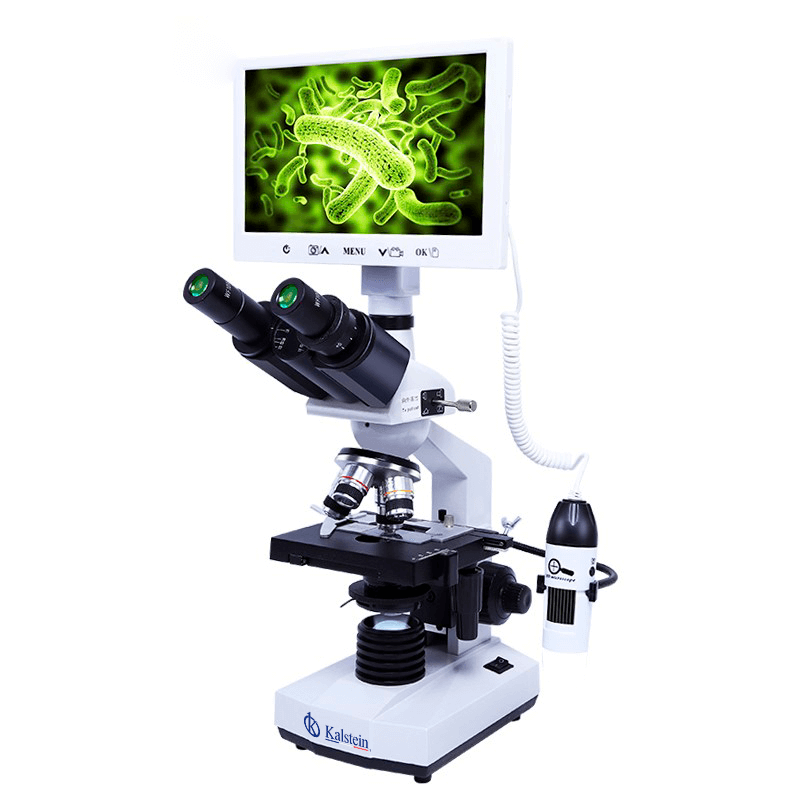
Installation and Startup Guide for the YR05786 Digital Biological Microscope
The YR05786 Digital Biological Microscope is a versatile tool designed for educational and laboratory environments. This guide focuses on the installation and startup procedures required to ensure the microscope functions at its best. Following these steps will help in avoiding common mistakes and optimizing the initial setup.
Unboxing Checklist
Before proceeding with the installation, ensure that all components are included in the packaging. Here’s a checklist of what to expect:
- YR05786 Microscope Unit
- Power Adapter
- USB Cable
- 10 Prepared Slides
- Carrying Case
- CD with Software
- User Manual
Setting Up the Microscope
Follow these steps to properly set up your YR05786 microscope:
1. Find a Suitable Location
Choose a stable, level surface away from direct sunlight to prevent overheating and distortions. Ensure the area is free from vibrations and dust.
2. Assemble the Microscope
Carefully assemble the microscope by attaching the eyepiece and objective lenses. Make sure to follow the included diagrams in the user manual for accurate placement.
3. Connect to Power
Plug the power adapter into a suitable electrical outlet and connect it to the microscope. Ensure that the voltage matches the specifications outlined in the technical data table.
Power-Up Sequence
To start the microscope, follow these steps:
- Ensure all components are connected properly.
- Press the power button located on the unit.
- Allow the microscope to initialize; check for any error messages on the LCD display.
Calibration and First-Run Setup
After powering up, it's essential to calibrate the microscope:
1. Adjust Focus
Use the coarse and fine focus knobs to find the best image clarity. Begin with the lower magnification and gradually adjust to higher magnifications.
2. Set Brightness
Utilize the adjustable LED light to achieve optimal illumination for the specimen being observed. Adjust according to the type of slide being examined.
3. Connect the Software
Install the provided software on a compatible PC or Mac using the included CD. This software allows for image capture and measurement functionalities.
Common Setup Mistakes
To ensure a smooth setup experience, be aware of these common pitfalls:
- Not leveling the microscope properly, which can lead to viewing difficulties.
- Connecting the power supply to an incorrect voltage source.
- Failing to install the software before attempting to use the USB features.
Technical Specifications of YR05786
| Specification | Details |
|---|---|
| Model | YR05786 |
| Head Type | Teaching head, 45°+90° inclined, rotatable 360° |
| Camera Type | 7" LCD IPS, 2.0M, 30fps |
| Output | USB 2.0, LCD output for PC/mobile |
| Power Requirement | 5V DC/2A |
| Storage | SD card slot, max 32G |
| Weight | 5 kg |
Frequently Asked Questions
What should I do if the YR05786 does not power on?
If the microscope does not power on, verify that the power cable is securely connected to both the unit and the electrical outlet. Check the outlet with another device to ensure it is providing power. If the issue persists, consider inspecting the power adapter for faults.
How can I improve image quality when using the YR05786?
To enhance image quality, ensure that the objective lenses are clean and free of dust. Adjust the brightness settings and focus knobs to achieve the clearest possible image. Using high-quality slides can also impact the clarity of your observations.
Are there any special maintenance requirements for the YR05786?
Routine maintenance includes cleaning the optical components with a soft cloth and ensuring that the mechanical parts are properly lubricated. Regularly check connections and cables for wear and tear to prevent operational issues.
Can the microscope be used for different types of specimens?
Yes, the YR05786 is versatile and can be used for a variety of specimens, including biological slides, histological samples, and educational demonstrations. Adjustments to the illumination and focus settings may be necessary depending on the specimen type.
What software is compatible with the YR05786 microscope?
The YR05786 comes with software that is compatible with Windows and iMac systems. This software allows users to capture images, perform measurements, and analyze data effectively.
How do I handle error codes displayed on the YR05786?
If an error code appears on the LCD display, consult the user manual for a list of codes and their meanings. Following the recommended troubleshooting steps can help resolve the issue quickly.
How do I request a quote for the YR05786?
To request a quote, you can visit our inquiry section. Provide the necessary details about your requirements, and we will get back to you with the best pricing options available.
If you are looking for a fusion of innovation and quality, you have come to the right place. At Kalstein, we offer you the luxury of exploring our exclusive catalog of laboratory equipment. We manufacture every device to the highest standards of excellence. Our intuitive and seamless online purchasing channels are designed for your convenience, securing the most competitive prices. Hesitate no longer — we bring science to life, it is time to become part of our community.