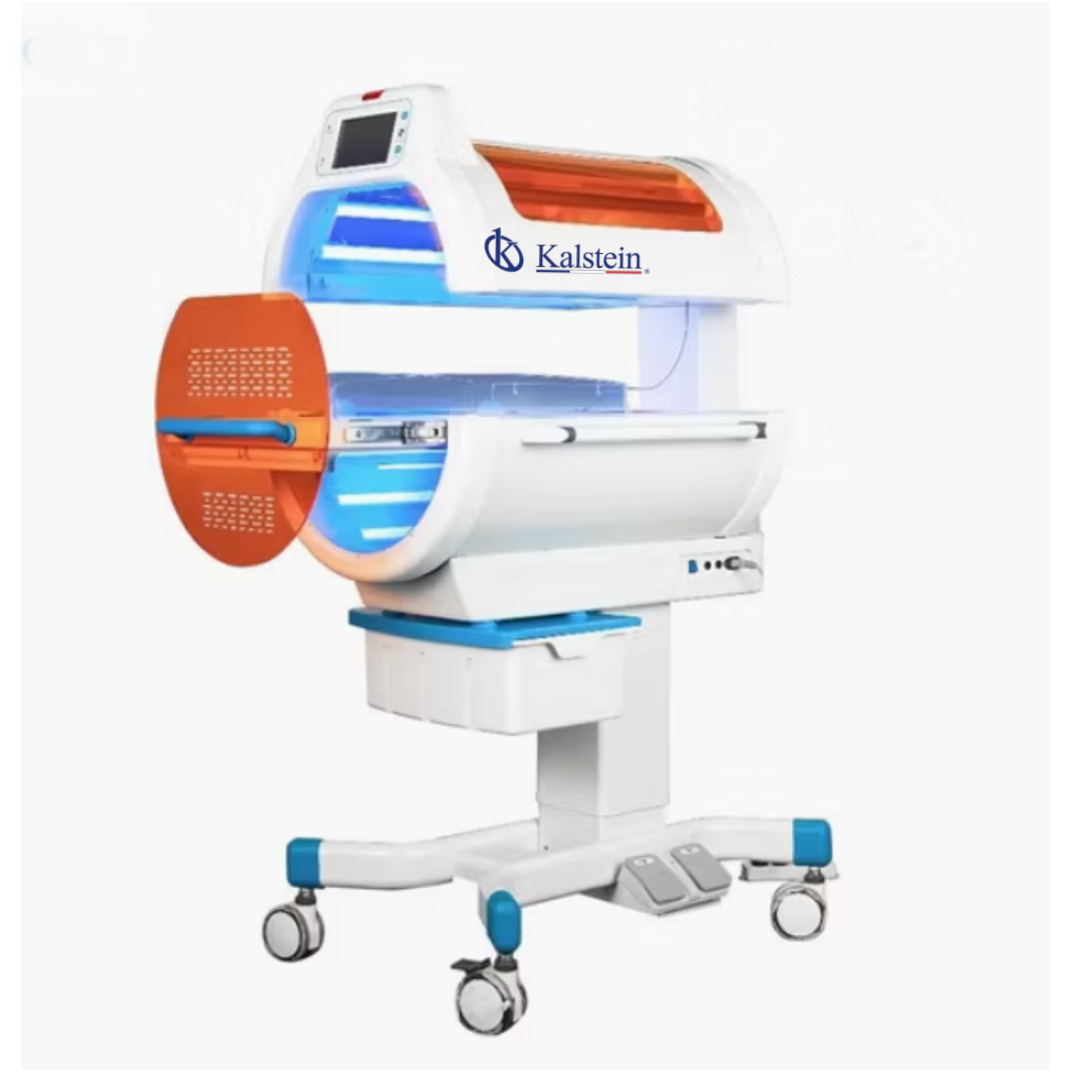
Troubleshooting Common Errors with the YR06671 Tunnel Phototherapy System
The YR06671 Tunnel Phototherapy System is an advanced medical solution designed to effectively treat jaundice in newborns. However, like any sophisticated medical equipment, it may encounter issues that require troubleshooting. In this article, we will delve into common symptoms operators may face while using the YR06671 and provide detailed solutions to resolve these problems efficiently.
Understanding the YR06671 Tunnel Phototherapy System
The YR06671 is specifically engineered for the rapid reduction of bilirubin levels in neonates, utilizing a 360° irradiation design to ensure maximum coverage and treatment efficacy. Its LED light source operates within a wavelength range of 400nm to 550nm, adjustable intensity levels (33%, 66%, and 100%), and incorporates safety features to maintain an optimal thermal environment for the patient.
Technical Specifications of YR06671
| Specification | Features |
|---|---|
| Model | YR06671 |
| Light Source | LED (Light Emitting Diode) |
| Effective Wavelength | 400nm - 550nm |
| Irradiation Intensity | Adjustable (33%, 66%, 100%) |
| Max Upper Irradiance | 3600 μw/cm² |
| Max Lower Irradiance | 3200 μw/cm² |
| Effective Irradiation Area | 400mm x 250mm |
| Uniformity of Irradiation | > 0.4 |
| Lift Stroke | 0 - 200mm |
| Power Supply | AC 100V - 240V |
| Power Consumption | ≤ 250VA |
| Safety Alarms | Temperature, Treatment End, Bed Extraction |
| Dimensions | 98 x 65 x 115 cm (Approx. according to industrial standard) |
| Equipment Weight | Approx. 65 kg (Net) / 85 kg (Gross with packaging) |
Troubleshooting by Symptoms
When using the YR06671, operators may encounter various symptoms or issues. Below, we categorize common symptoms and provide probable causes along with diagnostic steps and solutions.
Equipment Does Not Power On
If the YR06671 does not turn on, follow these steps:
- Check Power Supply: Ensure the unit is plugged in and the power outlet is functioning. Try a different outlet if necessary.
- Inspect the Power Cord: Look for any visible damage to the power cord. Replace if damaged.
- Internal Fuses: Verify if the internal fuses are blown. Replace them if necessary.
Error Code E-03
This error typically indicates a thermal issue. To troubleshoot:
- Check Temperature Settings: Ensure that the temperature settings are properly configured.
- Inspect Temperature Sensor: Confirm that the temperature sensor is correctly placed and functioning.
- Environment Check: Make sure the ambient temperature is within operational limits.
Inconsistent Readings
If the readings displayed are inconsistent or erratic, consider the following:
- Calibration: Ensure the unit is calibrated correctly. Perform calibration as per the user manual.
- Check for Interference: Look for any sources of electromagnetic interference nearby that could affect readings.
- Inspect Connections: Verify that all connections are secure and not corroded.
Faulty Alarms
If alarms are not functioning correctly:
- Alarm Settings: Ensure that alarm settings are configured properly.
- Alarm Indicator Light: Check if the alarm indicator light is operational.
- Firmware Update: Consider updating the firmware if the problem persists.
Symptom-Cause-Solution Matrix
| Symptom | Probable Cause | Solution |
|---|---|---|
| Equipment Does Not Power On | Power Supply Failure | Check power cord and outlet |
| Error Code E-03 | Thermal Regulation Issue | Verify temperature settings |
| Inconsistent Readings | Calibration Error | Recalibrate the device |
| Faulty Alarms | Incorrect Settings | Check alarm configurations |
Frequently Asked Questions
How do I maintain the YR06671 Tunnel Phototherapy System for optimal performance?
Regular maintenance includes cleaning the LED panels, checking the integrity of the power cord, and ensuring the calibration is performed at scheduled intervals. Always follow the manufacturer's guidelines for maintenance.
What should I do if the light intensity is too low?
First, check the intensity settings and ensure it is set to the required level. If the issue persists, inspect the LED light source for any faults and consider replacing it if necessary.
Can the YR06671 be used for longer than recommended treatment durations?
It is crucial to adhere to recommended treatment durations to avoid potential skin damage due to prolonged exposure. Always consult with a healthcare provider for guidance on treatment protocols.
How do I know when to replace the LED light source?
Monitor performance and light intensity. If you notice a significant drop in efficacy or the LED lights are flickering, it may be time for replacement.
What are the power requirements for the YR06671?
The YR06671 requires an AC power supply of 100V to 240V with a maximum consumption of 250VA. Ensure your power setup meets these requirements to avoid operational issues.
Conclusion and Call to Action
If you encounter any issues with the YR06671 Tunnel Phototherapy System, the troubleshooting tips outlined in this article will help you diagnose and resolve common problems effectively. For further assistance or to request a quote, please reach out through our dedicated channels.
If you are looking for a fusion of innovation and quality, you have come to the right place. At Kalstein, we offer you the luxury of exploring our exclusive catalog of laboratory equipment. We manufacture every device to the highest standards of excellence. Our intuitive and seamless online purchasing channels are designed for your convenience, securing the most competitive prices. Hesitate no longer — we bring science to life, it is time to become part of our community.